WMI Query Builder
Overview
Windows Management Instrumentation (WMI) is a technology built into Windows that allows for improved manageability of computers in a networked environment. The WMI Query Builder is a convenient development tool that comes packaged with the WMI Query action. It comes equipped with an easy to use graphical user interface that allows you to do the following:
-
Explore the full set of WMI management classes, objects, and their properties.
-
Browse through objects and settings on the local remote machines.
-
Create your own WQL queries to execute during runtime.
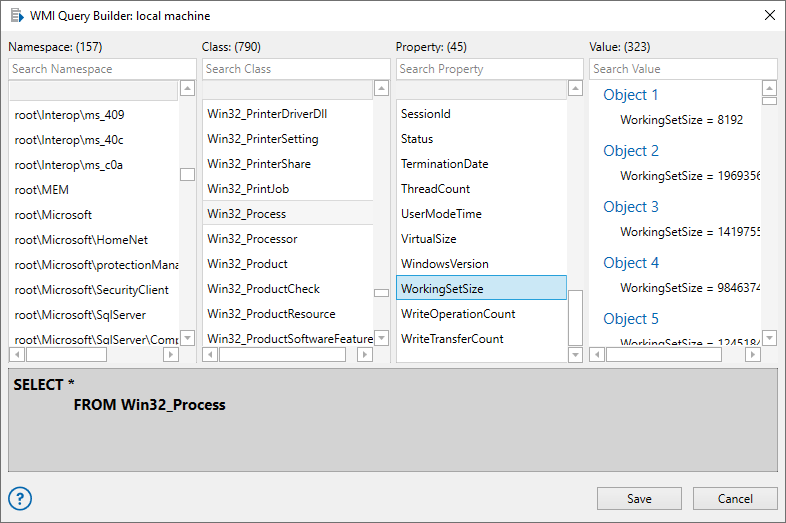
Using the WMI Query Builder
The WMI Query Builder can be launched from the properties of the WMI Query activity by clicking Query Builder. Connection is determined by the current properties. For instance, if the Remote Computer property is selected and required parameters are entered (remote computer name, domain, username, password), the WMI Query Builder connects to the remote computer and searches for appropriate data. The Query Builder interface is comprised of four top panels and a single bottom panel (as shown above). You can build a WQL query by selecting from the entries listed in each of the top panels (from left to right). Upon completion, the finished query appears in the Query View panel.
To build a query
- Open the WMI Query Builder. The Namespace and Class panels populate with namespaces and classes available on the connected computer.
- From the Namespace panel, select a namespace to filter the available classes for it. You can also search for a namespace.
- From the Class panel, select a class. You can also search for a class.
- From the Property panel, select a property for the class to populate the values for it in the Values panel. You can also search for a property. The property value for a specific object can be viewed or selected from the Property panel.
- The Query View displays the assembled query. This can be an invaluable resource for those who know where to look for certain elements but need to see what exactly is being returned by Windows API.
- Click Save.