 If
If
Overview
In programming, the If statement is used to run code based on conditions. This allows programs the ability to perform different operations in response to different conditions. Automate Desktop If activities encompass the same capabilities but with a more user-friendly approach. For example, you might want your task to check if a file exists and do something different depending on the outcome. The If file exists activity allows you to evaluate whether or not the file exists and to run different sections of your task based on the results. The If window exists can evaluate if a window currently exists or not on the desktop and execute specific activities based in the outcome. Additional If activities include If process running, which evaluates if a process is currently running or not on the system, If folder exists which evaluates the existence of a folder, and others.
Decision making structures require that the developer specify one or more conditions to be evaluated or tested by the program, along with a statement or statements to be executed if the condition is determined to be true, and optionally, other statements to be executed if the condition is determined to be false. The following is the general format of a typical decision making structure:
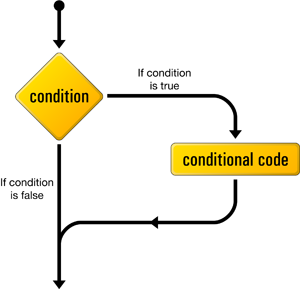
All If activities must be followed at some point with an End if activity to mark the end of the block of steps that are to be executed if the evaluation is true. Optionally, you can use an Else activity to mark the block of steps that are to be executed if the evaluation is false. During runtime, the task executes the block of steps immediately following the If activity up until an End if step is encountered, otherwise the block is skipped or if an Else activity is encountered, the task executes those block of steps instead.
Available activities
Click the associated link for more details regarding each activity.
| Activity | Description |
|---|---|
| If - Compare files | Compares two files using the specified criteria and returns TRUE if the values match or FALSE if they do not. |
| If - Condition | Begins a block of steps that are executed conditionally. |
| If - Contains text | Determines if the text to look for is contained within the target text and returns TRUE or FALSE depending on the outcome. |
| If - Else |
Used along with an If activity to provide an alternate code block to execute only if the condition returns FALSE. |
| If - End if | Marks the end of the block of steps that should be executed if a previous If activity returns TRUE. |
| If - File exists | Determines the existence of a file and returns TRUE or FALSE depending on the outcome |
| If - Folder exists | Determines the existence of a folder and returns TRUE or FALSE depending on the outcome. |
| If - Last step | Controls task flow depending on whether the last step is a success, general failure, or failed because of a specific error. |
| If - Object exists | Controls task flow depending on the existence of an Active Directory object. |
| If - Pixel exists | Determines if the specified pixels are in the specified state and returns TRUE or FALSE depending on the outcome. |
| If - Process running | Determines the state of a process and returns TRUE or FALSE depending on the outcome. If TRUE, the steps immediately following this step are executed. Otherwise, execution follows the next Else step, or End If step. |
| If - Window exists | Determines the state of a window and returns TRUE or FALSE depending on the outcome. |