Debug Panel - Labels
Overview
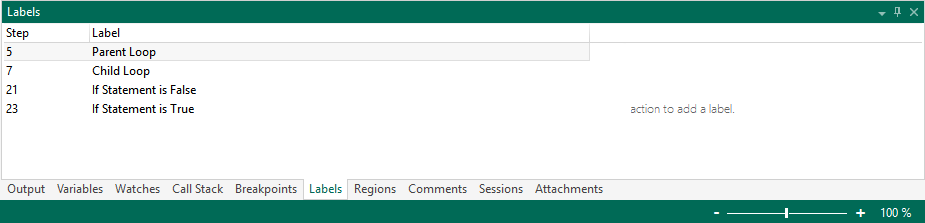
A Label can be used as a bookmark in a task. Labels can be placed at specific steps in a task to mark them as reference points for Goto activities. Labels can be used in step level error handling by setting up a Goto action to be executed if a step error occurs. The Labels debug panel displays labels that are contained in a task, including the name of the label and corresponding step number. This debug tool also allows you to create labels to add to the task. More on Labels.
Parameters
The Labels debug screen includes the following fields (columns).
| Column header | Description |
|---|---|
| Step | The step number where the label resides. |
| Label | The name of the label (this can be a brief description of the label). |
Shortcut menu
Right-clicking anywhere inside the Labels screen opens a shortcut menu with the following items:
| Menu Item | Description |
|---|---|
| Add | Adds a label to the task. To add a label to a specific step, highlight the step from the Steps panel, right-click inside the Labels tab, and click Add. |
| Properties | Opens the properties dialog associated to the label to modify its settings. This item is active only when a right-click is performed on a label. |
| Remove | Removes the selected labels. To select multiple labels, hold down Ctrl on the keyboard during selection. This item is active only when a right-click is performed on a label. |
| Jump To | Jumps to the step in the Steps panel where the specified label is located. This item is active only when a right-click is performed on a label. |
| Stay On Top | If enabled, after undocking this panel, it will stay on top of all other undocked panels. This option is disabled by default. |
| Dockable | If enabled, allows the panel to dock to its base when it is undocked. If disabled, you cannot re-dock the panel when it is undocked. This option is enabled by default. You can undock a panel by holding down and dragging its title bar away from the main window or double-clicking the title bar. |
| Help | Opens the help topic regarding this debug tool. |