Error Causes
Overview
The Error Causes properties allows you to modify how this step behaves when an error occurs. The default behavior is to monitor for the occurrence of all errors, however, these properties can be set to ignore certain errors or only react to specific errors. It also allows you to set the length of time this step is permitted to run before causing a time out error. If any Error Causes conditions are met during task execution, the procedures set under the On Error properties are carried out.
Practical usage
Particularly used as a way to ignore non-critical errors or overlook anticipated issues in order for task execution to proceed without interruption. Can also be used to set a time out value for time-sensitive steps.
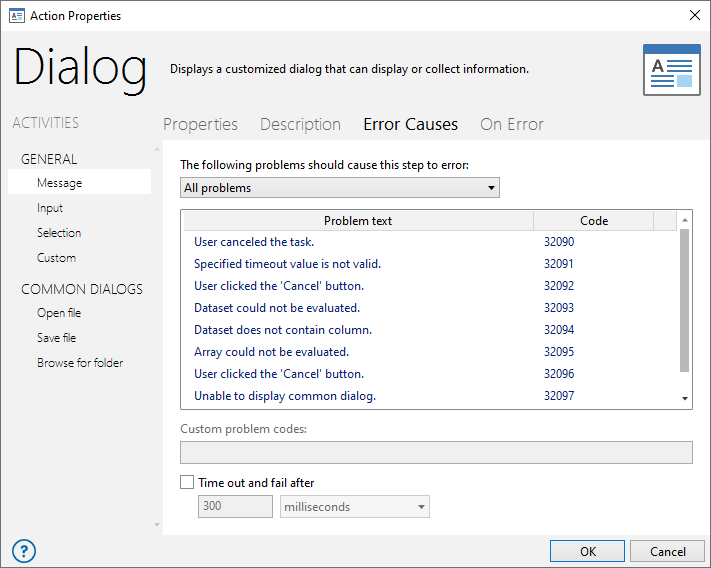
Parameters
| Property | Type | Default | Markup | Description |
|---|---|---|---|---|
| The following problems should cause this step to error | Text | All Problems | AM_ERRORS=18999,18998,20008 | Allows you to select/de-select specific errors
that causes this step to fail.The available options are:
|
| Custom problem codes | Text | (Empty) | AM_ERRORS="18999,18998,20008" | Allows a custom error code to be entered in
case it does not appear in the list of errors. This parameter
will adhere to the specifications set under the parameter labeled
The following problems should
cause this step to error. Variables can be used in this
parameter. NOTE: Use AMError to determine specific information about an error. |
| Time out and fail after | Number | (Empty) | AM_TIMEOUT=20 | If enabled, allows you to set the total amount of time this step should be allowed to execute before generating a timeout error. For example, a SQL Query step is set to time out after 30 seconds. If the query takes longer than 30 seconds to complete, the step generates a time out error and the instructions set in the On Error properties are carried out. This parameter is disabled by default. |
| Timeout scale | Text (options) | Milliseconds | AM_TIMEOUTSCALE=seconds | The scale in which the timeout value should
be set to. The available options are:
|