Interacting with the User
Aggressor Script displays output using Sleep's &println, &printAll, &writeb, and &warn functions. These functions display output to the script console.
Scripts may register commands as well. These commands allow scripts to receive a trigger from the user through the console. Use the command keyword to register a command:
command foo{
        println("Hello $1");
}
This code snippet registers the command foo. The script console automatically parses the arguments to a command and splits them by whitespace into tokens for you. $1 is the first token, $2 is the second token, and so on. Typically, tokens are separated by spaces but users may use "double quotes" to create a token with spaces. If this parsing is disruptive to what you'd like to do with the input, use $0 to access the raw text passed to the command.
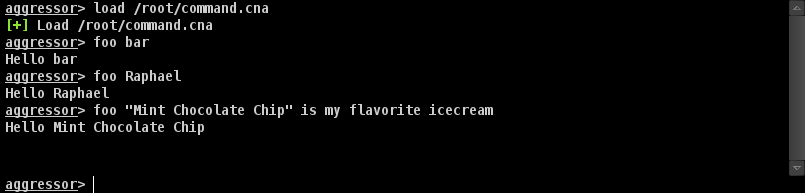
Command Output
Colors
You may add color and styles to text that is output in Cobalt Strike's consoles. The \c, \U, and
\o escapes tell Cobalt Strile how to format text. These escapes are parsed inside of double-quoted strings
only.
The \cX escape colors the text that comes after it. X specifies the color. Your color choices are:

Color Options
The \U escape underlines the text that comes after it. A second \U stops the underline format.
The \o escape resets the format of the text that comes after it. A newline resets text formatting as well.