Signing
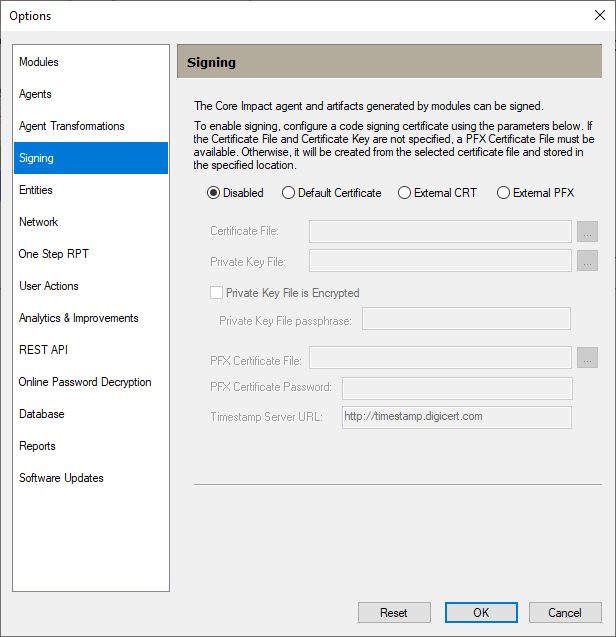
The Signing panel of the Options Dialog Box includes options related to signing Core Impact agents and binary artifacts, which are useful to configure exclusions in AV / EDR to skip analyzing Core Impact artifacts in a pentest. Follow these steps to set the Signing options:
- Select the Tools > Options command from the main menu.
-
Click the Signing category to review or edit the available options.
-
Press OK after making any changes.
 Parameters
Disabled - Select to disable signing.
Default Certificate - Select to use the WebApps certificates bundled in the Core Impact License for the .pfx file that will be created.
External CRT - Select the custom .crt and .key files for the .pfx file that will be created.
External PFX - Select the .pfx file that will be read.
Certificate File -Click the ellipsis  button to select the .crt file to use to generate the .pfx file ( External CRT option only).
Private Key File - Click the ellipsis button to select the .key file to use to generate the .pfx file ( External CRT option only).
Private Key File Passphrase - Enter the password assigned to the .key file.
PFX Certificate File - Click the ellipsis button to select the .pfx file. For the Default Certificate or External CRT options, this file will be generated by the .crt and .key files.
PFX Certificate Password - Enter the password assigned to the .pfx file.
Timestamp Server URL - URL of the Timestamp Server to use during the signing process. This server provides a trusted timestamp, ensuring that the signature remains valid even after the certificate expires. If you do not enter a URL, this parameter will default to http://timestamp.digicert.com.