Security GPA
Developed by Fortra, the Fortra VMSecurity GPA provides a simplified assessment of your environment’s internal and external security posture. Like a grade point average in school, the higher your Security GPA, the better your security posture.
Based on the number and severity level of vulnerabilities discovered, the Security GPA reflects even the smallest changes to your environment that other vulnerability management systems often do not. For example, if a domain controller’s security rating improves even just slightly, your Security GPA typically goes up. This helps you quickly identify problem areas and see almost immediate progress as vulnerabilities are resolved.
Other vulnerability management systems also often weigh noncritical devices (such as printers and voice over IP [VoIP] phones) in a way that negatively affects your overall posture, even if those assets are not critical to your business. The Security GPA, meanwhile, understands which systems are important to you and rates those accordingly.
How is It Calculated?
The Security GPA is the weighted average of your asset ratings. By default, Fortra VM weighs an asset’s risk to your environment based on its type (for example, servers, workstations).
When an asset belongs to more than one asset group, Fortra VM uses the group with the most severe risk weight when calculating your Security GPA. This allows you to apply weighted averages to broad types of assets in addition to custom, critically weighted assets groups important to your organization.
Security GPA ratings
| Rating | Description |
|---|---|

|
The weighted average of your asset ratings is 0.00–0.33. |

|
The weighted average of your asset ratings is 0.34–0.67. |

|
The weighted average of your asset ratings is 0.68–1.00. |

|
The weighted average of your asset ratings is 1.01–1.33. |

|
The weighted average of your asset ratings is 1.34–1.67. |

|
The weighted average of your asset ratings is 1.68–2.00. |

|
The weighted average of your asset ratings is 2.01–2.33. |

|
The weighted average of your asset ratings is 2.34–2.67. |

|
The weighted average of your asset ratings is 2.68–3.00. |

|
The weighted average of your asset ratings is 3.01–3.33. |

|
The weighted average of your asset ratings is 3.34–3.67. |

|
The weighted average of your asset ratings is 3.68–4.00. |
Vulnerability severity levels
A vulnerability is a weakness in an asset's hardware, software, or configuration that an attacker might exploit. Fortra VM determines vulnerability severity based on the potential effect on confidentiality, integrity, and availability.
| Severity Level | Description |
|---|---|

|
If exploited, a critical vulnerability can allow an attacker to gain complete control of the affected asset. Publicly available exploits may require little or no specialized knowledge to use. In some cases, the presence of a critical vulnerability can indicate that the asset is already compromised. Resolve critical vulnerabilities immediately. |

|
If exploited, a high-severity vulnerability can allow an attacker to gain user or administrative access to the affected asset, run commands, access or delete files, or launch attacks against other assets. Exploitation may require specialized knowledge, and publicly available exploits may not exist. Resolve high-severity vulnerabilities as soon as possible. |

|
If exploited, a medium-severity vulnerability can provide information that helps an attacker gain access to the asset. Medium-severity vulnerabilities can result from improperly configured services, weak or missing security settings, or unprotected limited-access accounts. Address these vulnerabilities promptly. |

|
If exploited, a low-severity vulnerability can expose information that might not be sufficient to access the asset. You can often address low-severity vulnerabilities by applying security-hardening practices or disabling unnecessary services. |

|
If exploited, a trivial vulnerability can expose information that is unlikely to provide access to the asset. Some trivial vulnerabilities cannot be remediated because of operating system limitations and pose minimal risk to the asset. |

|
Information reported by an asset or service that is not considered a vulnerability. |
Asset Ratings
Fortra VM assigns your asset’s ratings based on the highest-level vulnerabilities discovered on the asset.
Asset ratings uses a compliant-by-default model, which means only vulnerabilities discovered during your scans are factored into an asset’s rating. (Some scan policies, for example, are for information-only reconnaissance checks [for example, host discovery, port scan], in which case Fortra VM would apply an A rating to the assets within the scope of those scans.)
During an individual scan, an asset’s rating is based on the vulnerabilities detected during that scan. Active View, meanwhile, provides a comprehensive rating based on vulnerabilities discovered from all scans on the asset.
See related: Active View - Overview
| Rating | Description |
|---|---|
|
|
Asset has one or more critical-level vulnerabilities. |
|
|
Asset has one or more high-level vulnerabilities. |
|
|
Asset has one or more medium-level vulnerabilities. |
|
|
Asset has one or more low-level vulnerabilities. |
|
|
Asset has 0 or more trivial-level vulnerabilities. |
Cloud GPA
Fortra VM aggregates anonymized tenant data to provide a comparison between your Security GPA and other organizations using the platform.
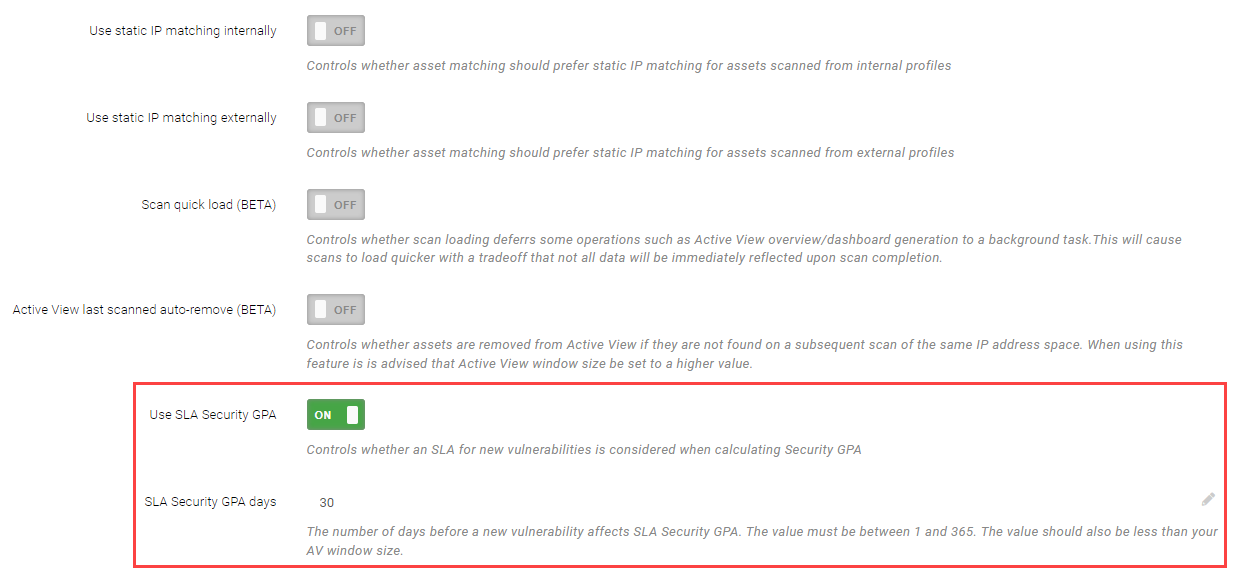
Organizations can define a grace period before newly identified vulnerabilities affect Security GPA. This can help align Security GPA with remediation processes that require change control, testing, or other internal procedures before remediation can be completed
To configure SLA GPA:
-
Select Scan Settings > Settings.
-
Under Matching and Trending, enable Use SLA Security GPA.
-
In SLA Security GPA days, enter the number of days before vulnerabilities are included in Security GPA calculations.
Insight Peer Comparison
Insight Peer Comparison provides an on-demand view that compares your security posture with organizations in the same industry or of a similar size.