
Border Priority
If the Border Priority has been set as follows in the Page Properties dialog box:
Then the result in the page area is as follows:
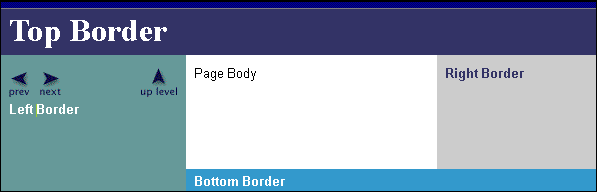
Notice that the top border, which has first priority, stretches into both corners that it could potentially fill, taking precedence over the right and left borders in the corners where it meets them. The left border has second priority: it makes way for the higher-priority top border in the upper-left corner, but stretches to the lower-right corner. The bottom border has third priority, so it gives way to the left border, but stretches to the lower-right corner where it meets the right border. The right border, which has last priority, does not touch either corner.