Click Settings  . The Web Transfer Client - Settings dialog
box appears.
. The Web Transfer Client - Settings dialog
box appears.
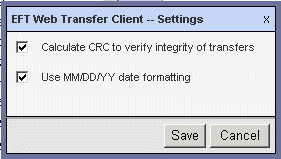
The Use MM/DD/YY date formatting check box is selected by default. Clear the check box if you want it to display the day/month/year (e.g., 28/05/2008) instead of month/day/year (e.g., 05/28/2008).
Click Save to save changes or Cancel to keep existing settings.
Refresh the display using the WTC's refresh icon  . The
refresh icon in the WTC refreshes
the display without requesting a new session. Each refresh of the browser
counts as one session, so do not use the browser's refresh icon or F5.
. The
refresh icon in the WTC refreshes
the display without requesting a new session. Each refresh of the browser
counts as one session, so do not use the browser's refresh icon or F5.