
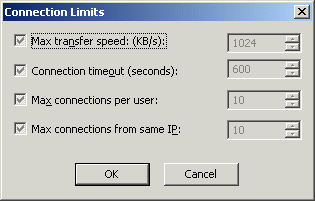
The Connection Limits dialog box is used to specify limits for the following parameters:
Maximum transfer speeds for a Site, Settings Template, and user
Max connections per user on the Site, Settings Template, and user
Max connections from same IP address on the Site, Settings Template, and user
To specify connection limits
Do one of the following:
Select the Max transfer speed check box, then specify the maximum speed (in kilobytes per second) allowed.
Select the Connection timeout check box, then type or select the maximum allowable seconds of inactivity allowed before the user is disconnected.
Select the Max connections per user check box, then specify the maximum number of simultaneous connections allowed to the Site.
Select the Max connections from same IP check box, then specify the maximum number of simultaneous connections to the Site allowed from the same IP address.
Click OK to close the dialog box.
Click Apply to save the changes on EFT Server.