
EFT Server can automatically disable or lockout user accounts after a specified number of bad password login attempts over a specified time. This feature can be enabled for a Site, Settings Template, and/or per user. Once an account is disabled, you can re-enable the account on the General tab of the user.
|
|
The PCI DSS (multifaceted security standard that includes requirements for security management, policies, procedures, network architecture, software design, and other critical protective measures)requires that you should limit repeated access attempts by locking out a user after not more than six attempts and that you should set the lockout duration to thirty minutes or until administrator enables the user account. If a Site is running in high-security mode, and you clear the Disable/Lockout check box or set the maximum login attempts to a value greater than 6, a warning appears. |
To disable or lockout an account after a defined number of incorrect login attempts
In the Administrator, connect to EFT Server and click the Server tab.
In the left pane, click the Settings Template or user that you want to configure.
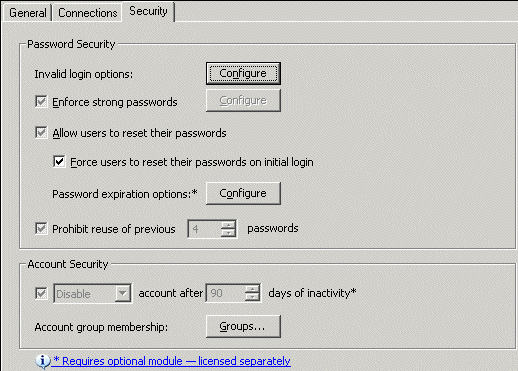
In the right pane, click the Security tab.
|
|
If the check box contains a gray check mark, the user or Settings Template is inheriting permission from the parent level. |
In the Account Security area, select the check box next to Disable then specify the following:
Whether to Disable or Remove the account
Number of days of inactivity after which to disable or remove the account
Click Apply to save the changes on EFT Server.
Banning an IP Address that Uses an Invalid Account
Enabling or Disabling a Settings Template or User
Disabling or Removing an Administrator Account due to Repeated Incorrect Logins
Possible PCI Compliance Report Outcomes
