
You can override the hard-coded location of the Web Transfer Client files by settings some registry values to indicate the new location of the files you would like to use. The registry key indicates the specific file used by the Web Transfer Client, and the value of the key indicates the full file path to use for the file.
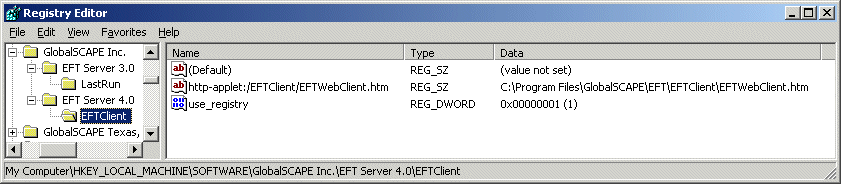
To use this key, set use_registry dword to 1 (same path).
[HKEY_LOCAL_MACHINE\SOFTWARE\GlobalSCAPE Inc.\EFT Server 4.0\EFTClient\]
http-applet:/eftclient/eftwebclient.htm
http-applet:/eftclient/EFTAppletFunctions.js
http-applet:/eftclient/eftwebclientlogic.js
http-applet:/eftclient/EFTStyles.css
http-applet:/eftclient/eft.jar
http-applet:/eftclient/chttpclient.jar
http-applet:/eftclient/httpimpl.jar
http-applet:/eftclient/jclientupload.jar
http-applet:/eftclient/clogging.jar
http-applet:/eftclient/weakssl.jar
You can add each of the keys you need to a .reg file in the following format:
|
Windows Registry Editor Version 5.00 [HKEY_LOCAL_MACHINE\SOFTWARE\GlobalSCAPE Inc.\EFT Server 4.0\EFTClient] "use_registry"=dword:00000001 "http-applet:/EFTClient/EFTWebClient.htm"="C:\\Program Files\\GlobalSCAPE\\EFT\\EFTClient\\EFTWebClient.htm"
|
Less commonly used Web Transfer Client Registry Overrides:
http-applet:/eftclient
http-applet:/favicon.ico
http-applet:/eftclient/META-INF/services/org.apache.commons.logging.LogFactory
http-applet:/org/apache/log4j/Logger.class
http-applet:/javazoom/transfer/client/util/resources.class
http-applet:/javazoom/transfer/client/util/resources_en.class
http-applet:/javazoom/transfer/client/util/resources_en_US.class
http-applet:/javazoom/transfer/client/util/resources_en_US.properties
http-applet:/eftclient/commons-logging.properties
http-applet:/javazoom/transfer/client/util
http-applet:/org/apache
Other Registry Overrides:
http-applet:/ManageAccount