
When you create Commands in EFT Server, you can assign permissions to specific users and/or permission Groups. The Command Settings Interface methods are used to get, add, and remove users/groups to/from Commands.
To view the user permissions for the Command in EFT Server
In the Administrator, connect to the Server and click the Server tab.
In the left pane, expand the Site node for the Site that you want to configure, then click Commands.
In the right pane, click the Command that you want to edit. The Command Settings tab appears.
In the FTP Custom Command Specific area, click Configure. The FTP Custom Command Specific dialog box appears.
Next to User(s) or group(s) allowed to execute this custom command, click Configure.
The dialog box below is labeled with some of the methods that are available in the ICICommandSettings Interface:
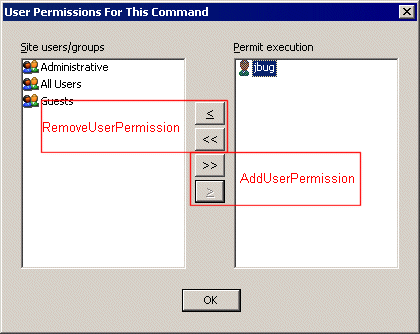
Retrieving a List of Users Allowed to Use a Custom Command (GetUserPermissions)
Prohibiting Users from Using a Custom Command (RemoveUserPermission)