
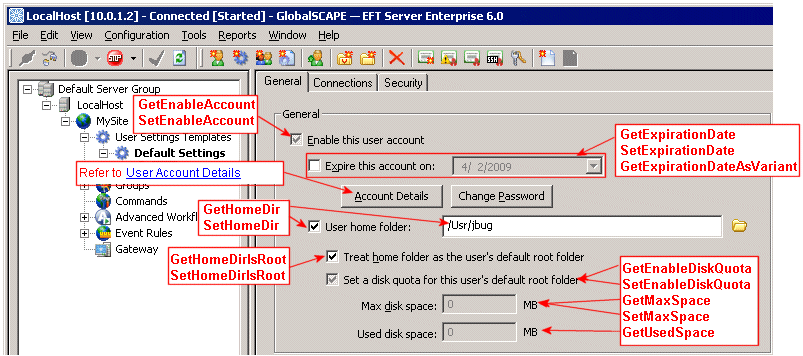
User account general settings include whether the account is enabled, get/set expiration date, get/set the home folder, and get/set user disk quota. You can view/set the user account general settings in the Administrator interface on the user's General tab. The illustration below is labeled with some of the parameters that are available in the ICIClientSettings interface for the user account's general settings.
 .
.
Determining if a User Account or User Settings Level is Enabled (GetEnableAccount)
Enabling a User Account or User Settings Level (SetEnableAccount)
Determining if the Account Home Folder is the Default Root Folder (GetHomeDirIsRoot)
Determining the Expiration Date for a User Account (GetExpirationDate)
Specifying the Expiration Date for a User Account (SetExpirationDate)
Determining the Expiration Date for a User Account (GetExpirationDateAsVariant)
Determining if an Account has a Disk Quota (GetEnableDiskQuota)
Specifying the Path to Users' Home Folders (SetHomeDirString)
Determining How Much Disk Space a User has Used (GetUsedSpace)