
User password settings include whether a complex password must be used, invalid login attempts, and so on . You can view/set the user password settings in the Administrator interface on the user's Security tab. The illustration below is labeled with some of the parameters that are available in the ICIClientSettings interface for the user password settings.
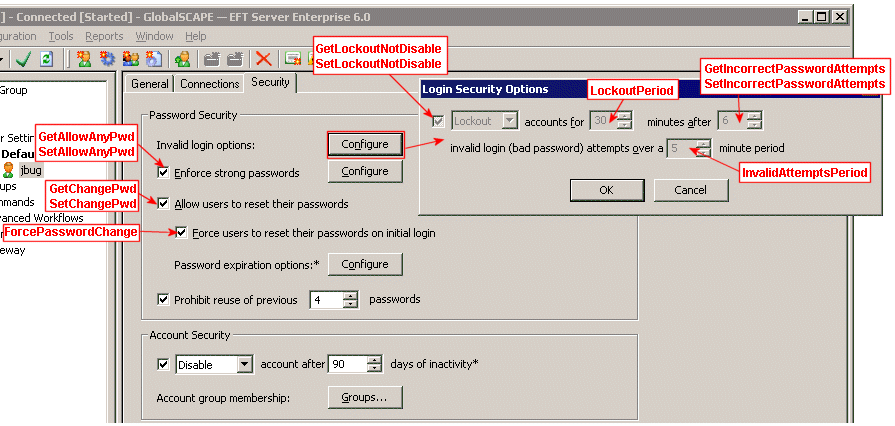
Determining if Users Can Create Any Password (GetAllowAnyPwd)
Determining if Users are Allowed to Change their Passwords (GetChangePwd)
Forcing a User to Change Password on Login (ForcePasswordChange)
Viewing Whether Account Lockout is Enabled for a User (GetLockoutNotDisable)
Determining the Number of Failed Password Attempts (GetIncorrectPasswordAttempts)
Specifying the Number of Incorrect Password Attempts (SetIncorrectPasswordAttempts)
Viewing Invalid Attempts Period for a Client (InvalidAttemptsPeriod)