
User connection limits in the COM API include getting/setting the number of uploads and download per session and maximum upload and download sizes. You can view/set these settings in the Administrator interface on the user's Connections tab by clicking Configure next to Transfer Settings. The dialog box below is labeled with some of the parameters that are available in the ICIClientSettings interface.
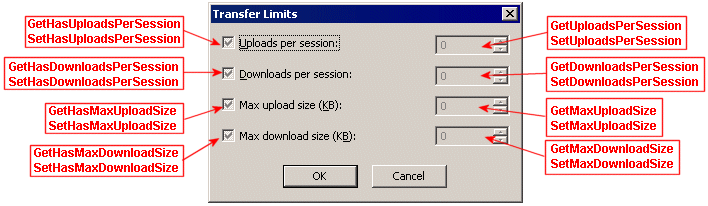
Determining if a User has an Upload per Session Limit (GetHasUploadsPerSession)
Enabling a User's Uploads-per-Session Limit (SetHasUploadsPerSession)
Retrieving a User's Upload per Session Limit (GetUploadsPerSession)
Specifying the Maximum Number of Uploads a User is Permitted per Session (SetUploadsPerSession)
Determining if a User has a Download per Session Limit (GetHasDownloadsPerSession)
Enabling a User's Downloads-per-Session Limit (SetHasDownloadsPerSession)
Retrieving a Download per Session Limit (GetDownloadsPerSession)
Specifying the Maximum Number of Downloads a User is Permitted per Session (SetDownloadsPerSession)
Determining if a User has an Upload Size Limit (GetHasMaxUploadSize)
Specifying the Maximum File Size a User is Permitted to Upload (SetMaxUploadSize )
Determining if a User has a Download Size Limit (GetHasMaxDownloadSize)
Enabling a User's Download Size Limit (SetHasMaxDownloadSize)
Retrieving a User's Download Size Limit (GetMaxDownloadSize)
Specifying the Maximum File Size a User is Permitted to Download (SetMaxDownloadSize)