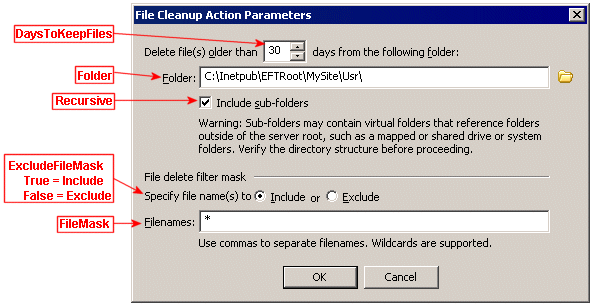
In EFT Server Enterprise, you can configure an EFT Server Event Rule to clean up a specified folder at regularly scheduled intervals. The Clean up in Folder Action is available only with the On Timer Server event. At the interval that you specify, EFT Server compares the filter parameters of the Cleanup Action to the files in the designated folder, then determines the creation time of the file and deletes ("cleans up") files that match the cleanup parameters. For example, if you specify to cleanup files that are older than 7 days named dailyreport*.doc in the folder D:\WorkFolder\Sales\Daily Reports, any Microsoft Word files in that folder with dailyreport in the file name are deleted.
The dialog box below is labeled with the parameters that are available in the Cleanup Action Parameters interface.