Description
Populates an Automated Workflow variable with the LDAP path of the specified Active Directory object (e.g. user, computer, printer, etc.).
Declaration
<AMGETADOBJECT LDAPPATH="text" ADOBJECT="text [options]" OBJECTNAME="text" RESULTVARIABLE="text" USERNAME="text" PASSWORD="text"/>
Example
<AMGETADOBJECT LDAPPATH="LDAP://OU=Network Automation Employees,DC=networkautomation,DC=com" ADOBJECT="USER" OBJECTNAME="Gi*" RESULTVARIABLE="ObjectPath" />
General Tab Parameters
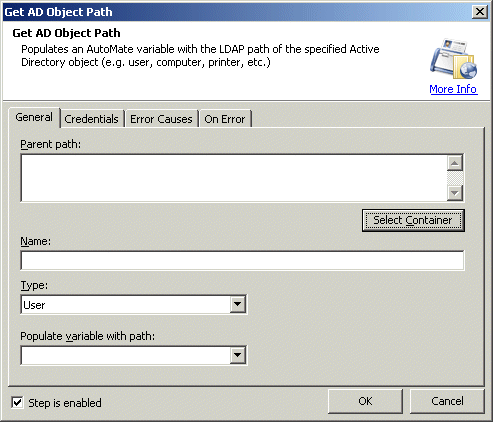
Parent Path: Allows you to enter the Ldap path of the parent active directory object. Usually the top most container or rootdse path.
Text, Required
MARKUP: LDAPPATH="LDAP://DC=networkautomation,DC=com"
Click Select Container to select the parent container from the domain. When you do, this launches a standard Windows Active Directory dialog box that allows you to select the user.
Name: Allows you to enter the name of the active directory object. You can use * and ? also to filter the name. For example, enter S* if there is any user whose name starts with S in the active directory.
Text, Required
MARKUP: OBJECTNAME="Scott"
Type: Allows you to select the type of object you are looking for from the list. The available options are:
User (default)
Computer
Group
Organization Unit
Printer
Text [options], Optional - Default
"User"
MARKUP: ADOBJECT="GROUP"
Populate variable with path: Variable is populated with the first object's LDAP path found in Active Directory matching the name.
Text [variable name], Required
MARKUP: RESULTVARIABLE="varname"
Credentials Tab Parameters
Username: Allows you to enter the name of the active directory user.
Text, Optional
MARKUP: USERNAME="username"
Password: Allows you to enter the password of the active directory user.
Text, Optional
MARKUP: PASSWORD="password"
Note: Leave these fields blank if you want to use current user's credentials. If you are trying to access the active directory information then any Domain user is valid but in order to modify the user or group you need Domain Administrator. We recommend to use domain administrator for all the active directory actions.
Refer to the following link for more information: http://en.wikipedia.org/wiki/Lightweight_Directory_Access_Protocol