Configuring SFTP (SSH) in CuteFTP
Specify ciphers, macs, and KEX ciphers for external SFTP connections.
To configure SFTP in CuteFTP
-
In the CuteFTP interface click the Tools menu.
-
Click the Global Options option.
-
Select the SSH2 Security option under Security.
-
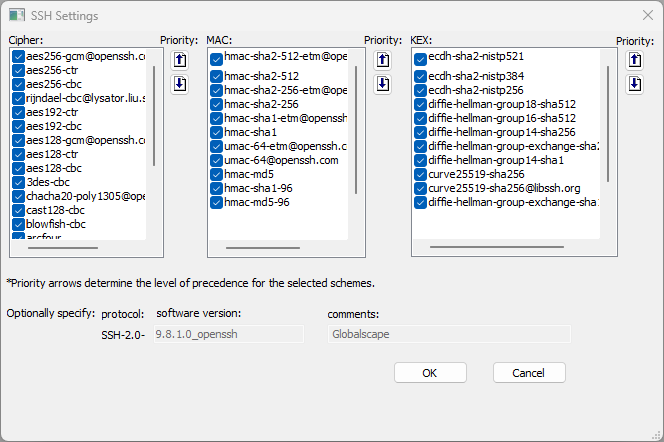
Next to SSH configuration settings, click Configure. The SSH Settings dialog box appears.
-
Select the check box of one or more ciphers, macs, and KEX ciphers to use; clear check boxes of ciphers, macs, and KEX ciphers that you don't want to use. At least one cipher must be specified.
-
Click OK to save the changes to CuteFTP.
EFT's SFTP library implementation is based on the 8.1 version of Portable OpenSSH (PowerShell) which is a fork of Portable OpenSSH , which in turn is a fork of the canonical OpenSSH. EFT and CuteFTP will be updated once the fork that EFT is using is updated to 8.2, 8.3, or newer version. Also note that the EFT and CuteFTP implementation contains some modified OpenSSH files, modified via use of a Fedora patch, for purposes of FIPS certification when FIPS mode is enabled (where EFT and CuteFTP leverages OpenSSL’s LibEay32.dll for SFTP’s cryptographic functions).