Global Antivirus Scanning
You can configure a Content Integrity Control profile to scan all inbound and/or outbound files. When configured, all inbound and/or outbound traffic to the Site, regardless of protocol, will be scanned by the configured profile’s AV tool. No event rules will need to be configured for scans to trigger. Response handling for the AV trigger will honor the configured profile’s settings.
To enable global antivirus scanning
-
Create a CIC profile, as described above.
-
Right-click the profile, then click GlobalAV: inbound scan or GlobalAV: outbound scan.
-
Click Apply. An up arrow and/or down arrow appears next to the profile.
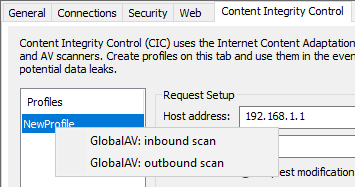
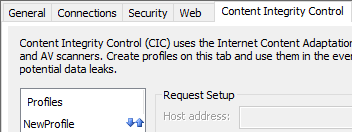
The EFT administrator interface will display both an upward and downward arrow to denote that the CIC profile is configured for global inbound and outbound scans. EFT logs should include any entries for files being scanned, triggered, and errors when global AV is enabled. When inbound and outbound GlobalAV is disabled, the EFT administrator interface will not show downward and upward arrows and AV scans for any transfers via any protocol will no longer be scanned. Any previously configured Event Rules that have been defined AV (DLP).