Using a SOCKS Proxy Server
When you create an Event Rule that requires the use of a SOCKS proxy server, you can specify settings in EFT for the connection to the SOCKS proxy server.
To use a SOCKS proxy server
-
Create an Event Rule.
-
In the Event Rule Action, click %FS.PATH%. The Offload Action wizard appears.
-
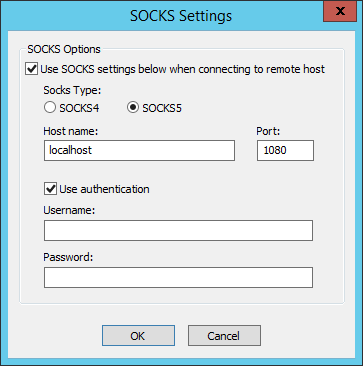
Click Socks. The SOCKS Settings dialog box appears.
-
Select the Use SOCKS settings check box to enable the Socks Type options.
-
In the Socks Type area, specify a SOCKS server type of either SOCKS4 or SOCKS5.
-
When SOCKS4 is specified, Use authentication is disabled.
-
When SOCKS 5 is specified, Use authentication can be enabled, allowing you to provide a username and password for the SOCKS connection. If you selected SOCKS5 and the Use authentication check box, specify the Username and Password required to connect to the SOCKS server.
-
-
Click OK to save the SOCKS options.