Enabling REST API for Remote Administration
To use the EFT REST API to administer EFT remotely, you first must enable REST API in the EFT administration interface.
To enable REST API for remote administration
-
In the administration interface, connect to EFT and click the Server tab.
-
On the Server tab, click the Server node that you want to manage.
-
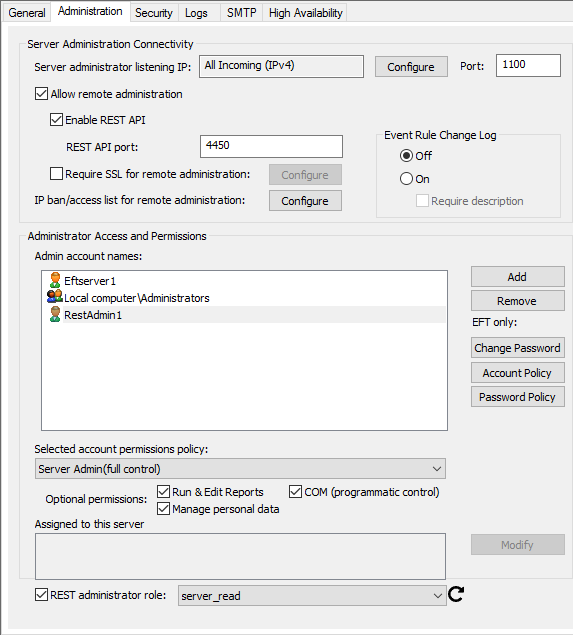
In the right pane, click the Administration tab.
-
Select the Allow remote administration check box.
-
Select the Enable REST API
-
Specify the REST API
-
(Optional) Select the Require SSL for remote administration check box, then specify the SSL certificate to use.
-
At the bottom of the tab, the REST administrator role check box is enabled when the Enable REST API check box is selected. Refer to Configuring REST Permission Roles for details of configuring REST permissions.
NOTE: When the Web Admin Client check box is selected, the Programmatic Policy automatically changes to "use account permission policy." -
Click Apply to save the changes on EFT.