
For information about Globalscape, visit www.globalscape.com. |
|
|
For information about Globalscape, visit www.globalscape.com. |
|
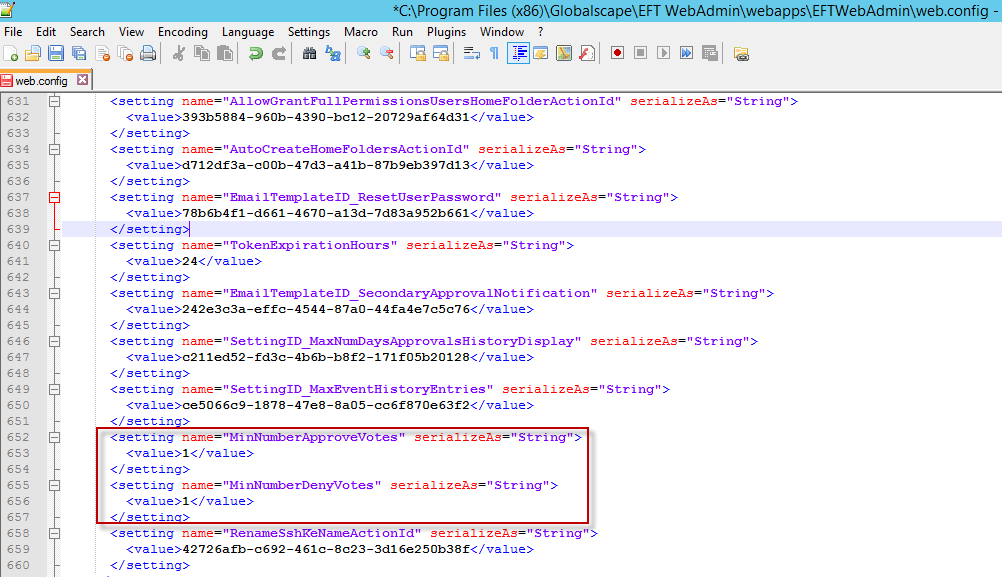
The web.config file in the EFT Web Admin installation folder (e.g., C:\Program Files (x86)\Globalscape\EFT WebAdmin\webapps\EFTWebAdmin), provides the following settings that are not exposed in the interface.
|
Setting |
Default |
Description |
|
CacheExpirationInSecs |
60 |
Seconds used to cache application settings |
|
TokenExpirationHours |
24 |
Number of hours that tokes are valid when passwords are reset. |
|
MinNumberApproveVotes |
0 |
Minimum number of approve votes are needed to approve an admin change |
|
MinNumberDenyVotes |
0 |
Minimum number of denied votes are needed to deny an admin change |
|
DisableARMIntegration |
False |
Allows you to disable integration with ARM module. When True Web Admin won’t query ARM DB to retrieve Event Rules last status. Reports are not affected by this setting. |
To make changes to the web.config file
Open web.config.
Save a backup copy in case you need to revert.
Search for the setting that you want to change.
Make the change.
Save web.config.
|
This online help file is for EFT WebAdmin. For other help documentation, please refer to http://help.globalscape.com/help/index.html. (If the Index and Contents are hidden, click Show Contents pane in the top left corner of this topic.) |
