Changing HA-MX Rule Criteria
This option is invoked by taking option 2=Change against the HA-MX rule criteria displayed on the Add/Change HA-MX Rule display. This opens the Change Selection Criteria display.
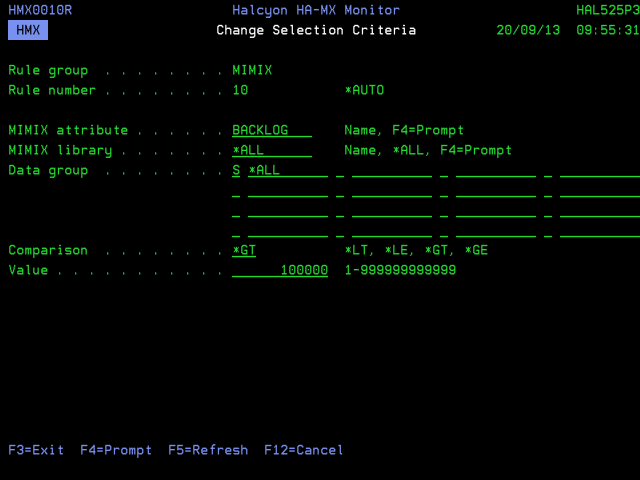
Parameters on the Change Selection Criteria display
The following parameters are available on the Change Selection Criteria display.
Rule group
Displays the name of the HA-MX rule group that contains this rule.
Rule number
Displays the sequence number of the rule to which this criteria is applied.
MIMIX attribute
Specifies the name of the MIMIX attribute being tested. Either enter the attribute name or use F4=Prompt to display a list of valid alternatives from which a selection can be made. Subsequent parameters on this display, depend on the selection made in this field.
 For *NORMAL MIMIX Attributes
MIMIX attribute: *NORMAL
A special value that causes an alert to be raised whenever any other type of alert is closed and there are no other alerts open for a given MIMIX library. This can be used to generate a confirmation message that all problems for a given MIMIX library have been resolved.
MIMIX Library
Specifies the name of the MIMIX library to which this rule applies.
| *ALL | The rule applies to all MIMIX libraries |
| name | Enter the name of a specific MIMIX library. The library must have been previously registered using the Work with Monitored Libraries (WRKMONLIB) command |
For ACTOBJENT MIMIX Attributes
MIMIX attribute: ACTOBJENT
Indicates whether there are active object entries currently in any object subprocess.
MIMIX Library
Specifies the name of the MIMIX library to which this rule applies.
| *ALL | The rule applies to all MIMIX libraries |
| name | Enter the name of a specific MIMIX library. The library must have been previously registered using the Work with Monitored Libraries (WRKMONLIB) command |
Data Group
Specifies the name of the data groups to which this rule applies. You can specify up to 16 names preceded by (S) Select or (O) Omit. You must specify at least one Select entry. Omit entries are optional. This rule applies to data groups that are selected by any select entry and that are not omitted by any omit entry.
| *ALL | The rule applies to all data groups |
| name | Enter the name of a specific data group. been previously discovered by Halcyon HA-MX Monitor. If you are unable to enter the name of a data group that exists, start Halcyon HA-MX Monitor to allow that data group to be discovered |
Data group state
Specifies the data group state which should be checked for each selection.
| *ALL | All Data groups are selected regardless of state |
| *ENABLED | Only enabled data groups are selected |
| *DISABLED | Only disabled data groups are selected |
System parameters
For ACTOBJENT attributes there are two system parameters (System 1 and System 2). These parameters can be used to specify two systems within the data group(s) for which these rule criteria apply. Any value that does not meet the comparison criteria, for these named systems only, will then raise an alert. Leave the parameters set to *ALL to apply the rule across all systems. Systems are only available for selection in these two parameters, either by direct entry or use of F4=Prompt, if the HA-MX Monitor has already discovered them. If systems are not available, start the HA-MX Monitor to add them to the selection criteria.
| *ALL | Data groups containing any qualified system name are selected |
| *LOCAL | Data groups containing just the local system name are selected |
| name | Specify a system name |
Comparison
Specify the comparison to be made between the value retrieved from MIMIX and the test value specified in this rule.
| *EQ | An alert is raised if the MIMIX value matches one of the specified values |
| *NE | An alert is raised if the MIMIX value does not match any of the specified values |
Values
Enter one or more comparison values or use F4=Prompt to select from a list of valid alternatives.
For APYPRC MIMIX Attributes
MIMIX attribute: APYPRC
Specifies the operational status of an apply session.
MIMIX Library
Specifies the name of the MIMIX library to which this rule applies.
| *ALL | The rule applies to all MIMIX libraries |
| name | Enter the name of a specific MIMIX library. The library must have been previously registered using the Work with Monitored Libraries (WRKMONLIB) command |
Data Group
Specifies the name of the data groups to which this rule applies. You can specify up to 16 names preceded by (S) Select or (O) Omit. You must specify at least one Select entry. Omit entries are optional. This rule applies to data groups that are selected by any select entry and that are not omitted by any omit entry.
| *ALL | The rule applies to all data groups |
| name | Enter the name of a specific data group. been previously discovered by Halcyon HA-MX Monitor. If you are unable to enter the name of a data group that exists, start Halcyon HA-MX Monitor to allow that data group to be discovered |
System parameters
For APYPRC attributes there are two system parameters (System 1 and System 2). These parameters can be used to specify two systems within the data group(s) for which these rule criteria apply. Any value that does not meet the comparison criteria, for these named systems only, will then raise an alert. Leave the parameters set to *ALL to apply the rule across all systems. Systems are only available for selection in these two parameters, either by direct entry or use of F4=Prompt, if the HA-MX Monitor has already discovered them. If systems are not available, start the HA-MX Monitor to add them to the selection criteria.
| *ALL | Data groups containing any qualified system name are selected |
| *LOCAL | Data groups containing just the local system name are selected |
| name | Specify a system name |
Comparison
Specify the comparison to be made between the value retrieved from MIMIX and the test value specified in this rule.
| *EQ | An alert is raised if the MIMIX value matches one of the specified values |
| *NE | An alert is raised if the MIMIX value does not match any of the specified values |
Values
Enter one or more comparison values or use F4=Prompt to select from a list of valid alternatives.
For AUDCMP MIMIX Attributes
MIMIX attribute: AUDCMP
The number of objects compared by the last audit, if available. Returns 0 if not available. See AUDSTS.
MIMIX Library
Specifies the name of the MIMIX library to which this rule applies.
| *ALL | The rule applies to all MIMIX libraries |
| name | Enter the name of a specific MIMIX library. The library must have been previously registered using the Work with Monitored Libraries (WRKMONLIB) command |
Data Group
Specifies the name of the data groups to which this rule applies. You can specify up to 16 names preceded by (S) Select or (O) Omit. You must specify at least one Select entry. Omit entries are optional. This rule applies to data groups that are selected by any select entry and that are not omitted by any omit entry.
| *ALL | The rule applies to all data groups |
| name | Enter the name of a specific data group. been previously discovered by Halcyon HA-MX Monitor. If you are unable to enter the name of a data group that exists, start Halcyon HA-MX Monitor to allow that data group to be discovered |
Data group state
Specifies the data group state which should be checked for each selection.
| *ALL | All Data groups are selected regardless of state |
| *ENABLED | Only enabled data groups are selected |
| *DISABLED | Only disabled data groups are selected |
System parameters
For AUDCMP attributes there are two system parameters (System 1 and System 2). These parameters can be used to specify two systems within the data group(s) for which these rule criteria apply. Any value that does not meet the comparison criteria, for these named systems only, will then raise an alert. Leave the parameters set to *ALL to apply the rule across all systems. Systems are only available for selection in these two parameters, either by direct entry or use of F4=Prompt, if the HA-MX Monitor has already discovered them. If systems are not available, start the HA-MX Monitor to add them to the selection criteria.
| *ALL | Data groups containing any qualified system name are selected |
| *LOCAL | Data groups containing just the local system name are selected |
| name | Specify a system name |
Comparison
Specify the comparison to be made between the value retrieved from MIMIX and the test value specified in this rule.
| *LT | An alert is raised if the MIMIX value is less than the specified value |
| *LE | An alert is raised if the MIMIX value is less than or equal to the specified value |
| *GT | An alert is raised if the MIMIX value is greater than the specified value |
| *GE | An alert is raised if the MIMIX value is greater than or equal to the specified value |
Values
Enter one or more comparison values or use F4=Prompt to select from a list of valid alternatives.
For AUDDETNE MIMIX Attributes
MIMIX attribute: AUDDETNE
The number of objects detected not equal by the last audit, if available. Returns 0 if not available. See AUDSTS.
MIMIX Library
Specifies the name of the MIMIX library to which this rule applies.
| *ALL | The rule applies to all MIMIX libraries |
| name | Enter the name of a specific MIMIX library. The library must have been previously registered using the Work with Monitored Libraries (WRKMONLIB) command |
Data Group
Specifies the name of the data groups to which this rule applies. You can specify up to 16 names preceded by (S) Select or (O) Omit. You must specify at least one Select entry. Omit entries are optional. This rule applies to data groups that are selected by any select entry and that are not omitted by any omit entry.
| *ALL | The rule applies to all data groups |
| name | Enter the name of a specific data group. been previously discovered by Halcyon HA-MX Monitor. If you are unable to enter the name of a data group that exists, start Halcyon HA-MX Monitor to allow that data group to be discovered |
Data group state
Specifies the data group state which should be checked for each selection.
| *ALL | All Data groups are selected regardless of state |
| *ENABLED | Only enabled data groups are selected |
| *DISABLED | Only disabled data groups are selected |
System parameters
For AUDDETNE attributes there are two system parameters (System 1 and System 2). These parameters can be used to specify two systems within the data group(s) for which these rule criteria apply. Any value that does not meet the comparison criteria, for these named systems only, will then raise an alert. Leave the parameters set to *ALL to apply the rule across all systems. Systems are only available for selection in these two parameters, either by direct entry or use of F4=Prompt, if the HA-MX Monitor has already discovered them. If systems are not available, start the HA-MX Monitor to add them to the selection criteria.
| *ALL | Data groups containing any qualified system name are selected |
| *LOCAL | Data groups containing just the local system name are selected |
| name | Specify a system name |
Comparison
Specify the comparison to be made between the value retrieved from MIMIX and the test value specified in this rule.
| *LT | An alert is raised if the MIMIX value is less than the specified value |
| *LE | An alert is raised if the MIMIX value is less than or equal to the specified value |
| *GT | An alert is raised if the MIMIX value is greater than the specified value |
| *GE | An alert is raised if the MIMIX value is greater than or equal to the specified value |
Values
Enter one or more comparison values or use F4=Prompt to select from a list of valid alternatives.
For AUDNOTCMP MIMIX Attributes
MIMIX attribute: AUDNOTCMP
The number of objects not compared by the last audit, if available. Returns 0 if not available. See AUDSTS.
MIMIX Library
Specifies the name of the MIMIX library to which this rule applies.
| *ALL | The rule applies to all MIMIX libraries |
| name | Enter the name of a specific MIMIX library. The library must have been previously registered using the Work with Monitored Libraries (WRKMONLIB) command |
Data Group
Specifies the name of the data groups to which this rule applies. You can specify up to 16 names preceded by (S) Select or (O) Omit. You must specify at least one Select entry. Omit entries are optional. This rule applies to data groups that are selected by any select entry and that are not omitted by any omit entry.
| *ALL | The rule applies to all data groups |
| name | Enter the name of a specific data group. been previously discovered by Halcyon HA-MX Monitor. If you are unable to enter the name of a data group that exists, start Halcyon HA-MX Monitor to allow that data group to be discovered |
Data group state
Specifies the data group state which should be checked for each selection.
| *ALL | All Data groups are selected regardless of state |
| *ENABLED | Only enabled data groups are selected |
| *DISABLED | Only disabled data groups are selected |
System parameters
For AUDNOTCMP attributes there are two system parameters (System 1 and System 2). These parameters can be used to specify two systems within the data group(s) for which these rule criteria apply. Any value that does not meet the comparison criteria, for these named systems only, will then raise an alert. Leave the parameters set to *ALL to apply the rule across all systems. Systems are only available for selection in these two parameters, either by direct entry or use of F4=Prompt, if the HA-MX Monitor has already discovered them. If systems are not available, start the HA-MX Monitor to add them to the selection criteria.
| *ALL | Data groups containing any qualified system name are selected |
| *LOCAL | Data groups containing just the local system name are selected |
| name | Specify a system name |
Comparison
Specify the comparison to be made between the value retrieved from MIMIX and the test value specified in this rule.
| *LT | An alert is raised if the MIMIX value is less than the specified value |
| *LE | An alert is raised if the MIMIX value is less than or equal to the specified value |
| *GT | An alert is raised if the MIMIX value is greater than the specified value |
| *GE | An alert is raised if the MIMIX value is greater than or equal to the specified value |
Values
Enter one or more comparison values or use F4=Prompt to select from a list of valid alternatives.
For AUDNOTRCV MIMIX Attributes
MIMIX attribute: AUDNOTRCV
The number of objects not recovered by the last audit, if available. Returns 0 if not available. See AUDSTS.
MIMIX Library
Specifies the name of the MIMIX library to which this rule applies.
| *ALL | The rule applies to all MIMIX libraries |
| name | Enter the name of a specific MIMIX library. The library must have been previously registered using the Work with Monitored Libraries (WRKMONLIB) command |
Data Group
Specifies the name of the data groups to which this rule applies. You can specify up to 16 names preceded by (S) Select or (O) Omit. You must specify at least one Select entry. Omit entries are optional. This rule applies to data groups that are selected by any select entry and that are not omitted by any omit entry.
| *ALL | The rule applies to all data groups |
| name | Enter the name of a specific data group. been previously discovered by Halcyon HA-MX Monitor. If you are unable to enter the name of a data group that exists, start Halcyon HA-MX Monitor to allow that data group to be discovered |
Data group state
Specifies the data group state which should be checked for each selection.
| *ALL | All Data groups are selected regardless of state |
| *ENABLED | Only enabled data groups are selected |
| *DISABLED | Only disabled data groups are selected |
System parameters
For AUDNOTRCV attributes there are two system parameters (System 1 and System 2). These parameters can be used to specify two systems within the data group(s) for which these rule criteria apply. Any value that does not meet the comparison criteria, for these named systems only, will then raise an alert. Leave the parameters set to *ALL to apply the rule across all systems. Systems are only available for selection in these two parameters, either by direct entry or use of F4=Prompt, if the HA-MX Monitor has already discovered them. If systems are not available, start the HA-MX Monitor to add them to the selection criteria.
| *ALL | Data groups containing any qualified system name are selected |
| *LOCAL | Data groups containing just the local system name are selected |
| name | Specify a system name |
Comparison
Specify the comparison to be made between the value retrieved from MIMIX and the test value specified in this rule.
| *LT | An alert is raised if the MIMIX value is less than the specified value |
| *LE | An alert is raised if the MIMIX value is less than or equal to the specified value |
| *GT | An alert is raised if the MIMIX value is greater than the specified value |
| *GE | An alert is raised if the MIMIX value is greater than or equal to the specified value |
Values
Enter one or more comparison values or use F4=Prompt to select from a list of valid alternatives.
For AUDRCV MIMIX Attributes
MIMIX attribute: AUDRCV
The number of objects recovered by the last audit, if available. Returns 0 if not available. See AUDSTS.
MIMIX Library
Specifies the name of the MIMIX library to which this rule applies.
| *ALL | The rule applies to all MIMIX libraries |
| name | Enter the name of a specific MIMIX library. The library must have been previously registered using the Work with Monitored Libraries (WRKMONLIB) command |
Data Group
Specifies the name of the data groups to which this rule applies. You can specify up to 16 names preceded by (S) Select or (O) Omit. You must specify at least one Select entry. Omit entries are optional. This rule applies to data groups that are selected by any select entry and that are not omitted by any omit entry.
| *ALL | The rule applies to all data groups |
| name | Enter the name of a specific data group. been previously discovered by Halcyon HA-MX Monitor. If you are unable to enter the name of a data group that exists, start Halcyon HA-MX Monitor to allow that data group to be discovered |
Data group state
Specifies the data group state which should be checked for each selection.
| *ALL | All Data groups are selected regardless of state |
| *ENABLED | Only enabled data groups are selected |
| *DISABLED | Only disabled data groups are selected |
System parameters
For AUDRCV attributes there are two system parameters (System 1 and System 2). These parameters can be used to specify two systems within the data group(s) for which these rule criteria apply. Any value that does not meet the comparison criteria, for these named systems only, will then raise an alert. Leave the parameters set to *ALL to apply the rule across all systems. Systems are only available for selection in these two parameters, either by direct entry or use of F4=Prompt, if the HA-MX Monitor has already discovered them. If systems are not available, start the HA-MX Monitor to add them to the selection criteria.
| *ALL | Data groups containing any qualified system name are selected |
| *LOCAL | Data groups containing just the local system name are selected |
| name | Specify a system name |
Comparison
Specify the comparison to be made between the value retrieved from MIMIX and the test value specified in this rule.
| *LT | An alert is raised if the MIMIX value is less than the specified value |
| *LE | An alert is raised if the MIMIX value is less than or equal to the specified value |
| *GT | An alert is raised if the MIMIX value is greater than the specified value |
| *GE | An alert is raised if the MIMIX value is greater than or equal to the specified value |
Values
Enter one or more comparison values or use F4=Prompt to select from a list of valid alternatives.
For AUDSTS MIMIX Attributes
MIMIX attribute: AUDSTS
Indicates whether audit information is available for the AUDCMP, AUDNOTCMP, AUDRCV, AUDNOTRCV, AUDDETNE and AUDTOT attributes.
Returns *AVAIL or *NOTAVAIL. Audit information is considered to be available if the last audit was completed within the time specified by system default HMX/AUDHSTMAXMINS.
MIMIX Library
Specifies the name of the MIMIX library to which this rule applies.
| *ALL | The rule applies to all MIMIX libraries |
| name | Enter the name of a specific MIMIX library. The library must have been previously registered using the Work with Monitored Libraries (WRKMONLIB) command |
Data Group
Specifies the name of the data groups to which this rule applies. You can specify up to 16 names preceded by (S) Select or (O) Omit. You must specify at least one Select entry. Omit entries are optional. This rule applies to data groups that are selected by any select entry and that are not omitted by any omit entry.
| *ALL | The rule applies to all data groups |
| name | Enter the name of a specific data group. been previously discovered by Halcyon HA-MX Monitor. If you are unable to enter the name of a data group that exists, start Halcyon HA-MX Monitor to allow that data group to be discovered |
Data group state
Specifies the data group state which should be checked for each selection.
| *ALL | All Data groups are selected regardless of state |
| *ENABLED | Only enabled data groups are selected |
| *DISABLED | Only disabled data groups are selected |
System parameters
For AUDSTS attributes there are two system parameters (System 1 and System 2). These parameters can be used to specify two systems within the data group(s) for which these rule criteria apply. Any value that does not meet the comparison criteria, for these named systems only, will then raise an alert. Leave the parameters set to *ALL to apply the rule across all systems. Systems are only available for selection in these two parameters, either by direct entry or use of F4=Prompt, if the HA-MX Monitor has already discovered them. If systems are not available, start the HA-MX Monitor to add them to the selection criteria.
| *ALL | Data groups containing any qualified system name are selected |
| *LOCAL | Data groups containing just the local system name are selected |
| name | Specify a system name |
Comparison
Specify the comparison to be made between the value retrieved from MIMIX and the test value specified in this rule.
| *EQ | An alert is raised if the MIMIX value matches one of the specified values |
| *NE | An alert is raised if the MIMIX value does not match any of the specified values |
Values
The default value is *NOTAVAIL. Enter one or more comparison values or use F4=Prompt to select from a list of valid alternatives.
For AUDTOT MIMIX Attributes
MIMIX attribute: AUDTOT
The total number of objects selected by the last audit, if available. Returns 0 if not available. See AUDSTS.
MIMIX Library
Specifies the name of the MIMIX library to which this rule applies.
| *ALL | The rule applies to all MIMIX libraries |
| name | Enter the name of a specific MIMIX library. The library must have been previously registered using the Work with Monitored Libraries (WRKMONLIB) command |
Data Group
Specifies the name of the data groups to which this rule applies. You can specify up to 16 names preceded by (S) Select or (O) Omit. You must specify at least one Select entry. Omit entries are optional. This rule applies to data groups that are selected by any select entry and that are not omitted by any omit entry.
| *ALL | The rule applies to all data groups |
| name | Enter the name of a specific data group. been previously discovered by Halcyon HA-MX Monitor. If you are unable to enter the name of a data group that exists, start Halcyon HA-MX Monitor to allow that data group to be discovered |
Data group state
Specifies the data group state which should be checked for each selection.
| *ALL | All Data groups are selected regardless of state |
| *ENABLED | Only enabled data groups are selected |
| *DISABLED | Only disabled data groups are selected |
System parameters
For AUDTOT attributes there are two system parameters (System 1 and System 2). These parameters can be used to specify two systems within the data group(s) for which these rule criteria apply. Any value that does not meet the comparison criteria, for these named systems only, will then raise an alert. Leave the parameters set to *ALL to apply the rule across all systems. Systems are only available for selection in these two parameters, either by direct entry or use of F4=Prompt, if the HA-MX Monitor has already discovered them. If systems are not available, start the HA-MX Monitor to add them to the selection criteria.
| *ALL | Data groups containing any qualified system name are selected |
| *LOCAL | Data groups containing just the local system name are selected |
| name | Specify a system name |
Comparison
Specify the comparison to be made between the value retrieved from MIMIX and the test value specified in this rule.
| *LT | An alert is raised if the MIMIX value is less than the specified value |
| *LE | An alert is raised if the MIMIX value is less than or equal to the specified value |
| *GT | An alert is raised if the MIMIX value is greater than the specified value |
| *GE | An alert is raised if the MIMIX value is greater than or equal to the specified value |
Values
The default value is 10000. Enter a value between 1 and 999999999.
For BACKLOG MIMIX Attributes
MIMIX attribute: BACKLOG
Specifies the number of received, but unprocessed, entries in an apply log space.
MIMIX library
Specifies the name of the MIMIX library to which this rule applies.
| *ALL | The rule applies to all MIMIX libraries |
| name | Enter the name of a specific MIMIX library. The library must have been previously registered using the Work with Monitored Libraries (WRKMONLIB) command |
Data Group
Specifies the name of the data groups to which this rule applies. You can specify up to 16 names preceded by (S) Select or (O) Omit. You must specify at least one Select entry. Omit entries are optional. This rule applies to data groups that are selected by any select entry and that are not omitted by any omit entry.
| *ALL | The rule applies to all data groups |
| name | Enter the name of a specific data group. The data group must have been previously discovered by Halcyon HA-MX Monitor. If you are unable to enter the name of a data group that exists, start Halcyon HA-MX Monitor to allow that data group to be discovered |
System parameters
For BACKLOG attributes there are two system parameters (System 1 and System 2). These parameters can be used to specify two systems within the data group(s) for which these rule criteria apply. Any value that does not meet the comparison criteria, for these named systems only, will then raise an alert. Leave the parameters set to *ALL to apply the rule across all systems. Systems are only available for selection in these two parameters, either by direct entry or use of F4=Prompt, if the HA-MX Monitor has already discovered them. If systems are not available, start the HA-MX Monitor to add them to the selection criteria.
| *ALL | Data groups containing any qualified system name are selected |
| *LOCAL | Data groups containing just the local system name are selected |
| name | Specify a system name |
Comparison
For attributes that return a numeric value:
| *LT | An alert is raised if the MIMIX value is less than the specified value |
| *LE | An alert is raised if the MIMIX value is less than or equal to the specified value |
| *GT | An alert is raised if the MIMIX value is greater than the specified value |
| *GE | An alert is raised if the MIMIX value is greater than or equal to the specified value |
Value
Enter the comparison value. The value must be within the indicated range.
For CLUSRVSTS Attributes
MIMIX attribute: CLUSRVSTS
Specifies the status of the cluster services for a system definition.
MIMIX library
Specifies the name of the MIMIX library to which this rule applies.
| *ALL | The rule applies to all MIMIX libraries |
| name | Enter the name of a specific MIMIX library. The library must have been previously registered using the Work with Monitored Libraries (WRKMONLIB) command |
Remote system
Specifies the name of the MIMIX remote system definition to which this rule applies.
| *ALL | This rule applies to all remote system definitions |
| name | Enter the name of the remote system definition. The remote system definition must have been previously discovered by Halcyon HA-MX Monitor. If you are unable to enter the name of a remote system definition that exists, start Halcyon HA-MX Monitor to allow that remote system definition to be discovered |
Comparison
Specify the comparison to be made between the value retrieved from MIMIX and the test value specified in this rule.
| *EQ | An alert is raised if the MIMIX value matches one of the specified values |
| *NE | An alert is raised if the MIMIX value does not match any of the specified values |
Values
Enter one or more comparison values or use F4=Prompt to select from a list of valid alternatives.
For CNRSNDBKLG Attributes
MIMIX attribute: CNRSNDBKLG
Specifies the number of entries that the container send process has marked for sending to the target system but have yet to be sent.
MIMIX library
Specifies the name of the MIMIX library to which this rule applies.
| *ALL | The rule applies to all MIMIX libraries |
| name | Enter the name of a specific MIMIX library. The library must have been previously registered using the Work with Monitored Libraries (WRKMONLIB) command |
Data Group
Specifies the name of the data groups to which this rule applies. You can specify up to 16 names preceded by (S) Select or (O) Omit. You must specify at least one Select entry. Omit entries are optional. This rule applies to data groups that are selected by any select entry and that are not omitted by any omit entry.
| *ALL | This rule applies to all data groups |
| name |
Enter the name of a specific data group. The data group must have been previously discovered by Halcyon HA-MX Monitor. If you are unable to enter the name of a data group that exists, start Halcyon HA-MX Monitor to allow that data group to be discovered. |
System parameters
For CNRSNDBKLG attributes there are two system parameters (System 1 and System 2). These parameters can be used to specify two systems within the data group(s) for which these rule criteria apply. Any value that does not meet the comparison criteria, for these named systems only, will then raise an alert. Leave the parameters set to *ALL to apply the rule across all systems. Systems are only available for selection in these two parameters, either by direct entry or use of F4=Prompt, if the HA-MX Monitor has already discovered them. If systems are not available, start the HA-MX Monitor to add them to the selection criteria.
| *ALL | Data groups containing any qualified system name are selected |
| *LOCAL | Data groups containing just the local system name are selected |
| name | Specify a system name |
Comparison
For attributes that return a numeric value:
| *LT | An alert is raised if the MIMIX value is less than the specified value |
| *LE | An alert is raised if the MIMIX value is less than or equal to the specified value |
| *GT | An alert is raised if the MIMIX value is greater than the specified value |
| *GE | An alert is raised if the MIMIX value is greater than or equal to the specified value |
Value
Enter the comparison value. The value must be within the indicated range.
For CNRSNDPRC Attributes
MIMIX attribute: CNRSNDPRC
Specifies the number of active container send processes.
MIMIX library
Specifies the name of the MIMIX library to which this rule applies.
| *ALL | The rule applies to all MIMIX libraries |
| name | Enter the name of a specific MIMIX library. The library must have been previously registered using the Work with Monitored Libraries (WRKMONLIB) command |
Data Group
Specifies the name of the data groups to which this rule applies. You can specify up to 16 names preceded by (S) Select or (O) Omit. You must specify at least one Select entry. Omit entries are optional. This rule applies to data groups that are selected by any select entry and that are not omitted by any omit entry.
| *ALL | This rule applies to all data groups |
| name | Enter the name of a specific data group. The data group must have been previously discovered by Halcyon HA-MX Monitor. If you are unable to enter the name of a data group that exists, start Halcyon HA-MX Monitor to allow that data group to be discovered. |
System parameters
For CNRSNDPRC attributes there are two system parameters (System 1 and System 2). These parameters can be used to specify two systems within the data group(s) for which these rule criteria apply. Any value that does not meet the comparison criteria, for these named systems only, will then raise an alert. Leave the parameters set to *ALL to apply the rule across all systems. Systems are only available for selection in these two parameters, either by direct entry or use of F4=Prompt, if the HA-MX Monitor has already discovered them. If systems are not available, start the HA-MX monitor to add them to the selection criteria.
| *ALL | Data groups containing any qualified system name are selected |
| *LOCAL | Data groups containing just the local system name are selected |
| name | Specify a system name |
Comparison
For attributes that return a numeric value:
| *LT | An alert is raised if the MIMIX value is less than the specified value |
| *LE | An alert is raised if the MIMIX value is less than or equal to the specified value |
| *GT | An alert is raised if the MIMIX value is greater than the specified value |
| *GE | An alert is raised if the MIMIX value is greater than or equal to the specified value |
Value
Enter the comparison value. The value must be within the indicated range.
For COLSRVSTS Attributes
MIMIX attribute: COLSRVSTS
Specifies the operational status of collector services for a system definition.
MIMIX library
Specifies the name of the MIMIX library to which this rule applies.
| *ALL | The rule applies to all MIMIX libraries |
| name | Enter the name of a specific MIMIX library. The library must have been previously registered using the Work with Monitored Libraries (WRKMONLIB) command |
Remote system
Specifies the name of the MIMIX remote system definition to which this rule applies.
| *ALL | This rule applies to all remote system definitions |
| name | Enter the name of the remote system definition. The remote system definition must have been previously discovered by Halcyon HA-MX Monitor |
If you are unable to enter the name of a remote system definition that exists, start Halcyon HA-MX Monitor to allow that remote system definition to be discovered.
Comparison
Specify the comparison to be made between the value retrieved from MIMIX and the test value specified in this rule.
| *EQ | An alert is raised if the MIMIX value matches one of the specified values |
| *NE | An alert is raised if the MIMIX value does not match any of the specified values |
Values
Enter one or more comparison values or use F4=Prompt to select from a list of valid alternatives.
For DBAPYPRC Attributes
MIMIX attribute: DBAPYPRC
Specifies the number of active database apply processes.
MIMIX library
Specifies the name of the MIMIX library to which this rule applies.
| *ALL | The rule applies to all MIMIX libraries |
| name | Enter the name of a specific MIMIX library. The library must have been previously registered using the Work with Monitored Libraries (WRKMONLIB) command |
Data Group
Specifies the name of the data groups to which this rule applies. You can specify up to 16 names preceded by (S) Select or (O) Omit. You must specify at least one Select entry. Omit entries are optional. This rule applies to data groups that are selected by any select entry and that are not omitted by any omit entry.
| *ALL | This rule applies to all data groups |
| name | Enter the name of a specific data group. The data group must have been previously discovered by Halcyon HA-MX Monitor. If you are unable to enter the name of a data group that exists, start Halcyon HA-MX Monitor to allow that data group to be discovered. |
System parameters
For DBAPYPRC attributes there are two system parameters (System 1 and System 2). These parameters can be used to specify two systems within the data group(s) for which these rule criteria apply. Any value that does not meet the comparison criteria, for these named systems only, will then raise an alert. Leave the parameters set to *ALL to apply the rule across all systems. Systems are only available for selection in these two parameters, either by direct entry or use of F4=Prompt, if the HA-MX Monitor has already discovered them. If systems are not available, start the HA-MX Monitor to add them to the selection criteria.
| *ALL | Data groups containing any qualified system name are selected |
| *LOCAL | Data groups containing just the local system name are selected |
| name | Specify a system name |
Comparison
For attributes that return a numeric value.
| *LT | An alert is raised if the MIMIX value is less than the specified value |
| *LE | An alert is raised if the MIMIX value is less than or equal to the specified value |
| *GT | An alert is raised if the MIMIX value is greater than the specified value |
| *GE | An alert is raised if the MIMIX value is greater than or equal to the specified value |
Value
Enter the comparison value. The value must be within the indicated range.
For DBRDRPRC Attributes
MIMIX attribute: DBRDRPRC
Specifies the status of the database reader process.
MIMIX Library
Specifies the name of the MIMIX library to which this rule applies.
| *ALL | The rule applies to all MIMIX libraries |
| name | Enter the name of a specific MIMIX library. The library must have been previously registered using the Work with Monitored Libraries (WRKMONLIB) command |
Data Group
Specifies the name of the data groups to which this rule applies. You can specify up to 16 names preceded by (S) Select or (O) Omit. You must specify at least one Select entry. Omit entries are optional. This rule applies to data groups that are selected by any select entry and that are not omitted by any omit entry.
| *ALL | This rule applies to all data groups |
| name | Enter the name of a specific data group. The data group must have been previously discovered by Halcyon HA-MX Monitor. If you are unable to enter the name of a data group that exists, start Halcyon HA-MX Monitor to allow that data group to be discovered. |
System parameters
For DBRDRPRC attributes there are two system parameters (System 1 and System 2). These parameters can be used to specify two systems within the data group(s) for which these rule criteria apply. Any value that does not meet the comparison criteria, for these named systems only, will then raise an alert. Leave the parameters set to *ALL to apply the rule across all systems. Systems are only available for selection in these two parameters, either by direct entry or use of F4=Prompt, if the HA-MX Monitor has already discovered them. If systems are not available, start the HA-MX Monitor to add them to the selection criteria.
| *ALL | Data groups containing any qualified system name are selected |
| *LOCAL | Data groups containing just the local system name are selected |
| name | Specify a system name |
Comparison
Specify the comparison to be made between the value retrieved from MIMIX and the test value specified in this rule.
| *EQ | An alert is raised if the MIMIX value matches one of the specified values |
| *NE | An alert is raised if the MIMIX value does not match any of the specified values |
Values
Enter one or more comparison values or use F4=Prompt to select from a list of valid alternatives.
For DBSNDBKLG Attributes
MIMIX attribute: DBSNDBKLG
Specifies the number of journal entries that have not been read.
MIMIX library
Specifies the name of the MIMIX library to which this rule applies.
| *ALL | The rule applies to all MIMIX libraries |
| name | Enter the name of a specific MIMIX library. The library must have been previously registered using the Work with Monitored Libraries (WRKMONLIB) command |
Data Group
Specifies the name of the data groups to which this rule applies. You can specify up to 16 names preceded by (S) Select or (O) Omit. You must specify at least one Select entry. Omit entries are optional. This rule applies to data groups that are selected by any select entry and that are not omitted by any omit entry.
| *ALL | This rule applies to all data groups |
| name | Enter the name of a specific data group. The data group must have been previously discovered by Halcyon HA-MX Monitor. If you are unable to enter the name of a data group that exists, start Halcyon HA-MX Monitor to allow that data group to be discovered. |
System parameters
For DBSNDBKLG rules there are two system parameters (System 1 and System 2). These parameters can be used to specify two systems within the data group(s) for which these rule criteria apply. Any value that does not meet the comparison criteria, for these named systems only, will then raise an alert. Leave the parameters set to *ALL to apply the rule across all systems. Systems are only available for selection in these two parameters, either by direct entry or use of F4=Prompt, if the HA-MX Monitor has already discovered them. If systems are not available, start the HA-MX Monitor to add them to the selection criteria.
| *ALL | Data groups containing any qualified system name are selected |
| *LOCAL | Data groups containing just the local system name are selected |
| name | Specify a system name |
Comparison
For attributes that return a numeric value:
| *LT | An alert is raised if the MIMIX value is less than the specified value |
| *LE | An alert is raised if the MIMIX value is less than or equal to the specified value |
| *GT | An alert is raised if the MIMIX value is greater than the specified value |
| *GE | An alert is raised if the MIMIX value is greater than or equal to the specified value |
Value
Enter the comparison value. The value must be within the indicated range.
For DBSNDPRC Attributes
MIMIX attribute: DBSNDPRC
Specifies the status of the database send process.
MIMIX Library
Specifies the name of the MIMIX library to which this rule applies.
| *ALL | The rule applies to all MIMIX libraries |
| name | Enter the name of a specific MIMIX library. The library must have been previously registered using the Work with Monitored Libraries (WRKMONLIB) command |
Data Group
Specifies the name of the data groups to which this rule applies. You can specify up to 16 names preceded by (S) Select or (O) Omit. You must specify at least one Select entry. Omit entries are optional. This rule applies to data groups that are selected by any select entry and that are not omitted by any omit entry.
| *ALL | This rule applies to all data groups |
| name | Enter the name of a specific data group. The data group must have been previously discovered by Halcyon HA-MX Monitor. If you are unable to enter the name of a data group that exists, start Halcyon HA-MX Monitor to allow that data group to be discovered. |
System parameters
For DBSNDPRC attributes there are two system parameters (System 1 and System 2). These parameters can be used to specify two systems within the data group(s) for which these rule criteria apply. Any value that does not meet the comparison criteria, for these named systems only, will then raise an alert. Leave the parameters set to *ALL to apply the rule across all systems. Systems are only available for selection in these two parameters, either by direct entry or use of F4=Prompt, if the HA-MX Monitor has already discovered them. If systems are not available, start the HA-MX Monitor to add them to the selection criteria.
| *ALL | Data groups containing any qualified system name are selected |
| *LOCAL | Data groups containing just the local system name are selected |
| name | Specify a system name |
Comparison
Specify the comparison to be made between the value retrieved from MIMIX and the test value specified in this rule.
| *EQ | An alert is raised if the MIMIX value matches one of the specified values |
| *NE | An alert is raised if the MIMIX value does not match any of the specified values |
Values
Enter one or more comparison values or use F4=Prompt to select from a list of valid alternatives.
For DGSTATE Attributes
MIMIX attribute: DGSTATE
Specifies the state of the data group.
MIMIX library
Specifies the name of the MIMIX library to which this rule applies.
| *ALL | The rule applies to all MIMIX libraries |
| name | Enter the name of a specific MIMIX library. The library must have been previously registered using the Work with Monitored Libraries (WRKMONLIB) command |
Data Group
Specifies the name of the data groups to which this rule applies. You can specify up to 16 names preceded by (S) Select or (O) Omit. You must specify at least one Select entry. Omit entries are optional. This rule applies to data groups that are selected by any select entry and that are not omitted by any omit entry.
| *ALL | This rule applies to all data groups |
| name | Enter the name of a specific data group. The data group must have been previously discovered by Halcyon HA-MX Monitor. If you are unable to enter the name of a data group that exists, start Halcyon HA-MX Monitor to allow that data group to be discovered. |
System parameters
For DGSTATE attributes there are two system parameters (System 1 and System 2). These parameters can be used to specify two systems within the data group(s) for which these rule criteria apply. Any value that does not meet the comparison criteria, for these named systems only, will then raise an alert. Leave the parameters set to *ALL to apply the rule across all systems. Systems are only available for selection in these two parameters, either by direct entry or use of F4=Prompt, if the HA-MX Monitor has already discovered them. If systems are not available, start the HA-MX Monitor to add them to the selection criteria.
| *ALL | Data groups containing any qualified system name are selected |
| *LOCAL | Data groups containing just the local system name are selected |
| name | Specify a system name |
Comparison
Specify the comparison to be made between the value retrieved from MIMIX and the test value specified in this rule.
| *EQ | An alert is raised if the MIMIX value matches one of the specified values |
| *NE | An alert is raised if the MIMIX value does not match any of the specified values |
Values
Enter one or more comparison values or use F4=Prompt to select from a list of valid alternatives.
For DGSTS Attributes
MIMIX attribute: DGSTS
Indicates whether data group status is actually available.
MIMIX library
Specifies the name of the MIMIX library to which this rule applies.
| *ALL | The rule applies to all MIMIX libraries |
| name | Enter the name of a specific MIMIX library. The library must have been previously registered using the Work with Monitored Libraries (WRKMONLIB) command |
Data Group
Specifies the name of the data groups to which this rule applies. You can specify up to 16 names preceded by (S) Select or (O) Omit. You must specify at least one Select entry. Omit entries are optional. This rule applies to data groups that are selected by any select entry and that are not omitted by any omit entry.
| *ALL | This rule applies to all data groups |
| name | Enter the name of a specific data group. The data group must have been previously discovered by Halcyon HA-MX Monitor. If you are unable to enter the name of a data group that exists, start Halcyon HA-MX Monitor to allow that data group to be discovered. |
System parameters
For DGSTS attributes there are two system parameters (System 1 and System 2). These parameters can be used to specify two systems within the data group(s) for which these rule criteria apply. Any value that does not meet the comparison criteria, for these named systems only, will then raise an alert. Leave the parameters set to *ALL to apply the rule across all systems. Systems are only available for selection in these two parameters, either by direct entry or use of F4=Prompt, if the HA-MX Monitor has already discovered them. If systems are not available, start the HA-MX Monitorto add them to the selection criteria.
| *ALL | Data groups containing any qualified system name are selected |
| *LOCAL | Data groups containing just the local system name are selected |
| name | Specify a system name |
Comparison
Specify the comparison to be made between the value retrieved from MIMIX and the test value specified in this rule.
| *EQ | An alert is raised if the MIMIX value matches one of the specified values |
| *NE | An alert is raised if the MIMIX value does not match any of the specified values |
Values
Enter one or more comparison values or use F4=Prompt to select from a list of valid alternatives.
For DLOCFGCHG Attributes
MIMIX attribute: DLOCFGCHG
Indicates whether the configuration of DLO entries for a data group has changed since the data group was last started.
MIMIX library
Specifies the name of the MIMIX library to which this rule applies.
| *ALL | The rule applies to all MIMIX libraries |
| name | Enter the name of a specific MIMIX library. The library must have been previously registered using the Work with Monitored Libraries (WRKMONLIB) command |
Data Group
Specifies the name of the data groups to which this rule applies. You can specify up to 16 names preceded by (S) Select or (O) Omit. You must specify at least one Select entry. Omit entries are optional. This rule applies to data groups that are selected by any select entry and that are not omitted by any omit entry.
| *ALL | This rule applies to all data groups |
| name | Enter the name of a specific data group. The data group must have been previously discovered by Halcyon HA-MX Monitor. If you are unable to enter the name of a data group that exists, start Halcyon HA-MX Monitor to allow that data group to be discovered. |
System parameters
For DLOCFGCHG attributes there are two system parameters (System 1 and System 2). These parameters can be used to specify two systems within the data group(s) for which these rule criteria apply. Any value that does not meet the comparison criteria, for these named systems only, will then raise an alert. Leave the parameters set to *ALL to apply the rule across all systems. Systems are only available for selection in these two parameters, either by direct entry or use of F4=Prompt, if the HA-MX Monitor has already discovered them. If systems are not available, start the HA-MX Monitor to add them to the selection criteria.
| *ALL | Data groups containing any qualified system name are selected |
| *LOCAL | Data groups containing just the local system name are selected |
| name | Specify a system name |
Comparison
Specify the comparison to be made between the value retrieved from MIMIX and the test value specified in this rule.
| *EQ | An alert is raised if the MIMIX value matches one of the specified values |
| *NE | An alert is raised if the MIMIX value does not match any of the specified values |
Values
Enter one or more comparison values or use F4=Prompt to select from a list of valid alternatives.
For DTAPOLLPRC Attributes
MIMIX attribute: DTAPOLLPRC
Specifies the status of the data area poller process.
MIMIX library
Specifies the name of the MIMIX library to which this rule applies.
| *ALL | The rule applies to all MIMIX libraries |
| name | Enter the name of a specific MIMIX library. The library must have been previously registered using the Work with Monitored Libraries (WRKMONLIB) command |
Data Group
Specifies the name of the data groups to which this rule applies. You can specify up to 16 names preceded by (S) Select or (O) Omit. You must specify at least one Select entry. Omit entries are optional. This rule applies to data groups that are selected by any select entry and that are not omitted by any omit entry.
| *ALL | This rule applies to all data groups |
| name | Enter the name of a specific data group. The data group must have been previously discovered by Halcyon HA-MX Monitor. If you are unable to enter the name of a data group that exists, start Halcyon HA-MX Monitor to allow that data group to be discovered. |
System parameters
For DTAPOLLPRC attributes there are two system parameters (System 1 and System 2). These parameters can be used to specify two systems within the data group(s) for which these rule criteria apply. Any value that does not meet the comparison criteria, for these named systems only, will then raise an alert. Leave the parameters set to *ALL to apply the rule across all systems. Systems are only available for selection in these two parameters, either by direct entry or use of F4=Prompt, if the HA-MX Monitor has already discovered them. If systems are not available, start the HA-MX Monitor to add them to the selection criteria.
| *ALL | Data groups containing any qualified system name are selected |
| *LOCAL | Data groups containing just the local system name are selected |
| name | Specify a system name |
Comparison
Specify the comparison to be made between the value retrieved from MIMIX and the test value specified in this rule.
| *EQ | An alert is raised if the MIMIX value matches one of the specified values |
| *NE | An alert is raised if the MIMIX value does not match any of the specified values |
Values
Enter one or more comparison values or use F4=Prompt to select from a list of valid alternatives.
For FAILOBJENT Attributes
MIMIX attribute: FAILOBJENT
Indicates whether there are any failed object entries currently in any object subprocess.
MIMIX library
Specifies the name of the MIMIX library to which this rule applies.
| *ALL | The rule applies to all MIMIX libraries |
| name | Enter the name of a specific MIMIX library. The library must have been previously registered using the Work with Monitored Libraries (WRKMONLIB) command |
Data Group
Specifies the name of the data groups to which this rule applies. You can specify up to 16 names preceded by (S) Select or (O) Omit. You must specify at least one Select entry. Omit entries are optional. This rule applies to data groups that are selected by any select entry and that are not omitted by any omit entry.
| *ALL | This rule applies to all data groups |
| name | Enter the name of a specific data group. The data group must have been previously discovered by Halcyon HA-MX Monitor. If you are unable to enter the name of a data group that exists, start Halcyon HA-MX Monitor to allow that data group to be discovered. |
System parameters
For FAILONJENT attributes there are two system parameters (System 1 and System 2). These parameters can be used to specify two systems within the data group(s) for which these rule criteria apply. Any value that does not meet the comparison criteria, for these named systems only, will then raise an alert. Leave the parameters set to *ALL to apply the rule across all systems. Systems are only available for selection in these two parameters, either by direct entry or use of F4=Prompt, if the HA-MX Monitor has already discovered them. If systems are not available, start the HA-MX Monitor to add them to the selection criteria.
| *ALL | Data groups containing any qualified system name are selected |
| *LOCAL | Data groups containing just the local system name are selected |
| name | Specify a system name |
Comparison
Specify the comparison to be made between the value retrieved from MIMIX and the test value specified in this rule.
| *EQ | An alert is raised if the MIMIX value matches one of the specified values |
| *NE | An alert is raised if the MIMIX value does not match any of the specified values |
Values
Enter one or more comparison values or use F4=Prompt to select from a list of valid alternatives.
For FECMPRPR Attributes
MIMIX attribute: FECMPRPR
Specifies the number of file entries for members that are currently being repaired.
MIMIX library
Specifies the name of the MIMIX library to which this rule applies.
| *ALL | The rule applies to all MIMIX libraries |
| name | Enter the name of a specific MIMIX library. The library must have been previously registered using the Work with Monitored Libraries (WRKMONLIB) command |
Data Group
Specifies the name of the data groups to which this rule applies. You can specify up to 16 names preceded by (S) Select or (O) Omit. You must specify at least one Select entry. Omit entries are optional. This rule applies to data groups that are selected by any select entry and that are not omitted by any omit entry.
| *ALL | This rule applies to all data groups |
| name | Enter the name of a specific data group. The data group must have been previously discovered by Halcyon HA-MX Monitor. If you are unable to enter the name of a data group that exists, start Halcyon HA-MX Monitor to allow that data group to be discovered. |
System parameters
For FECMPRPR attributes there are two system parameters (System 1 and System 2). These parameters can be used to specify two systems within the data group(s) for which these rule criteria apply. Any value that does not meet the comparison criteria, for these named systems only, will then raise an alert. Leave the parameters set to *ALL to apply the rule across all systems. Systems are only available for selection in these two parameters, either by direct entry or use of F4=Prompt, if the HA-MX Monitor has already discovered them. If systems are not available, start the HA-MX Monitor to add them to the selection criteria.
| *ALL | Data groups containing any qualified system name are selected |
| *LOCAL | Data groups containing just the local system name are selected |
| name | Specify a system name |
Comparison
For attributes that return a numeric value:
| *LT | An alert is raised if the MIMIX value is less than the specified value |
| *LE | An alert is raised if the MIMIX value is less than or equal to the specified value |
| *GT | An alert is raised if the MIMIX value is greater than the specified value |
| *GE | An alert is raised if the MIMIX value is greater than or equal to the specified value |
Value
Enter the comparison value. The value must be within the indicated range.
For FEHLD Attributes
MIMIX attribute: FEHLD
Specifies the number of file entries that are currently held for reasons other than an error, or are in a state of *CMPACT, *CMPRLS, or *RLSWAIT.
MIMIX library
Specifies the name of the MIMIX library to which this rule applies.
| *ALL | The rule applies to all MIMIX libraries |
| name | Enter the name of a specific MIMIX library. The library must have been previously registered using the Work with Monitored Libraries (WRKMONLIB) command |
Data Group
Specifies the name of the data groups to which this rule applies. You can specify up to 16 names preceded by (S) Select or (O) Omit. You must specify at least one Select entry. Omit entries are optional. This rule applies to data groups that are selected by any select entry and that are not omitted by any omit entry.
| *ALL | This rule applies to all data groups |
| name | Enter the name of a specific data group. The data group must have been previously discovered by Halcyon HA-MX Monitor. If you are unable to enter the name of a data group that exists, start Halcyon HA-MX Monitor to allow that data group to be discovered. |
System parameters
For FEHLD attributes there are two system parameters (System 1 and System 2). These parameters can be used to specify two systems within the data group(s) for which these rule criteria apply. Any value that does not meet the comparison criteria, for these named systems only, will then raise an alert. Leave the parameters set to *ALL to apply the rule across all systems. Systems are only available for selection in these two parameters, either by direct entry or use of F4=Prompt, if the HA-MX Monitor has already discovered them. If systems are not available, start the HA-MX Monitor to add them to the selection criteria.
| *ALL | Data groups containing any qualified system name are selected |
| *LOCAL | Data groups containing just the local system name are selected |
| name | Specify a system name |
Comparison
For attributes that return a numeric value:
| *LT | An alert is raised if the MIMIX value is less than the specified value |
| *LE | An alert is raised if the MIMIX value is less than or equal to the specified value |
| *GT | An alert is raised if the MIMIX value is greater than the specified value |
| *GE | An alert is raised if the MIMIX value is greater than or equal to the specified value |
Value
Enter the comparison value. The value must be within the indicated range.
For FEHLDERR Attributes
MIMIX attribute: FEHLDERR
Specifies the number of file entries that are currently held due to an error.
MIMIX library
Specifies the name of the MIMIX library to which this rule applies.
| *ALL | The rule applies to all MIMIX libraries |
| name | Enter the name of a specific MIMIX library. The library must have been previously registered using the Work with Monitored Libraries (WRKMONLIB) command |
Data Group
Specifies the name of the data groups to which this rule applies. You can specify up to 16 names preceded by (S) Select or (O) Omit. You must specify at least one Select entry. Omit entries are optional. This rule applies to data groups that are selected by any select entry and that are not omitted by any omit entry.
| *ALL | This rule applies to all data groups |
| name | Enter the name of a specific data group. The data group must have been previously discovered by Halcyon HA-MX Monitor. If you are unable to enter the name of a data group that exists, start Halcyon HA-MX Monitor to allow that data group to be discovered. |
System parameters
For FEHLDERR attributes there are two system parameters (System 1 and System 2). These parameters can be used to specify two systems within the data group(s) for which these rule criteria apply. Any value that does not meet the comparison criteria, for these named systems only, will then raise an alert. Leave the parameters set to *ALL to apply the rule across all systems. Systems are only available for selection in these two parameters, either by direct entry or use of F4=Prompt, if the HA-MX Monitor has already discovered them. If systems are not available, start the HA-MX Monitor to add them to the selection criteria.
| *ALL | Data groups containing any qualified system name are selected |
| *LOCAL | Data groups containing just the local system name are selected |
| name | Specify a system name |
Comparison
For attributes that return a numeric value:
| *LT | An alert is raised if the MIMIX value is less than the specified value |
| *LE | An alert is raised if the MIMIX value is less than or equal to the specified value |
| *GT | An alert is raised if the MIMIX value is greater than the specified value |
| *GE | An alert is raised if the MIMIX value is greater than or equal to the specified value |
Value
Enter the comparison value. The value must be within the indicated range.
For FENOTACT Attributes
MIMIX attribute: FENOTACT
Specifies the number of file entries that are currently not active for any reason.
MIMIX library
Specifies the name of the MIMIX library to which this rule applies.
| *ALL | The rule applies to all MIMIX libraries |
| name | Enter the name of a specific MIMIX library. The library must have been previously registered using the Work with Monitored Libraries (WRKMONLIB) command |
Data Group
Specifies the name of the data groups to which this rule applies. You can specify up to 16 names preceded by (S) Select or (O) Omit. You must specify at least one Select entry. Omit entries are optional. This rule applies to data groups that are selected by any select entry and that are not omitted by any omit entry.
| *ALL | This rule applies to all data groups |
| name | Enter the name of a specific data group. The data group must have been previously discovered by Halcyon HA-MX Monitor. If you are unable to enter the name of a data group that exists, start Halcyon HA-MX Monitor to allow that data group to be discovered. |
System parameters
For FENOTACT attributes there are two system parameters (System 1 and System 2). These parameters can be used to specify two systems within the data group(s) for which these rule criteria apply. Any value that does not meet the comparison criteria, for these named systems only, will then raise an alert. Leave the parameters set to *ALL to apply the rule across all systems. Systems are only available for selection in these two parameters, either by direct entry or use of F4=Prompt, if the HA-MX Monitor has already discovered them. If systems are not available, start the HA-MX Monitor to add them to the selection criteria.
| *ALL | Data groups containing any qualified system name are selected |
| *LOCAL | Data groups containing just the local system name are selected |
| name | Specify a system name |
Comparison
For attributes that return a numeric value:
| *LT | An alert is raised if the MIMIX value is less than the specified value |
| *LE | An alert is raised if the MIMIX value is less than or equal to the specified value |
| *GT | An alert is raised if the MIMIX value is greater than the specified value |
| *GE | An alert is raised if the MIMIX value is greater than or equal to the specified value |
Value
Enter the comparison value. The value must be within the indicated range.
For FENOTJRNS Attributes
MIMIX attribute: FENOTJRNS
Specifies the number of files entries on a data source system that are not journaled.
MIMIX library
Specifies the name of the MIMIX library to which this rule applies.
| *ALL | The rule applies to all MIMIX libraries |
| name | Enter the name of a specific MIMIX library. The library must have been previously registered using the Work with Monitored Libraries (WRKMONLIB) command |
Data Group
Specifies the name of the data groups to which this rule applies. You can specify up to 16 names preceded by (S) Select or (O) Omit. You must specify at least one Select entry. Omit entries are optional. This rule applies to data groups that are selected by any select entry and that are not omitted by any omit entry.
| *ALL | This rule applies to all data groups |
| name | Enter the name of a specific data group. The data group must have been previously discovered by Halcyon HA-MX Monitor. If you are unable to enter the name of a data group that exists, start Halcyon HA-MX Monitor to allow that data group to be discovered. |
System parameters
For FENOTJRNS attributes there are two system parameters (System 1 and System 2). These parameters can be used to specify two systems within the data group(s) for which these rule criteria apply. Any value that does not meet the comparison criteria, for these named systems only, will then raise an alert. Leave the parameters set to *ALL to apply the rule across all systems. Systems are only available for selection in these two parameters, either by direct entry or use of F4=Prompt, if the HA-MX Monitor has already discovered them. If systems are not available, start the HA-MX Monitor to add them to the selection criteria.
| *ALL | Data groups containing any qualified system name are selected |
| *LOCAL | Data groups containing just the local system name are selected |
| name | Specify a system name |
Comparison
For attributes that return a numeric value:
| *LT | An alert is raised if the MIMIX value is less than the specified value |
| *LE | An alert is raised if the MIMIX value is less than or equal to the specified value |
| *GT | An alert is raised if the MIMIX value is greater than the specified value |
| *GE | An alert is raised if the MIMIX value is greater than or equal to the specified value |
Value
Enter the comparison value. The value must be within the indicated range.
For FENOTJRNT Attributes
MIMIX attribute: FENOTJRNT
Specifies the number of files entries on a current target replication system that are not journaled.
MIMIX library
Specifies the name of the MIMIX library to which this rule applies.
| *ALL | The rule applies to all MIMIX libraries |
| name | Enter the name of a specific MIMIX library. The library must have been previously registered using the Work with Monitored Libraries (WRKMONLIB) command |
Data Group
Specifies the name of the data groups to which this rule applies. You can specify up to 16 names preceded by (S) Select or (O) Omit. You must specify at least one Select entry. Omit entries are optional. This rule applies to data groups that are selected by any select entry and that are not omitted by any omit entry.
| *ALL | This rule applies to all data groups |
| name | Enter the name of a specific data group. The data group must have been previously discovered by Halcyon HA-MX Monitor. If you are unable to enter the name of a data group that exists, start Halcyon HA-MX Monitor to allow that data group to be discovered. |
System parameters
For FENOTJRNT attributes there are two system parameters (System 1 and System 2). These parameters can be used to specify two systems within the data group(s) for which these rule criteria apply. Any value that does not meet the comparison criteria, for these named systems only, will then raise an alert. Leave the parameters set to *ALL to apply the rule across all systems. Systems are only available for selection in these two parameters, either by direct entry or use of F4=Prompt, if the HA-MX Monitor has already discovered them. If systems are not available, start the HA-MX Monitor to add them to the selection criteria.
| *ALL | Data groups containing any qualified system name are selected |
| *LOCAL | Data groups containing just the local system name are selected |
| name | Specify a system name |
Comparison
For attributes that return a numeric value:
| *LT | An alert is raised if the MIMIX value is less than the specified value |
| *LE | An alert is raised if the MIMIX value is less than or equal to the specified value |
| *GT | An alert is raised if the MIMIX value is greater than the specified value |
| *GE | An alert is raised if the MIMIX value is greater than or equal to the specified value |
Value
Enter the comparison value. The value must be within the indicated range.
For FERCYFAIL MIMIX Attributes
MIMIX attribute: FERCYFAIL
The number of file entries on a current replication target system that are in recovery failed status.
MIMIX Library
Specifies the name of the MIMIX library to which this rule applies.
| *ALL | The rule applies to all MIMIX libraries |
| name | Enter the name of a specific MIMIX library. The library must have been previously registered using the Work with Monitored Libraries (WRKMONLIB) command |
Data Group
Specifies the name of the data groups to which this rule applies. You can specify up to 16 names preceded by (S) Select or (O) Omit. You must specify at least one Select entry. Omit entries are optional. This rule applies to data groups that are selected by any select entry and that are not omitted by any omit entry.
| *ALL | The rule applies to all data groups |
| name | Enter the name of a specific data group. been previously discovered by Halcyon HA-MX Monitor. If you are unable to enter the name of a data group that exists, start Halcyon HA-MX Monitor to allow that data group to be discovered |
Data group state
Specifies the data group state which should be checked for each selection.
| *ALL | All Data groups are selected regardless of state |
| *ENABLED | Only enabled data groups are selected |
| *DISABLED | Only disabled data groups are selected |
System parameters
For FERCYFAIL attributes there are two system parameters (System 1 and System 2). These parameters can be used to specify two systems within the data group(s) for which these rule criteria apply. Any value that does not meet the comparison criteria, for these named systems only, will then raise an alert. Leave the parameters set to *ALL to apply the rule across all systems. Systems are only available for selection in these two parameters, either by direct entry or use of F4=Prompt, if the HA-MX Monitor has already discovered them. If systems are not available, start the HA-MX Monitor to add them to the selection criteria.
| *ALL | Data groups containing any qualified system name are selected |
| *LOCAL | Data groups containing just the local system name are selected |
| name | Specify a system name |
Comparison
Specify the comparison to be made between the value retrieved from MIMIX and the test value specified in this rule.
| *LT | An alert is raised if the MIMIX value is less than the specified value |
| *LE | An alert is raised if the MIMIX value is less than or equal to the specified value |
| *GT | An alert is raised if the MIMIX value is greater than the specified value |
| *GE | An alert is raised if the MIMIX value is greater than or equal to the specified value |
Values
The default value is 3. Enter one or more comparison values or use F4=Prompt to select from a list of valid alternatives.
For IFSCFGCHG Attributes
MIMIX attribute: IFSCFGCHG
Indicates whether the configuration of IFS entries for a data group has changed since the data group was last started.
MIMIX library
Specifies the name of the MIMIX library to which this rule applies.
| *ALL | The rule applies to all MIMIX libraries |
| name | Enter the name of a specific MIMIX library. The library must have been previously registered using the Work with Monitored Libraries (WRKMONLIB) command |
Data Group
Specifies the name of the data groups to which this rule applies. You can specify up to 16 names preceded by (S) Select or (O) Omit. You must specify at least one Select entry. Omit entries are optional. This rule applies to data groups that are selected by any select entry and that are not omitted by any omit entry.
| *ALL | This rule applies to all data groups |
| name | Enter the name of a specific data group. The data group must have been previously discovered by Halcyon HA-MX Monitor. If you are unable to enter the name of a data group that exists, start Halcyon HA-MX Monitor to allow that data group to be discovered. |
System parameters
For IFSCFGCHG attributes there are two system parameters (System 1 and System 2). These parameters can be used to specify two systems within the data group(s) for which these rule criteria apply. Any value that does not meet the comparison criteria, for these named systems only, will then raise an alert. Leave the parameters set to *ALL to apply the rule across all systems. Systems are only available for selection in these two parameters, either by direct entry or use of F4=Prompt, if the HA-MX Monitor has already discovered them. If systems are not available, start the HA-MX Monitor to add them to the selection criteria.
| *ALL | Data groups containing any qualified system name are selected |
| *LOCAL | Data groups containing just the local system name are selected |
| name | Specify a system name |
Comparison
Specifies the comparison to be made between the value retrieved from MIMIX and the test value specified in this rule.
| *EQ | An alert is raised if the MIMIX value matches one of the specified values |
| *NE | An alert is raised if the MIMIX value does not match any of the specified values |
Values
Enter one or more comparison values or use F4=Prompt to select from a list of valid alternatives.
For ITEHLD Attributes
MIMIX attribute: ITEHLD
Specifies the number of IFS tracking entries that are currently held for reasons other than an error, or are in a state of *RLSWAIT.
MIMIX library
Specifies the name of the MIMIX library to which this rule applies.
| *ALL | The rule applies to all MIMIX libraries |
| name | Enter the name of a specific MIMIX library. The library must have been previously registered using the Work with Monitored Libraries (WRKMONLIB) command |
Data Group
Specifies the name of the data groups to which this rule applies. You can specify up to 16 names preceded by (S) Select or (O) Omit. You must specify at least one Select entry. Omit entries are optional. This rule applies to data groups that are selected by any select entry and that are not omitted by any omit entry.
| *ALL | This rule applies to all data groups |
| name | Enter the name of a specific data group. The data group must have been previously discovered by Halcyon HA-MX Monitor. If you are unable to enter the name of a data group that exists, start Halcyon HA-MX Monitor to allow that data group to be discovered. |
System parameters
For ITEHLD attributes there are two system parameters (System 1 and System 2). These parameters can be used to specify two systems within the data group(s) for which these rule criteria apply. Any value that does not meet the comparison criteria, for these named systems only, will then raise an alert. Leave the parameters set to *ALL to apply the rule across all systems. Systems are only available for selection in these two parameters, either by direct entry or use of F4=Prompt, if the HA-MX Monitor has already discovered them. If systems are not available, start the HA-MX Monitor to add them to the selection criteria.
| *ALL | Data groups containing any qualified system name are selected |
| *LOCAL | Data groups containing just the local system name are selected |
| name | Specify a system name |
Comparison
For attributes that return a numeric value:
| *LT | An alert is raised if the MIMIX value is less than the specified value |
| *LE | An alert is raised if the MIMIX value is less than or equal to the specified value |
| *GT | An alert is raised if the MIMIX value is greater than the specified value |
| *GE | An alert is raised if the MIMIX value is greater than or equal to the specified value |
Value
Enter the comparison value. The value must be within the indicated range.
For ITEHLDERR Attributes
MIMIX attribute: ITEHLDERR
Specifies the number of IFS tracking entries that are currently held due to an error.
MIMIX library
Specifies the name of the MIMIX library to which this rule applies.
| *ALL | The rule applies to all MIMIX libraries |
| name | Enter the name of a specific MIMIX library. The library must have been previously registered using the Work with Monitored Libraries (WRKMONLIB) command |
Data Group
Specifies the name of the data groups to which this rule applies. You can specify up to 16 names preceded by (S) Select or (O) Omit. You must specify at least one Select entry. Omit entries are optional. This rule applies to data groups that are selected by any select entry and that are not omitted by any omit entry.
| *ALL | This rule applies to all data groups |
| name | Enter the name of a specific data group. The data group must have been previously discovered by Halcyon HA-MX Monitor. If you are unable to enter the name of a data group that exists, start Halcyon HA-MX Monitor to allow that data group to be discovered. |
System parameters
For ITEHLDERR attributes there are two system parameters (System 1 and System 2). These parameters can be used to specify two systems within the data group(s) for which these rule criteria apply. Any value that does not meet the comparison criteria, for these named systems only, will then raise an alert. Leave the parameters set to *ALL to apply the rule across all systems. Systems are only available for selection in these two parameters, either by direct entry or use of F4=Prompt, if the HA-MX Monitor has already discovered them. If systems are not available, start the HA-MX Monitor to add them to the selection criteria.
| *ALL | Data groups containing any qualified system name are selected |
| *LOCAL | Data groups containing just the local system name are selected |
| name | Specify a system name |
Comparison
For attributes that return a numeric value:
| *LT | An alert is raised if the MIMIX value is less than the specified value |
| *LE | An alert is raised if the MIMIX value is less than or equal to the specified value |
| *GT | An alert is raised if the MIMIX value is greater than the specified value |
| *GE | An alert is raised if the MIMIX value is greater than or equal to the specified value |
Value
Enter the comparison value. The value must be within the indicated range.
For ITENOTACT Attributes
MIMIX attribute: ITENOTACT
Specifies the number of IFS tracking entries that are currently inactive for any reason.
MIMIX library
Specifies the name of the MIMIX library to which this rule applies.
| *ALL | The rule applies to all MIMIX libraries |
| name | Enter the name of a specific MIMIX library. The library must have been previously registered using the Work with Monitored Libraries (WRKMONLIB) command |
Data Group
Specifies the name of the data groups to which this rule applies. You can specify up to 16 names preceded by (S) Select or (O) Omit. You must specify at least one Select entry. Omit entries are optional. This rule applies to data groups that are selected by any select entry and that are not omitted by any omit entry.
| *ALL | This rule applies to all data groups |
| name | Enter the name of a specific data group. The data group must have been previously discovered by Halcyon HA-MX Monitor. If you are unable to enter the name of a data group that exists, start Halcyon HA-MX Monitor to allow that data group to be discovered. |
System parameters
For ITENOTACT attributes there are two system parameters (System 1 and System 2). These parameters can be used to specify two systems within the data group(s) for which these rule criteria apply. Any value that does not meet the comparison criteria, for these named systems only, will then raise an alert. Leave the parameters set to *ALL to apply the rule across all systems. Systems are only available for selection in these two parameters, either by direct entry or use of F4=Prompt, if theHA-MX Monitor has already discovered them. If systems are not available, start the HA-MX Monitor to add them to the selection criteria.
| *ALL | Data groups containing any qualified system name are selected |
| *LOCAL | Data groups containing just the local system name are selected |
| name | Specify a system name |
Comparison
For attributes that return a numeric value:
| *LT | An alert is raised if the MIMIX value is less than the specified value |
| *LE | An alert is raised if the MIMIX value is less than or equal to the specified value |
| *GT | An alert is raised if the MIMIX value is greater than the specified value |
| *GE | An alert is raised if the MIMIX value is greater than or equal to the specified value |
Value
Enter the comparison value. The value must be within the indicated range.
For ITENOTJRNS Attributes
MIMIX attribute: ITENOTJRNS
Specifies the number of IFS tracking entries on a data source system that are not journaled.
MIMIX library
Specifies the name of the MIMIX library to which this rule applies.
| *ALL | The rule applies to all MIMIX libraries |
| name | Enter the name of a specific MIMIX library. The library must have been previously registered using the Work with Monitored Libraries (WRKMONLIB) command |
Data Group
Specifies the name of the data groups to which this rule applies. You can specify up to 16 names preceded by (S) Select or (O) Omit. You must specify at least one Select entry. Omit entries are optional. This rule applies to data groups that are selected by any select entry and that are not omitted by any omit entry.
| *ALL | This rule applies to all data groups |
| name | Enter the name of a specific data group. The data group must have been previously discovered by Halcyon HA-MX Monitor. If you are unable to enter the name of a data group that exists, start Halcyon HA-MX Monitor to allow that data group to be discovered. |
System parameters
For ITENOTJRNS attributes there are two system parameters (System 1 and System 2). These parameters can be used to specify two systems within the data group(s) for which these rule criteria apply. Any value that does not meet the comparison criteria, for these named systems only, will then raise an alert. Leave the parameters set to *ALL to apply the rule across all systems. Systems are only available for selection in these two parameters, either by direct entry or use of F4=Prompt, if the HA-MX Monitor has already discovered them. If systems are not available, start the HA-MX Monitor to add them to the selection criteria.
| *ALL | Data groups containing any qualified system name are selected |
| *LOCAL | Data groups containing just the local system name are selected |
| name | Specify a system name |
Comparison
For attributes that return a numeric value:
| *LT | An alert is raised if the MIMIX value is less than the specified value |
| *LE | An alert is raised if the MIMIX value is less than or equal to the specified value |
| *GT | An alert is raised if the MIMIX value is greater than the specified value |
| *GE | An alert is raised if the MIMIX value is greater than or equal to the specified value |
Value
Enter the comparison value. The value must be within the indicated range.
For ITENOTJRNT Attributes
MIMIX attribute: ITENOTJRNT
Specifies the number of IFS tracking entries on a replication target system that are not journaled.
MIMIX library
Specifies the name of the MIMIX library to which this rule applies.
| *ALL | The rule applies to all MIMIX libraries |
| name | Enter the name of a specific MIMIX library. The library must have been previously registered using the Work with Monitored Libraries (WRKMONLIB) command |
Data Group
Specifies the name of the data groups to which this rule applies. You can specify up to 16 names preceded by (S) Select or (O) Omit. You must specify at least one Select entry. Omit entries are optional. This rule applies to data groups that are selected by any select entry and that are not omitted by any omit entry.
| *ALL | This rule applies to all data groups |
| name | Enter the name of a specific data group. The data group must have been previously discovered by Halcyon HA-MX Monitor. If you are unable to enter the name of a data group that exists, start Halcyon HA-MX Monitor to allow that data group to be discovered. |
System parameters
For ITENOTJRNT attributes there are two system parameters (System 1 and System 2). These parameters can be used to specify two systems within the data group(s) for which these rule criteria apply. Any value that does not meet the comparison criteria, for these named systems only, will then raise an alert. Leave the parameters set to *ALL to apply the rule across all systems. Systems are only available for selection in these two parameters, either by direct entry or use of F4=Prompt, if the HA-MX Monitor has already discovered them. If systems are not available, start the HA-MX Monitor to add them to the selection criteria.
| *ALL | Data groups containing any qualified system name are selected |
| *LOCAL | Data groups containing just the local system name are selected |
| name | Specify a system name |
Comparison
For attributes that return a numeric value:
| *LT | An alert is raised if the MIMIX value is less than the specified value |
| *LE | An alert is raised if the MIMIX value is less than or equal to the specified value |
| *GT | An alert is raised if the MIMIX value is greater than the specified value |
| *GE | An alert is raised if the MIMIX value is greater than or equal to the specified value |
Value
Enter the comparison value. The value must be within the indicated range.
For ITERCYFAIL MIMIX Attributes
MIMIX attribute: ITERCYFAIL
The number of IFS tracking entries on a current replication target system that are in recovery failed status.
MIMIX Library
Specifies the name of the MIMIX library to which this rule applies.
| *ALL | The rule applies to all MIMIX libraries |
| name | Enter the name of a specific MIMIX library. The library must have been previously registered using the Work with Monitored Libraries (WRKMONLIB) command |
Data Group
Specifies the name of the data groups to which this rule applies. You can specify up to 16 names preceded by (S) Select or (O) Omit. You must specify at least one Select entry. Omit entries are optional. This rule applies to data groups that are selected by any select entry and that are not omitted by any omit entry.
| *ALL | The rule applies to all data groups |
| name | Enter the name of a specific data group. been previously discovered by Halcyon HA-MX Monitor. If you are unable to enter the name of a data group that exists, start Halcyon HA-MX Monitor to allow that data group to be discovered |
Data group state
Specifies the data group state which should be checked for each selection.
| *ALL | All Data groups are selected regardless of state |
| *ENABLED | Only enabled data groups are selected |
| *DISABLED | Only disabled data groups are selected |
System parameters
For ITERCYFAIL attributes there are two system parameters (System 1 and System 2). These parameters can be used to specify two systems within the data group(s) for which these rule criteria apply. Any value that does not meet the comparison criteria, for these named systems only, will then raise an alert. Leave the parameters set to *ALL to apply the rule across all systems. Systems are only available for selection in these two parameters, either by direct entry or use of F4=Prompt, if the HA-MX Monitor has already discovered them. If systems are not available, start the HA-MX Monitor to add them to the selection criteria.
| *ALL | Data groups containing any qualified system name are selected |
| *LOCAL | Data groups containing just the local system name are selected |
| name | Specify a system name |
Comparison
Specify the comparison to be made between the value retrieved from MIMIX and the test value specified in this rule.
| *LT | An alert is raised if the MIMIX value is less than the specified value |
| *LE | An alert is raised if the MIMIX value is less than or equal to the specified value |
| *GT | An alert is raised if the MIMIX value is greater than the specified value |
| *GE | An alert is raised if the MIMIX value is greater than or equal to the specified value |
Values
The default value is 3. Enter one or more comparison values or use F4=Prompt to select from a list of valid alternatives.
For JRNINSPSTS Attributes
MIMIX attribute: JRNINSPSTS
Specifies the summarized status of all journal inspection processes on a system.
MIMIX library
Specifies the name of the MIMIX library to which this rule applies.
| *ALL | The rule applies to all MIMIX libraries |
| name | Enter the name of a specific MIMIX library. The library must have been previously registered using the Work with Monitored Libraries (WRKMONLIB) command |
Remote system
Specifies the name of the MIMIX remote system definition to which this rule applies.
| *ALL | The rule applies to all remote system definitions |
| name | Enter the name of the remote system definition. The remote system definition must have been previously discovered by Halcyon HA-MX Monitor. If you are unable to enter the name of a remote system definition that exists, start Halcyon HA-MX Monitor to allow that remote system definition to be discovered. |
Comparison
Specifies the comparison to be made between the value retrieved from MIMIX and the test value specified in this rule.
| *EQ | An alert is raised if the MIMIX value matches one of the specified values |
| *NE | An alert is raised if the MIMIX value does not match any of the specified values |
Values
Enter one or more comparison values or use F4=Prompt to select from a list of valid alternatives.
For JRNMGRPRC Attributes
MIMIX attribute: JRNMGRPRC
Specifies the operational status of the journal manager.
MIMIX library
Specifies the name of the MIMIX library to which this rule applies.
| *ALL | The rule applies to all MIMIX libraries |
| name | Enter the name of a specific MIMIX library. The library must have been previously registered using the Work with Monitored Libraries (WRKMONLIB) command |
Remote system
Specifies the name of the MIMIX remote system definition to which this rule applies.
| *ALL | The rule applies to all remote system definitions |
| name | Enter the name of the remote system definition. The remote system definition must have been previously discovered by Halcyon HA-MX Monitor. If you are unable to enter the name of a remote system definition that exists, start Halcyon HA-MX Monitor to allow that remote system definition to be discovered. |
Comparison
Specifies the comparison to be made between the value retrieved from MIMIX and the test value specified in this rule.
| *EQ | An alert is raised if the MIMIX value matches one of the specified values |
| *NE | An alert is raised if the MIMIX value does not match any of the specified values |
Values
Enter one or more comparison values or use F4=Prompt to select from a list of valid alternatives.
For LSTAPYTIME Attributes
MIMIX attribute: LSTAPYTIME
If the operation status of the apply session is *ACTIVE and there are received, but unprocessed, entries in the apply log space, returns the difference in time in minutes between the current time and the journal entry time of the last entry received from the source system that exists in the apply log space. If the operation status of the apply session is not *ACTIVE or there are no received, but unprocessed, entries in the apply log space, returns zero.
MIMIX library
Specifies the name of the MIMIX library to which this rule applies.
| *ALL | The rule applies to all MIMIX libraries |
| name | Enter the name of a specific MIMIX library. The library must have been previously registered using the Work with Monitored Libraries (WRKMONLIB) command |
Data Group
Specifies the name of the data groups to which this rule applies. You can specify up to 16 names preceded by (S) Select or (O) Omit. You must specify at least one Select entry. Omit entries are optional. This rule applies to data groups that are selected by any select entry and that are not omitted by any omit entry.
| *ALL | This rule applies to all data groups |
| name | Enter the name of a specific data group. The data group must have been previously discovered by Halcyon HA-MX Monitor. If you are unable to enter the name of a data group that exists, start Halcyon HA-MX Monitor to allow that data group to be discovered. |
System parameters
For LSTAPYTIME attributes there are two system parameters (System 1 and System 2). These parameters can be used to specify two systems within the data group(s) for which these rule criteria apply. Any value that does not meet the comparison criteria, for these named systems only, will then raise an alert. Leave the parameters set to *ALL to apply the rule across all systems. Systems are only available for selection in these two parameters, either by direct entry or use of F4=Prompt, if the HA-MX Monitor has already discovered them. If systems are not available, start the HA-MX Monitor to add them to the selection criteria.
| *ALL | Data groups containing any qualified system name are selected |
| *LOCAL | Data groups containing just the local system name are selected |
| name | Specify a system name |
Comparison
For attributes that return a numeric value:
| *LT | An alert is raised if the MIMIX value is less than the specified value |
| *LE | An alert is raised if the MIMIX value is less than or equal to the specified value |
| *GT | An alert is raised if the MIMIX value is greater than the specified value |
| *GE | An alert is raised if the MIMIX value is greater than or equal to the specified value |
Value
Enter the comparison value. The value must be within the indicated range of 1-9999.
For OBJAPYBKLG Attributes
MIMIX attribute: OBJAPYBKLG
Specifies the number of entries that an object apply process has marked to be applied, but has not yet started to apply.
MIMIX library
Specifies the name of the MIMIX library to which this rule applies.
| *ALL | The rule applies to all MIMIX libraries |
| name | Enter the name of a specific MIMIX library. The library must have been previously registered using the Work with Monitored Libraries (WRKMONLIB) command |
Data Group
Specifies the name of the data groups to which this rule applies. You can specify up to 16 names preceded by (S) Select or (O) Omit. You must specify at least one Select entry. Omit entries are optional. This rule applies to data groups that are selected by any select entry and that are not omitted by any omit entry.
| *ALL | This rule applies to all data groups |
| name | Enter the name of a specific data group. The data group must have been previously discovered by Halcyon HA-MX Monitor. If you are unable to enter the name of a data group that exists, start Halcyon HA-MX Monitor to allow that data group to be discovered. |
System parameters
For OBJAPYBKLG attributes there are two system parameters (System 1 and System 2). These parameters can be used to specify two systems within the data group(s) for which these rule criteria apply. Any value that does not meet the comparison criteria, for these named systems only, will then raise an alert. Leave the parameters set to *ALL to apply the rule across all systems. Systems are only available for selection in these two parameters, either by direct entry or use of F4=Prompt, if the HA-MX Monitor has already discovered them. If systems are not available, start the HA-MX Monitor to add them to the selection criteria.
| *ALL | Data groups containing any qualified system name are selected |
| *LOCAL | Data groups containing just the local system name are selected |
| name | Specify a system name |
Comparison
For attributes that return a numeric value:
| *LT | An alert is raised if the MIMIX value is less than the specified value |
| *LE | An alert is raised if the MIMIX value is less than or equal to the specified value |
| *GT | An alert is raised if the MIMIX value is greater than the specified value |
| *GE | An alert is raised if the MIMIX value is greater than or equal to the specified value |
Value
Enter the comparison value. The value must be within the indicated range.
For OBJAPYPRC Attributes
MIMIX attribute: OBJAPYPRC
Specifies the number active object apply processes.
MIMIX library
Specifies the name of the MIMIX library to which this rule applies.
| *ALL | The rule applies to all MIMIX libraries |
| name | Enter the name of a specific MIMIX library. The library must have been previously registered using the Work with Monitored Libraries (WRKMONLIB) command |
Data Group
Specifies the name of the data groups to which this rule applies. You can specify up to 16 names preceded by (S) Select or (O) Omit. You must specify at least one Select entry. Omit entries are optional. This rule applies to data groups that are selected by any select entry and that are not omitted by any omit entry.
| *ALL | This rule applies to all data groups |
| name | Enter the name of a specific data group. The data group must have been previously discovered by Halcyon HA-MX Monitor. If you are unable to enter the name of a data group that exists, start Halcyon HA-MX Monitor to allow that data group to be discovered. |
System parameters
For OBJAPYPRC attributes there are two system parameters (System 1 and System 2). These parameters can be used to specify two systems within the data group(s) for which these rule criteria apply. Any value that does not meet the comparison criteria, for these named systems only, will then raise an alert. Leave the parameters set to *ALL to apply the rule across all systems. Systems are only available for selection in these two parameters, either by direct entry or use of F4=Prompt, if the HA-MX Monitor has already discovered them. If systems are not available, start the HA-MX Monitor to add them to the selection criteria.
| *ALL | Data groups containing any qualified system name are selected |
| *LOCAL | Data groups containing just the local system name are selected |
| name | Specify a system name |
Comparison
For attributes that return a numeric value:
| *LT | An alert is raised if the MIMIX value is less than the specified value |
| *LE | An alert is raised if the MIMIX value is less than or equal to the specified value |
| *GT | An alert is raised if the MIMIX value is greater than the specified value |
| *GE | An alert is raised if the MIMIX value is greater than or equal to the specified value |
Value
Enter the comparison value. The value must be within the indicated range.
For OBJCFGCHG Attributes
MIMIX attribute: OBJCFGCHG
Indicates whether the configuration of object entries for a data group has changed since the data group was last started.
MIMIX library
Specifies the name of the MIMIX library to which this rule applies.
| *ALL | The rule applies to all MIMIX libraries |
| name | Enter the name of a specific MIMIX library. The library must have been previously registered using the Work with Monitored Libraries (WRKMONLIB) command |
Data Group
Specifies the name of the data groups to which this rule applies. You can specify up to 16 names preceded by (S) Select or (O) Omit. You must specify at least one Select entry. Omit entries are optional. This rule applies to data groups that are selected by any select entry and that are not omitted by any omit entry.
| *ALL | This rule applies to all data groups |
| name | Enter the name of a specific data group. The data group must have been previously discovered by Halcyon HA-MX Monitor. If you are unable to enter the name of a data group that exists, start Halcyon HA-MX Monitor to allow that data group to be discovered. |
System parameters
For OBJCFGCHG attributes there are two system parameters (System 1 and System 2). These parameters can be used to specify two systems within the data group(s) for which these rule criteria apply. Any value that does not meet the comparison criteria, for these named systems only, will then raise an alert. Leave the parameters set to *ALL to apply the rule across all systems. Systems are only available for selection in these two parameters, either by direct entry or use of F4=Prompt, if the HA-MX Monitor has already discovered them. If systems are not available, start the HA-MX Monitor to add them to the selection criteria.
| *ALL | Data groups containing any qualified system name are selected |
| *LOCAL | Data groups containing just the local system name are selected |
| name | Specify a system name |
Comparison
Specifies the comparison to be made between the value retrieved from MIMIX and the test value specified in this rule.
| *EQ | An alert is raised if the MIMIX value matches one of the specified values |
| *NE | An alert is raised if the MIMIX value does not match any of the specified values |
Values
Enter one or more comparison values or use F4=Prompt to select from a list of valid alternatives.
For OBJERR Attributes
MIMIX attribute: OBJERR
Specifies the number of objects that have a failed distribution status.
MIMIX library
Specifies the name of the MIMIX library to which this rule applies.
| *ALL | The rule applies to all MIMIX libraries |
| name | Enter the name of a specific MIMIX library. The library must have been previously registered using the Work with Monitored Libraries (WRKMONLIB) command |
Data Group
Specifies the name of the data groups to which this rule applies. You can specify up to 16 names preceded by (S) Select or (O) Omit. You must specify at least one Select entry. Omit entries are optional. This rule applies to data groups that are selected by any select entry and that are not omitted by any omit entry.
| *ALL | This rule applies to all data groups |
| name | Enter the name of a specific data group. The data group must have been previously discovered by Halcyon HA-MX Monitor. If you are unable to enter the name of a data group that exists, start Halcyon HA-MX Monitor to allow that data group to be discovered. |
System parameters
For OBJERR attributes there are two system parameters (System 1 and System 2). These parameters can be used to specify two systems within the data group(s) for which these rule criteria apply. Any value that does not meet the comparison criteria, for these named systems only, will then raise an alert. Leave the parameters set to *ALL to apply the rule across all systems. Systems are only available for selection in these two parameters, either by direct entry or use of F4=Prompt, if theHA-MX Monitor has already discovered them. If systems are not available, start the HA-MX Monitor to add them to the selection criteria.
| *ALL | Data groups containing any qualified system name are selected |
| *LOCAL | Data groups containing just the local system name are selected |
| name | Specify a system name |
Comparison
For attributes that return a numeric value:
| *LT | An alert is raised if the MIMIX value is less than the specified value |
| *LE | An alert is raised if the MIMIX value is less than or equal to the specified value |
| *GT | An alert is raised if the MIMIX value is greater than the specified value |
| *GE | An alert is raised if the MIMIX value is greater than or equal to the specified value |
Value
Enter the comparison value. The value must be within the indicated range.
For OBJRTVBKLG Attributes
MIMIX attribute: OBJRTVBKLG
Specifies the number of entries that an object retrieve process has marked for retrieval, but has not yet retrieved.
MIMIX library
Specifies the name of the MIMIX library to which this rule applies.
| *ALL | The rule applies to all MIMIX libraries |
| name | Enter the name of a specific MIMIX library. The library must have been previously registered using the Work with Monitored Libraries (WRKMONLIB) command |
Data Group
Specifies the name of the data groups to which this rule applies. You can specify up to 16 names preceded by (S) Select or (O) Omit. You must specify at least one Select entry. Omit entries are optional. This rule applies to data groups that are selected by any select entry and that are not omitted by any omit entry.
| *ALL | This rule applies to all data groups |
| name | Enter the name of a specific data group. The data group must have been previously discovered by Halcyon HA-MX Monitor. If you are unable to enter the name of a data group that exists, start Halcyon HA-MX Monitor to allow that data group to be discovered. |
System parameters
For OBJRTVBKLG attributes there are two system parameters (System 1 and System 2). These parameters can be used to specify two systems within the data group(s) for which these rule criteria apply. Any value that does not meet the comparison criteria, for these named systems only, will then raise an alert. Leave the parameters set to *ALL to apply the rule across all systems. Systems are only available for selection in these two parameters, either by direct entry or use of F4=Prompt, if the HA-MX Monitor has already discovered them. If systems are not available, start the HA-MX Monitor to add them to the selection criteria.
| *ALL | Data groups containing any qualified system name are selected |
| *LOCAL | Data groups containing just the local system name are selected |
| name | Specify a system name |
Comparison
For attributes that return a numeric value:
| *LT | An alert is raised if the MIMIX value is less than the specified value |
| *LE | An alert is raised if the MIMIX value is less than or equal to the specified value |
| *GT | An alert is raised if the MIMIX value is greater than the specified value |
| *GE | An alert is raised if the MIMIX value is greater than or equal to the specified value |
Value
Enter the comparison value. The value must be within the indicated range.
For OBJRTVPRC Attributes
MIMIX attribute: OBJRTVPRC
Specifies the number of active object retrieve processes.
MIMIX library
Specifies the name of the MIMIX library to which this rule applies.
| *ALL | The rule applies to all MIMIX libraries |
| name | Enter the name of a specific MIMIX library. The library must have been previously registered using the Work with Monitored Libraries (WRKMONLIB) command |
Data Group
Specifies the name of the data groups to which this rule applies. You can specify up to 16 names preceded by (S) Select or (O) Omit. You must specify at least one Select entry. Omit entries are optional. This rule applies to data groups that are selected by any select entry and that are not omitted by any omit entry.
| *ALL | This rule applies to all data groups |
| name | Enter the name of a specific data group. The data group must have been previously discovered by Halcyon HA-MX Monitor. If you are unable to enter the name of a data group that exists, start Halcyon HA-MX Monitor to allow that data group to be discovered. |
System parameters
For OBJRTVPRC attributes there are two system parameters (System 1 and System 2). These parameters can be used to specify two systems within the data group(s) for which these rule criteria apply. Any value that does not meet the comparison criteria, for these named systems only, will then raise an alert. Leave the parameters set to *ALL to apply the rule across all systems. Systems are only available for selection in these two parameters, either by direct entry or use of F4=Prompt, if the HA-MX Monitor has already discovered them. If systems are not available, start the HA-MX Monitor to add them to the selection criteria.
| *ALL | Data groups containing any qualified system name are selected |
| *LOCAL | Data groups containing just the local system name are selected |
| name | Specify a system name |
Comparison
For attributes that return a numeric value:
| *LT | An alert is raised if the MIMIX value is less than the specified value |
| *LE | An alert is raised if the MIMIX value is less than or equal to the specified value |
| *GT | An alert is raised if the MIMIX value is greater than the specified value |
| *GE | An alert is raised if the MIMIX value is greater than or equal to the specified value |
Value
Enter the comparison value. The value must be within the indicated range.
For OBJSNDBKLG Attributes
MIMIX attribute: OBJSNDBKLG
The number of security audit journal entries that have not yet been read by an object send process.
MIMIX library
Specifies the name of the MIMIX library to which this rule applies.
| *ALL | The rule applies to all MIMIX libraries |
| name | Enter the name of a specific MIMIX library. The library must have been previously registered using the Work with Monitored Libraries (WRKMONLIB) command |
Data Group
Specifies the name of the data groups to which this rule applies. You can specify up to 16 names preceded by (S) Select or (O) Omit. You must specify at least one Select entry. Omit entries are optional. This rule applies to data groups that are selected by any select entry and that are not omitted by any omit entry.
| *ALL | This rule applies to all data groups |
| name | Enter the name of a specific data group. The data group must have been previously discovered by Halcyon HA-MX Monitor. If you are unable to enter the name of a data group that exists, start Halcyon HA-MX Monitor to allow that data group to be discovered. |
System parameters
For OBJSNDBKLG attributes there are two system parameters (System 1 and System 2). These parameters can be used to specify two systems within the data group(s) for which these rule criteria apply. Any value that does not meet the comparison criteria, for these named systems only, will then raise an alert. Leave the parameters set to *ALL to apply the rule across all systems. Systems are only available for selection in these two parameters, either by direct entry or use of F4=Prompt, if the HA-MX Monitor has already discovered them. If systems are not available, start the HA-MX Monitor to add them to the selection criteria.
| *ALL | Data groups containing any qualified system name are selected |
| *LOCAL | Data groups containing just the local system name are selected |
| name | Specify a system name |
Comparison
For attributes that return a numeric value:
| *LT | An alert is raised if the MIMIX value is less than the specified value |
| *LE | An alert is raised if the MIMIX value is less than or equal to the specified value |
| *GT | An alert is raised if the MIMIX value is greater than the specified value |
| *GE | An alert is raised if the MIMIX value is greater than or equal to the specified value |
Value
Enter the comparison value. The value must be within the indicated range.
For OBJSNDPRC Attributes
MIMIX attribute: OBJSNDPRC
Specifies the number of entries that an object retrieve process has marked for retrieval, but has not yet retrieved.
MIMIX library
Specifies the name of the MIMIX library to which this rule applies.
| *ALL | The rule applies to all MIMIX libraries |
| name | Enter the name of a specific MIMIX library. The library must have been previously registered using the Work with Monitored Libraries (WRKMONLIB) command |
Data Group
Specifies the name of the data groups to which this rule applies. You can specify up to 16 names preceded by (S) Select or (O) Omit. You must specify at least one Select entry. Omit entries are optional. This rule applies to data groups that are selected by any select entry and that are not omitted by any omit entry.
| *ALL | This rule applies to all data groups |
| name | Enter the name of a specific data group. The data group must have been previously discovered by Halcyon HA-MX Monitor. If you are unable to enter the name of a data group that exists, start Halcyon HA-MX Monitor to allow that data group to be discovered. |
System parameters
For OBJSNDPRC attributes there are two system parameters (System 1 and System 2). These parameters can be used to specify two systems within the data group(s) for which these rule criteria apply. Any value that does not meet the comparison criteria, for these named systems only, will then raise an alert. Leave the parameters set to *ALL to apply the rule across all systems. Systems are only available for selection in these two parameters, either by direct entry or use of F4=Prompt, if the HA-MX Monitor has already discovered them. If systems are not available, start the HA-MX Monitor to add them to the selection criteria.
| *ALL | Data groups containing any qualified system name are selected |
| *LOCAL | Data groups containing just the local system name are selected |
| name | Specify a system name |
Comparison
For attributes that return a numeric value:
| *LT | An alert is raised if the MIMIX value is less than the specified value |
| *LE | An alert is raised if the MIMIX value is less than or equal to the specified value |
| *GT | An alert is raised if the MIMIX value is greater than the specified value |
| *GE | An alert is raised if the MIMIX value is greater than or equal to the specified value |
Value
Enter the comparison value. The value must be within the indicated range.
For OTEHLD Attributes
MIMIX attribute: OTEHLD
Specifies the number of object tracking entries that are currently held for reasons other than an error, or are in a state of *RLSWAIT.
MIMIX library
Specifies the name of the MIMIX library to which this rule applies.
| *ALL | The rule applies to all MIMIX libraries |
| name | Enter the name of a specific MIMIX library. The library must have been previously registered using the Work with Monitored Libraries (WRKMONLIB) command |
Data Group
Specifies the name of the data groups to which this rule applies. You can specify up to 16 names preceded by (S) Select or (O) Omit. You must specify at least one Select entry. Omit entries are optional. This rule applies to data groups that are selected by any select entry and that are not omitted by any omit entry.
| *ALL | This rule applies to all data groups |
| name | Enter the name of a specific data group. The data group must have been previously discovered by Halcyon HA-MX Monitor. If you are unable to enter the name of a data group that exists, start Halcyon HA-MX Monitor to allow that data group to be discovered. |
System parameters
For OTEHLD attributes there are two system parameters (System 1 and System 2). These parameters can be used to specify two systems within the data group(s) for which these rule criteria apply. Any value that does not meet the comparison criteria, for these named systems only, will then raise an alert. Leave the parameters set to *ALL to apply the rule across all systems. Systems are only available for selection in these two parameters, either by direct entry or use of F4=Prompt, if the HA-MX Monitor has already discovered them. If systems are not available, start the HA-MX Monitor to add them to the selection criteria.
| *ALL | Data groups containing any qualified system name are selected |
| *LOCAL | Data groups containing just the local system name are selected |
| name | Specify a system name |
Comparison
For attributes that return a numeric value:
| *LT | An alert is raised if the MIMIX value is less than the specified value |
| *LE | An alert is raised if the MIMIX value is less than or equal to the specified value |
| *GT | An alert is raised if the MIMIX value is greater than the specified value |
| *GE | An alert is raised if the MIMIX value is greater than or equal to the specified value |
Value
Enter the comparison value. The value must be within the indicated range.
For OTEHLDERR Attributes
MIMIX attribute: OTEHLDERR
Specifies the number of object tracking entries that are currently held due to an error.
MIMIX library
Specifies the name of the MIMIX library to which this rule applies.
| *ALL | The rule applies to all MIMIX libraries |
| name | Enter the name of a specific MIMIX library. The library must have been previously registered using the Work with Monitored Libraries (WRKMONLIB) command |
Data Group
Specifies the name of the data groups to which this rule applies. You can specify up to 16 names preceded by (S) Select or (O) Omit. You must specify at least one Select entry. Omit entries are optional. This rule applies to data groups that are selected by any select entry and that are not omitted by any omit entry.
| *ALL | This rule applies to all data groups |
| name | Enter the name of a specific data group. The data group must have been previously discovered by Halcyon HA-MX Monitor. If you are unable to enter the name of a data group that exists, start Halcyon HA-MX Monitor to allow that data group to be discovered. |
System parameters
For OTEHLDERR attributes there are two system parameters (System 1 and System 2). These parameters can be used to specify two systems within the data group(s) for which these rule criteria apply. Any value that does not meet the comparison criteria, for these named systems only, will then raise an alert. Leave the parameters set to *ALL to apply the rule across all systems. Systems are only available for selection in these two parameters, either by direct entry or use of F4=Prompt, if the HA-MX Monitor has already discovered them. If systems are not available, start the HA-MX Monitor to add them to the selection criteria.
| *ALL | Data groups containing any qualified system name are selected |
| *LOCAL | Data groups containing just the local system name are selected |
| name | Specify a system name |
Comparison
For attributes that return a numeric value:
| *LT | An alert is raised if the MIMIX value is less than the specified value |
| *LE | An alert is raised if the MIMIX value is less than or equal to the specified value |
| *GT | An alert is raised if the MIMIX value is greater than the specified value |
| *GE | An alert is raised if the MIMIX value is greater than or equal to the specified value |
Value
Enter the comparison value. The value must be within the indicated range.
For OTENOTACT Attributes
MIMIX attribute: OTENOTACT
Specifies the number of object tracking entries that are currently not active for any reason.
MIMIX library
Specifies the name of the MIMIX library to which this rule applies.
| *ALL | The rule applies to all MIMIX libraries |
| name | Enter the name of a specific MIMIX library. The library must have been previously registered using the Work with Monitored Libraries (WRKMONLIB) command |
Data Group
Specifies the name of the data groups to which this rule applies. You can specify up to 16 names preceded by (S) Select or (O) Omit. You must specify at least one Select entry. Omit entries are optional. This rule applies to data groups that are selected by any select entry and that are not omitted by any omit entry.
| *ALL | This rule applies to all data groups |
| name | Enter the name of a specific data group. The data group must have been previously discovered by Halcyon HA-MX Monitor. If you are unable to enter the name of a data group that exists, start Halcyon HA-MX Monitor to allow that data group to be discovered. |
System parameters
For OTENOTACT attributes there are two system parameters (System 1 and System 2). These parameters can be used to specify two systems within the data group(s) for which these rule criteria apply. Any value that does not meet the comparison criteria, for these named systems only, will then raise an alert. Leave the parameters set to *ALL to apply the rule across all systems. Systems are only available for selection in these two parameters, either by direct entry or use of F4=Prompt, if the HA-MX Monitor has already discovered them. If systems are not available, start the HA-MX Monitor to add them to the selection criteria.
| *ALL | Data groups containing any qualified system name are selected |
| *LOCAL | Data groups containing just the local system name are selected |
| name | Specify a system name |
Comparison
For attributes that return a numeric value:
| *LT | An alert is raised if the MIMIX value is less than the specified value |
| *LE | An alert is raised if the MIMIX value is less than or equal to the specified value |
| *GT | An alert is raised if the MIMIX value is greater than the specified value |
| *GE | An alert is raised if the MIMIX value is greater than or equal to the specified value |
Value
Enter the comparison value. The value must be within the indicated range.
For OTENOTJRNS Attributes
MIMIX attribute: OTENOTJRNS
Specifies the number of IFS tracking entries on the a data source system that are not journaled.
MIMIX library
Specifies the name of the MIMIX library to which this rule applies.
| *ALL | The rule applies to all MIMIX libraries |
| name | Enter the name of a specific MIMIX library. The library must have been previously registered using the Work with Monitored Libraries (WRKMONLIB) command |
Data Group
Specifies the name of the data groups to which this rule applies. You can specify up to 16 names preceded by (S) Select or (O) Omit. You must specify at least one Select entry. Omit entries are optional. This rule applies to data groups that are selected by any select entry and that are not omitted by any omit entry.
| *ALL | This rule applies to all data groups |
| name | Enter the name of a specific data group. The data group must have been previously discovered by Halcyon HA-MX Monitor. If you are unable to enter the name of a data group that exists, start Halcyon HA-MX Monitor to allow that data group to be discovered. |
System parameters
For FENOTJRNT attributes there are two system parameters (System 1 and System 2). These parameters can be used to specify two systems within the data group(s) for which these rule criteria apply. Any value that does not meet the comparison criteria, for these named systems only, will then raise an alert. Leave the parameters set to *ALL to apply the rule across all systems. Systems are only available for selection in these two parameters, either by direct entry or use of F4=Prompt, if the HA-MX Monitor has already discovered them. If systems are not available, start the HA-MX Monitor to add them to the selection criteria.
| *ALL | Data groups containing any qualified system name are selected |
| *LOCAL | Data groups containing just the local system name are selected |
| name | Specify a system name |
Comparison
For attributes that return a numeric value:
| *LT | An alert is raised if the MIMIX value is less than the specified value |
| *LE | An alert is raised if the MIMIX value is less than or equal to the specified value |
| *GT | An alert is raised if the MIMIX value is greater than the specified value |
| *GE | An alert is raised if the MIMIX value is greater than or equal to the specified value |
Value
Enter the comparison value. The value must be within the indicated range.
For OTENOTJRNT Attributes
MIMIX attribute: OTENOTJRNT
Specifies the number of IFS tracking entries on a replication target system that are not journaled.
MIMIX library
Specifies the name of the MIMIX library to which this rule applies.
| *ALL | The rule applies to all MIMIX libraries |
| name | Enter the name of a specific MIMIX library. The library must have been previously registered using the Work with Monitored Libraries (WRKMONLIB) command |
Data Group
Specifies the name of the data groups to which this rule applies. You can specify up to 16 names preceded by (S) Select or (O) Omit. You must specify at least one Select entry. Omit entries are optional. This rule applies to data groups that are selected by any select entry and that are not omitted by any omit entry.
| *ALL | This rule applies to all data groups |
| name | Enter the name of a specific data group. The data group must have been previously discovered by Halcyon HA-MX Monitor. If you are unable to enter the name of a data group that exists, start Halcyon HA-MX Monitor to allow that data group to be discovered. |
System parameters
For OTENOTJRNT attributes there are two system parameters (System 1 and System 2). These parameters can be used to specify two systems within the data group(s) for which these rule criteria apply. Any value that does not meet the comparison criteria, for these named systems only, will then raise an alert. Leave the parameters set to *ALL to apply the rule across all systems. Systems are only available for selection in these two parameters, either by direct entry or use of F4=Prompt, if the HA-MX Monitor has already discovered them. If systems are not available, start the HA-MX Monitor to add them to the selection criteria.
| *ALL | Data groups containing any qualified system name are selected |
| *LOCAL | Data groups containing just the local system name are selected |
| name | Specify a system name |
Comparison
For attributes that return a numeric value:
| *LT | An alert is raised if the MIMIX value is less than the specified value |
| *LE | An alert is raised if the MIMIX value is less than or equal to the specified value |
| *GT | An alert is raised if the MIMIX value is greater than the specified value |
| *GE | An alert is raised if the MIMIX value is greater than or equal to the specified value |
Value
Enter the comparison value. The value must be within the indicated range.
For OTERCYFAIL MIMIX Attributes
MIMIX attribute: OTERCYFAIL
The number of object tracking entries on a current replication target system taht are in recovery failed status
MIMIX Library
Specifies the name of the MIMIX library to which this rule applies.
| *ALL | The rule applies to all MIMIX libraries |
| name | Enter the name of a specific MIMIX library. The library must have been previously registered using the Work with Monitored Libraries (WRKMONLIB) command |
Data Group
Specifies the name of the data groups to which this rule applies. You can specify up to 16 names preceded by (S) Select or (O) Omit. You must specify at least one Select entry. Omit entries are optional. This rule applies to data groups that are selected by any select entry and that are not omitted by any omit entry.
| *ALL | The rule applies to all data groups |
| name | Enter the name of a specific data group. been previously discovered by Halcyon HA-MX Monitor. If you are unable to enter the name of a data group that exists, start Halcyon HA-MX Monitor to allow that data group to be discovered |
Data group state
Specifies the data group state which should be checked for each selection.
| *ALL | All Data groups are selected regardless of state |
| *ENABLED | Only enabled data groups are selected |
| *DISABLED | Only disabled data groups are selected |
System parameters
For OTERCYFAIL attributes there are two system parameters (System 1 and System 2). These parameters can be used to specify two systems within the data group(s) for which these rule criteria apply. Any value that does not meet the comparison criteria, for these named systems only, will then raise an alert. Leave the parameters set to *ALL to apply the rule across all systems. Systems are only available for selection in these two parameters, either by direct entry or use of F4=Prompt, if the HA-MX Monitor has already discovered them. If systems are not available, start the HA-MX Monitor to add them to the selection criteria.
| *ALL | Data groups containing any qualified system name are selected |
| *LOCAL | Data groups containing just the local system name are selected |
| name | Specify a system name |
Comparison
Specify the comparison to be made between the value retrieved from MIMIX and the test value specified in this rule.
| *LT | An alert is raised if the MIMIX value is less than the specified value |
| *LE | An alert is raised if the MIMIX value is less than or equal to the specified value |
| *GT | An alert is raised if the MIMIX value is greater than the specified value |
| *GE | An alert is raised if the MIMIX value is greater than or equal to the specified value |
Values
The default value is 3. Enter one or more comparison values or use F4=Prompt to select from a list of valid alternatives.
For PRLAPMNT Attributes
MIMIX attribute: PRLAPMNT
Specifies the parallel access path maintenance status.
MIMIX library
Specifies the name of the MIMIX library to which this rule applies.
| *ALL | The rule applies to all MIMIX libraries |
| name | Enter the name of a specific MIMIX library. The library must have been previously registered using the Work with Monitored Libraries (WRKMONLIB) command |
Data Group
Specifies the name of the data groups to which this rule applies. You can specify up to 16 names preceded by (S) Select or (O) Omit. You must specify at least one Select entry. Omit entries are optional. This rule applies to data groups that are selected by any select entry and that are not omitted by any omit entry.
| *ALL | This rule applies to all data groups |
| name | Enter the name of a specific data group. The data group must have been previously discovered by Halcyon HA-MX Monitor. If you are unable to enter the name of a data group that exists, start Halcyon HA-MX Monitor to allow that data group to be discovered. |
System parameters
For PRLAPMNT attributes there are two system parameters (System 1 and System 2). These parameters can be used to specify two systems within the data group(s) for which these rule criteria apply. Any value that does not meet the comparison criteria, for these named systems only, will then raise an alert. Leave the parameters set to *ALL to apply the rule across all systems.Systems are only available for selection in these two parameters, either by direct entry or use of F4=Prompt, if the HA-MX Monitor has already discovered them. If systems are not available, start the HA-MX Monitor to add them to the selection criteria.
| *ALL | Data groups containing any qualified system name are selected |
| *LOCAL | Data groups containing just the local system name are selected |
| name | Specify a system name |
Comparison
Specifies the comparison to be made between the value retrieved from MIMIX and the test value specified in this rule.
| *EQ | An alert is raised if the MIMIX value matches one of the specified values |
| *NE | An alert is raised if the MIMIX value does not match any of the specified values |
Values
Enter one or more comparison values or use F4=Prompt to select from a list of valid alternatives.
For REPJOBIND MIMIX Attributes
MIMIX attribute: REPJOBIND
Replicated job indicator. If a switch occurred, indicated if a replicated job remains on the current source system.
MIMIX Library
Specifies the name of the MIMIX library to which this rule applies.
| *ALL | The rule applies to all MIMIX libraries |
| name | Enter the name of a specific MIMIX library. The library must have been previously registered using the Work with Monitored Libraries (WRKMONLIB) command |
Data Group
Specifies the name of the data groups to which this rule applies. You can specify up to 16 names preceded by (S) Select or (O) Omit. You must specify at least one Select entry. Omit entries are optional. This rule applies to data groups that are selected by any select entry and that are not omitted by any omit entry.
| *ALL | The rule applies to all data groups |
| name | Enter the name of a specific data group. been previously discovered by Halcyon HA-MX Monitor. If you are unable to enter the name of a data group that exists, start Halcyon HA-MX Monitor to allow that data group to be discovered |
Data group state
Specifies the data group state which should be checked for each selection.
| *ALL | All Data groups are selected regardless of state |
| *ENABLED | Only enabled data groups are selected |
| *DISABLED | Only disabled data groups are selected |
System parameters
For REPJOBIND attributes there are two system parameters (System 1 and System 2). These parameters can be used to specify two systems within the data group(s) for which these rule criteria apply. Any value that does not meet the comparison criteria, for these named systems only, will then raise an alert. Leave the parameters set to *ALL to apply the rule across all systems. Systems are only available for selection in these two parameters, either by direct entry or use of F4=Prompt, if the HA-MX Monitor has already discovered them. If systems are not available, start the HA-MX Monitor to add them to the selection criteria.
| *ALL | Data groups containing any qualified system name are selected |
| *LOCAL | Data groups containing just the local system name are selected |
| name | Specify a system name |
Comparison
Specify the comparison to be made between the value retrieved from MIMIX and the test value specified in this rule.
| *EQ | An alert is raised if the MIMIX value matches one of the specified values |
| *NE | An alert is raised if the MIMIX value does not match any of the specified values |
Values
The default value is *NO. Enter one or more comparison values or use F4=Prompt to select from a list of valid alternatives.
For RJBKLG Attributes
MIMIX attribute: RJBKLG
Specifies the number of entries not sent from a source journal to a remote journal.
MIMIX library
Specifies the name of the MIMIX library to which this rule applies.
| *ALL | The rule applies to all MIMIX libraries |
| name | Enter the name of a specific MIMIX library. The library must have been previously registered using the Work with Monitored Libraries (WRKMONLIB) command |
Data Group
Specifies the name of the data groups to which this rule applies. You can specify up to 16 names preceded by (S) Select or (O) Omit. You must specify at least one Select entry. Omit entries are optional. This rule applies to data groups that are selected by any select entry and that are not omitted by any omit entry.
| *ALL | This rule applies to all data groups |
| name | Enter the name of a specific data group. The data group must have been previously discovered by Halcyon HA-MX Monitor. If you are unable to enter the name of a data group that exists, start Halcyon HA-MX Monitor to allow that data group to be discovered. |
System parameters
For RJBKLG attributes there are two system parameters (System 1 and System 2). These parameters can be used to specify two systems within the data group(s) for which these rule criteria apply. Any value that does not meet the comparison criteria, for these named systems only, will then raise an alert. Leave the parameters set to *ALL to apply the rule across all systems. Systems are only available for selection in these two parameters, either by direct entry or use of F4=Prompt, if the HA-MX Monitor has already discovered them. If systems are not available, start the HA-MX Monitor to add them to the selection criteria.
| *ALL | Data groups containing any qualified system name are selected |
| *LOCAL | Data groups containing just the local system name are selected |
| name | Specify a system name |
Comparison
For attributes that return a numeric value:
| *LT | An alert is raised if the MIMIX value is less than the specified value |
| *LE | An alert is raised if the MIMIX value is less than or equal to the specified value |
| *GT | An alert is raised if the MIMIX value is greater than the specified value |
| *GE | An alert is raised if the MIMIX value is greater than or equal to the specified value |
Value
Enter the comparison value. The value must be within the indicated range.
For RJLNK Attributes
MIMIX attribute: RJLNK
Specifies the status of the RJ link process.
MIMIX library
Specifies the name of the MIMIX library to which this rule applies.
| *ALL | The rule applies to all MIMIX libraries |
| name | Enter the name of a specific MIMIX library. The library must have been previously registered using the Work with Monitored Libraries (WRKMONLIB) command |
Data Group
Specifies the name of the data groups to which this rule applies. You can specify up to 16 names preceded by (S) Select or (O) Omit. You must specify at least one Select entry. Omit entries are optional. This rule applies to data groups that are selected by any select entry and that are not omitted by any omit entry.
| *ALL | This rule applies to all data groups |
| name | Enter the name of a specific data group. The data group must have been previously discovered by Halcyon HA-MX Monitor. If you are unable to enter the name of a data group that exists, start Halcyon HA-MX Monitor to allow that data group to be discovered. |
System parameters
For RJLNK attributes there are two system parameters (System 1 and System 2). These parameters can be used to specify two systems within the data group(s) for which these rule criteria apply. Any value that does not meet the comparison criteria, for these named systems only, will then raise an alert. Leave the parameters set to *ALL to apply the rule across all systems. Systems are only available for selection in these two parameters, either by direct entry or use of F4=Prompt, if the HA-MX Monitor has already discovered them. If systems are not available, start the HA-MX Monitor to add them to the selection criteria.
| *ALL | Data groups containing any qualified system name are selected |
| *LOCAL | Data groups containing just the local system name are selected |
| name | Specify a system name |
Comparison
Specifies the comparison to be made between the value retrieved from MIMIX and the test value specified in this rule.
| *EQ | An alert is raised if the MIMIX value matches one of the specified values |
| *NE | An alert is raised if the MIMIX value does not match any of the specified values |
Values
Enter one or more comparison values or use F4=Prompt to select from a list of valid alternatives.
For STSSNDPRC Attributes
MIMIX attribute: STSSNDPRC
Specifies the status of the object status send process.
MIMIX library
Specifies the name of the MIMIX library to which this rule applies.
| *ALL | The rule applies to all MIMIX libraries |
| name | Enter the name of a specific MIMIX library. The library must have been previously registered using the Work with Monitored Libraries (WRKMONLIB) command |
Data Group
Specifies the name of the data groups to which this rule applies. You can specify up to 16 names preceded by (S) Select or (O) Omit. You must specify at least one Select entry. Omit entries are optional. This rule applies to data groups that are selected by any select entry and that are not omitted by any omit entry.
| *ALL | This rule applies to all data groups |
| name | Enter the name of a specific data group. The data group must have been previously discovered by Halcyon HA-MX Monitor. If you are unable to enter the name of a data group that exists, start Halcyon HA-MX Monitor to allow that data group to be discovered. |
System parameters
For STSSNDPRC attributes there are two system parameters (System 1 and System 2). These parameters can be used to specify two systems within the data group(s) for which these rule criteria apply. Any value that does not meet the comparison criteria, for these named systems only, will then raise an alert. Leave the parameters set to *ALL to apply the rule across all systems. Systems are only available for selection in these two parameters, either by direct entry or use of F4=Prompt, if the HA-MX Monitor has already discovered them. If systems are not available, start the HA-MX Monitor to add them to the selection criteria.
| *ALL | Data groups containing any qualified system name are selected |
| *LOCAL | Data groups containing just the local system name are selected |
| name | Specify a system name |
Comparison
Specifies the comparison to be made between the value retrieved from MIMIX and the test value specified in this rule.
| *EQ | An alert is raised if the MIMIX value matches one of the specified values |
| *NE | An alert is raised if the MIMIX value does not match any of the specified values |
Values
Enter one or more comparison values or use F4=Prompt to select from a list of valid alternatives.
For SYSMGRPRC Attributes
MIMIX attribute: SYSMGRPRC
Specifies the operational status of the system manager.
MIMIX library
Specifies the name of the MIMIX library to which this rule applies.
| *ALL | The rule applies to all MIMIX libraries |
| name | Enter the name of a specific MIMIX library. The library must have been previously registered using the Work with Monitored Libraries (WRKMONLIB) command |
Data Group
Specifies the name of the data groups to which this rule applies. You can specify up to 16 names preceded by (S) Select or (O) Omit. You must specify at least one Select entry. Omit entries are optional. This rule applies to data groups that are selected by any select entry and that are not omitted by any omit entry.
| *ALL | This rule applies to all data groups |
| name | Enter the name of a specific data group. The data group must have been previously discovered by Halcyon HA-MX Monitor. If you are unable to enter the name of a data group that exists, start Halcyon HA-MX Monitor to allow that data group to be discovered. |
System parameters
For SYSMGRPRC attributes there are two system parameters (System 1 and System 2). These parameters can be used to specify two systems within the data group(s) for which these rule criteria apply. Any value that does not meet the comparison criteria, for these named systems only, will then raise an alert. Leave the parameters set to *ALL to apply the rule across all systems. Systems are only available for selection in these two parameters, either by direct entry or use of F4=Prompt, if the HA-MX Monitor has already discovered them. If systems are not available, start the HA-MX monitor to add them to the selection criteria.
| *ALL | Data groups containing any qualified system name are selected |
| *LOCAL | Data groups containing just the local system name are selected |
| name | Specify a system name |
Comparison
Specifies the comparison to be made between the value retrieved from MIMIX and the test value specified in this rule.
| *EQ | An alert is raised if the MIMIX value matches one of the specified values |
| *NE | An alert is raised if the MIMIX value does not match any of the specified values |
Values
Enter one or more comparison values or use F4=Prompt to select from a list of valid alternatives.
For SYSMGRPRC1 Attributes
MIMIX attribute: SYSMGRPRC1
Specifies the operational status of the system manager jobs communicating between the systems that are controlled by System 1.
MIMIX library
Specifies the name of the MIMIX library to which this rule applies.
| *ALL | The rule applies to all MIMIX libraries |
| name | Enter the name of a specific MIMIX library. The library must have been previously registered using the Work with Monitored Libraries (WRKMONLIB) command |
Data Group
Specifies the name of the data groups to which this rule applies. You can specify up to 16 names preceded by (S) Select or (O) Omit. You must specify at least one Select entry. Omit entries are optional. This rule applies to data groups that are selected by any select entry and that are not omitted by any omit entry.
| *ALL | This rule applies to all data groups |
| name | Enter the name of a specific data group. The data group must have been previously discovered by Halcyon HA-MX Monitor. If you are unable to enter the name of a data group that exists, start Halcyon HA-MX Monitor to allow that data group to be discovered. |
System parameters
For SYSMGRPRC1 attributes there are two system parameters (System 1 and System 2). These parameters can be used to specify two systems within the data group(s) for which these rule criteria apply. Any value that does not meet the comparison criteria, for these named systems only, will then raise an alert. Leave the parameters set to *ALL to apply the rule across all systems. Systems are only available for selection in these two parameters, either by direct entry or use of F4=Prompt, if the HA-MX Monitor has already discovered them. If systems are not available, start the HA-MX Monitor to add them to the selection criteria.
| *ALL | Data groups containing any qualified system name are selected |
| *LOCAL | Data groups containing just the local system name are selected |
| name | Specify a system name |
Comparison
Specifies the comparison to be made between the value retrieved from MIMIX and the test value specified in this rule.
| *EQ | An alert is raised if the MIMIX value matches one of the specified values |
| *NE | An alert is raised if the MIMIX value does not match any of the specified values |
Values
Enter one or more comparison values or use F4=Prompt to select from a list of valid alternatives.
For SYSMGRPRC2 Attributes
MIMIX attribute: SYSMGRPRC2
Specifies the operational status of the system manager jobs communicating between the systems that are controlled by System 2.
MIMIX library
Specifies the name of the MIMIX library to which this rule applies.
| *ALL | The rule applies to all MIMIX libraries |
| name | Enter the name of a specific MIMIX library. The library must have been previously registered using the Work with Monitored Libraries (WRKMONLIB) command |
Data Group
Specifies the name of the data groups to which this rule applies. You can specify up to 16 names preceded by (S) Select or (O) Omit. You must specify at least one Select entry. Omit entries are optional. This rule applies to data groups that are selected by any select entry and that are not omitted by any omit entry.
| *ALL | This rule applies to all data groups |
| name | Enter the name of a specific data group. The data group must have been previously discovered by Halcyon HA-MX Monitor. If you are unable to enter the name of a data group that exists, start Halcyon HA-MX Monitor to allow that data group to be discovered. |
System parameters
For SYSMGRPRC2 attributes there are two system parameters (System 1 and System 2). These parameters can be used to specify two systems within the data group(s) for which these rule criteria apply. Any value that does not meet the comparison criteria, for these named systems only, will then raise an alert. Leave the parameters set to *ALL to apply the rule across all systems. Systems are only available for selection in these two parameters, either by direct entry or use of F4=Prompt, if the HA-MX Monitor has already discovered them. If systems are not available, start the HA-MX Monitor to add them to the selection criteria.
| *ALL | Data groups containing any qualified system name are selected |
| *LOCAL | Data groups containing just the local system name are selected |
| name | Specify a system name |
Comparison
Specifies the comparison to be made between the value retrieved from MIMIX and the test value specified in this rule.
| *EQ | An alert is raised if the MIMIX value matches one of the specified values |
| *NE | An alert is raised if the MIMIX value does not match any of the specified values |
Values
Enter one or more comparison values or use F4=Prompt to select from a list of valid alternatives.
For TFRSTS Attributes
MIMIX attribute: TFRSTS
Specifies the status of the communication link defined by a transfer definition.
MIMIX library
Specifies the name of the MIMIX library to which this rule applies.
| *ALL | The rule applies to all MIMIX libraries |
| name | Enter the name of a specific MIMIX library. The library must have been previously registered using the Work with Monitored Libraries (WRKMONLIB) command |
Data Group
Specifies the name of the data groups to which this rule applies. You can specify up to 16 names preceded by (S) Select or (O) Omit. You must specify at least one Select entry. Omit entries are optional. This rule applies to data groups that are selected by any select entry and that are not omitted by any omit entry.
| *ALL | This rule applies to all data groups |
| name | Enter the name of a specific data group. The data group must have been previously discovered by Halcyon HA-MX Monitor. If you are unable to enter the name of a data group that exists, start Halcyon HA-MX Monitor to allow that data group to be discovered. |
System parameters
For TFRSTS attributes there are two system parameters (System 1 and System 2). These parameters can be used to specify two systems within the data group(s) for which these rule criteria apply. Any value that does not meet the comparison criteria, for these named systems only, will then raise an alert. Leave the parameters set to *ALL to apply the rule across all systems. Systems are only available for selection in these two parameters, either by direct entry or use of F4=Prompt, if the HA-MX Monitor has already discovered them. If systems are not available, start the HA-MX Monitor to add them to the selection criteria.
| *ALL | Data groups containing any qualified system name are selected |
| *LOCAL | Data groups containing just the local system name are selected |
| name | Specify a system name |
Comparison
Specifies the comparison to be made between the value retrieved from MIMIX and the test value specified in this rule.
| *EQ | An alert is raised if the MIMIX value matches one of the specified values |
| *NE | An alert is raised if the MIMIX value does not match any of the specified values |
Values
Enter one or more comparison values or use F4=Prompt to select from a list of valid alternatives.