Linux Reporting
Specific field data from the following options are available for the purposes of Linux Reporting:
- CPU
- Filesystem
- Memory
- Volume Group
- Physical Volume
- Logical Volume
- Process
Getting Started
In order to begin gathering data on which to report, ensure that the Capture Reporting Data setting is enabled within the Reporting Settings panel.
- From the left hand-navigation panel, select the Systems tab.
- Expand the system view for the Linux device.
- From the Linux System drop-down menu, select Reporting.
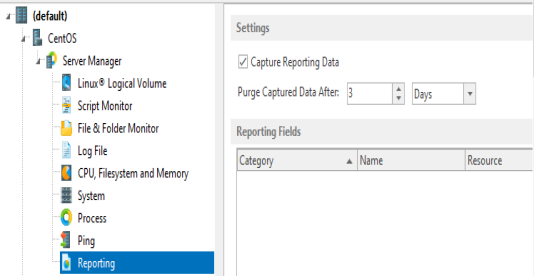
- In the Reporting panel, Settings section click Capture Reporting Data to enable this setting.
NOTE: By default, any captured data is purged after three days. See Purging Performance Data for more information on setting this parameter.
Once these settings have been specified, specific field data can be added to the Linux Reporting monitor.
Specifying The Reporting Fields
To start adding reporting fields to the Linux Reporting Monitor:
- Click Add Field at the bottom of the Reporting panel.
The Select Category dialog is displayed.
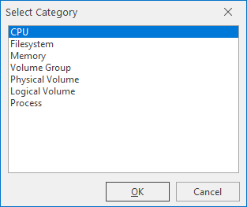
- Click on an entry in this list followed by OK to be able to set specific reporting criteria for the selected category.