Security Groups
The Security Groups screen allows you to view and manage Security Groups. See Adding Security Groups.
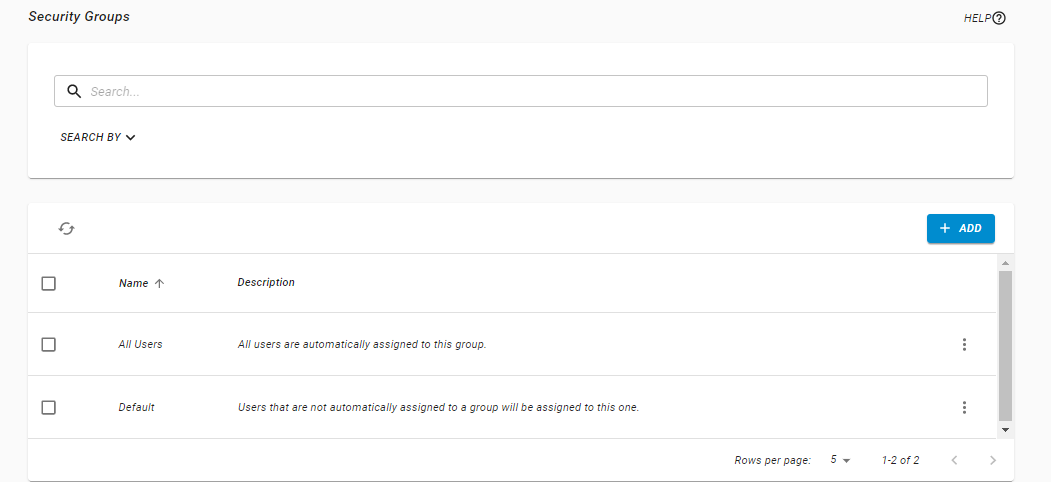
How to Get There
In the Core Menu, click Security, then click Security Groups.
Available Actions
-
Click
 to add a security group.
 -
Click
 Show Actions next to any group and click Edit Group to edit an existing Security Group.
 -
Check box next to any group and click Delete to delete a Security Group.
Ways to Use Security Groups
There are a couple of ways you can use security groups.
As a way to organize your users
Security groups can be used as organizational tools. You can add users and roles, and any changes made to the groups or roles attached to them will trickle down to the users. This ensures that the work you do with individual users (after they are created or pre-registered, see Adding a User) is minimal.
As a way to give a user extra permissions
You can also use security groups to give a user permissions to an area of Fortra Application Hub they generally do not have access to.
Users can easily be added to or removed from security groups, which makes it simple to give a user permissions that are outside their normal role functions.
The Default Security Group
Fortra Application Hub comes with a default security group that users are assigned to if they are not automatically assigned to a group or role. The Default security group cannot be deleted and has no basic authorities out of the box. If you want to add authorities to the default security group, you can do so by adding roles.
The Default security group should only be used to catch users who are not given a group or role when they first log on to Fortra Application Hub. We do not recommend using it to give users authorities long term. Please note, too, that if you assign another security group or role to the user, the default security group will be automatically removed next time they log on.
The All Users Security Group
Fortra Application Hub comes with an All Users security group that all users are assigned to automatically. The All Users security group cannot be deleted and has no basic authorities out of the box. If you want to add authorities to the All Users security group, you can do so by adding roles.
The All Users security group can be used to set permissions and share objects throughout Fortra Application Hub and Fortra Application Hub modules. For example, it can be used to share Dashboards and Insite Analytics Queries among all users.