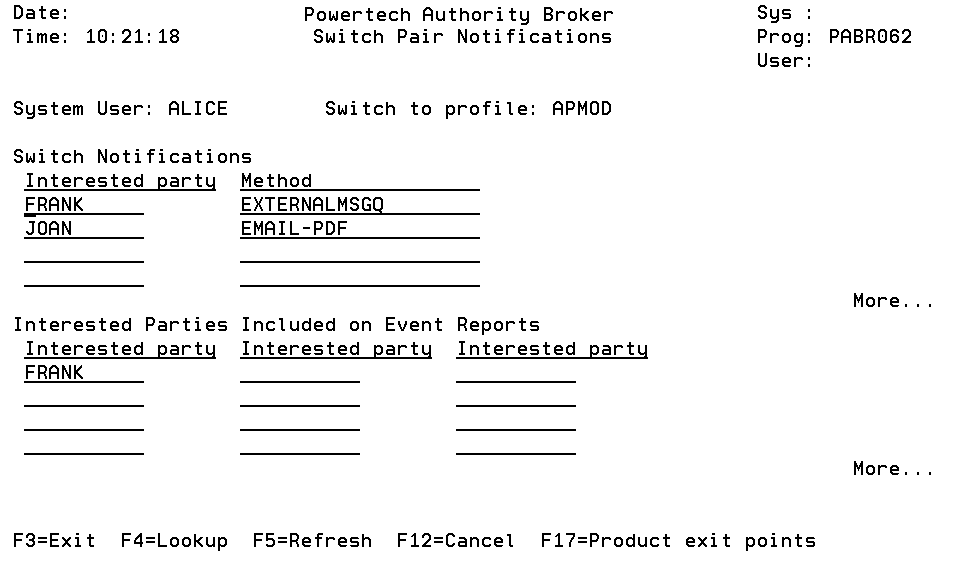
Switch Pair Notifications screen
The Switch Pair Notification screen is used to list, add, and remove Interested Parties associated with a switch pair. The screen is divided into two sections - Switch Notifications and Interested Parties included on Event reports. Interested Parties placed in the Switch Notifications section will be informed, via the given method, each time the System User switches to the Switch to Profile. Interested Parties placed in the Interested Parties included on Event reports section will be incorporated into the Event reports.
How to Get There
In the Assign System Users to Switch Profiles screen, enter 15 for a Switch Pair.
Options
The name of the user profile that will switch to the Switch to Profile.
Switch to Profile
The name of the user profile that the system user will switch to.
Switch Notification
The Switch Notification section lists, by interested party, the methods to be executed. A method is executed each time a profile switch is performed. Entries are added by placing new information on a line. Remove entries by blanking out all fields on a line.
Interested Party
The individual interested when this system user switches to the Switch to Profile.
The default methods shipped with the product are:
EMAIL-PDF
EMAIL-PDF specifies that a PDF document containing the screen captures will be emailed to the Interested Party's Email when a profile switch is released.
IFS-DIRECTORY
IFS-DIRECTORY specifies that a PDF document containing the screen captures will be sent to the Interested Party's IFS directory when a profile switch is released.
USERMSGQ
USERMSGQ specifies that a message is sent to the IBM i message queue of the Interested Party who has registered to receive the notification.
EXTERNALMSGQ
Specifies a single IBM i message queue for notification messages.
More
More Switch notification entry lines are available.
Include on Event Reports
The Include on Event Reports section lists interested parties to be included in Event Report distributions.
Interested Party
Interested parties are added by entering their user profile on a blank line.
More
More Interested Parties Included on Event Reports lines are available.
Function Keys
F3 (Exit): Exit the program without processing any pending changes.
F4 (Lookup): Pressing F4 provides lookup capabilities when the cursor is on a promptable field. Press F4 with the cursor on an Interested party field to display a list of user profiles that you can select from. Press F4 with the cursor on an alert method to display a list of alert methods you can select from.
F5 (Refresh): Refresh the screen.
F12 (Cancel): Exit the screen without processing any pending changes.