Audit Strategies
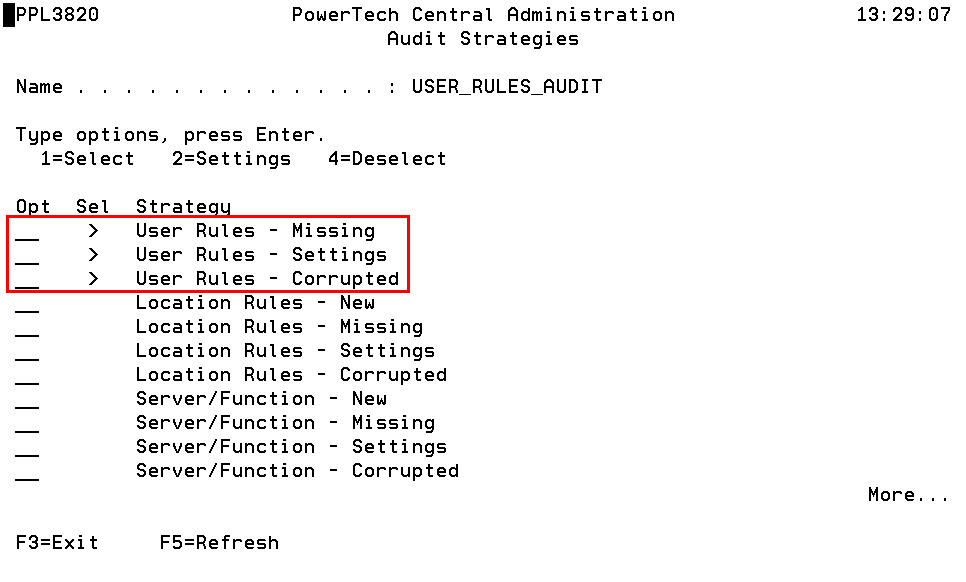
These are just three of several Powertech Exit Point Manager for IBM i Strategies available in the Central Administration Audit Strategies panel.
How to Get There
From the Powertech Main Menu, choose option 80 (Central Administration), then 5 (Auditing Menu), 1 (Audit Definitions), then enter 7 next to an Audit Definition.
What it Does
The Audit Strategies panels allow you to create, modify, delete, and perform other operations upon Audit Strategies. Audit Strategy determines how a set of items will be audited, and against what criteria they will be audited. An Audit Definition may contain more than one Audit Strategy. Each Audit Strategy may or may not have settings to control its operation.
Powertech Exit Point Manager for IBM i Strategy Descriptions
- User Rules - New compares User Rules on the Management System with User Rules on Endpoints and identifies those that have been added to Endpoints.
- User Rules - Missing compares User Rules on the Management System with User Rules on Endpoints and identifies those that have been removed from Endpoints.
- User Rules - Settings compares User Rules on the Management System with User Rules on Endpoints and identifies those whose settings do not match.
- User Rules - Corrupted identifies User Rules that have been corrupted.
- Location Rules - New compares Location Rules on the Management System with Location Rules on Endpoints and identifies those that have been added to Endpoints.
- Location Rules - Missing compares Location Rules on the Management System with Location Rules on Endpoints and identifies those that have been removed from Endpoints.
- Location Rules - Settings compares Location Rules on the Management System with Location Rules on Endpoints and identifies those whose settings do not match.
- Location Rules - Corrupted identifies Location Rules that have been corrupted.
- Server/Function - New compares Servers and Functions on the Management System with Servers and Functions on Endpoints and identifies those that have been added to Endpoints.
- Server/Function - Missing compares Servers and Functions on the Management System with Servers and Functions on Endpoints and identifies those that have been removed from Endpoints.
- Server/Function - Settings compares the active Servers and Functions on the Management System with active Servers and Functions on Endpoints and identifies any discrepancy.
- Server/Function - Corrupted identifies Servers and Functions that have been corrupted.
- Memorized Trans - New compares Memorized Transactions on the Management System with Memorized Transactions on Endpoints and identifies those that have been added to Endpoints.
- Memorized Trans - Missing compares Memorized Transactions on the Management System with Memorized Transactions on Endpoints and identifies those that have been removed from Endpoints.
- Memorized Trans - Settings compares Memorized Transactions on the Management System with Memorized Transactions on Endpoints and identifies those that have been removed from Endpoints.
- Memorized Trans - Corrupted identifies Memorized Transactions that have been corrupted.
- Pre-filters - New compares Pre-filters on the Management System with Location+User Pre-filters on Endpoints and identifies those that have been added to Endpoints.
- Pre-filters - Missing compares Pre-filters on the Management System with Location+User Pre-filters on Endpoints and identifies those that have been removed from Endpoints.
- Pre-filters - Settings compares Pre-filters on the Management System with Location+User Pre-filters on Endpoints and identifies those whose settings do not match.
- Pre-filters - Corrupted identifies Pre-filters that have been corrupted.
- Secure Screen Filters- New compares Secure Screen Filters on the Management System with SOMETHING on Endpoints and identifies those that have been added to Endpoints.
- Secure Screen Filters - Missing compares Secure Screen Filters on the Management System with SOMETHING on Endpoints and identifies those that have been removed from Endpoints.
- Secure Screen Filters - Settings compares Secure Screen Filters on the Management System with SOMETHING on Endpoints and identifies those whose settings do not match.
- Secure Screen Filters - Corrupted identifies Secure Screen Filters that have been corrupted.
- Report Groups - New compares Report Groups on the Management System with User Groups on Endpoints and identifies those that have been added to Endpoints.
- Report Groups - Missing compares Report Groups on the Management System with User Groups on Endpoints and identifies those that have been removed from Endpoints.
- Report Groups - Settings compares Report Groups on the Management System with User Groups on Endpoints and identifies those whose settings do not match.
- Report Groups - Corrupted identifies Report Groups that have been corrupted.
- Report Group Members - New compares Report Group Members on the Management System with User Group Members on Endpoints and identifies those that have been added to Endpoints.
- Report Group Members - Missing compares Report Group Members on the Management System with User Group Members on Endpoints and identifies those that have been removed from Endpoints.
- Report Group Members - Settings compares Report Group Members on the Management System with User Group Members on Endpoints and identifies those whose settings do not match.
- Report Group Members - Corrupted identifies Report Group Members that have been corrupted.
- System - New compares System Values on the Management System with System Values on Endpoints and identifies those that have been added to Endpoints.
- System - Missing compares System Values on the Management System with System Values on Endpoints and identifies those that have been removed from Endpoints.
- System - Settings compares System Values on the Management System with System Values on Endpoints and identifies those whose settings do not match.
- Object List - New compares Object List on the Management System with Object Lists on Endpoints and identifies those that have been added to Endpoints.
- Object List - Missing compares Object Lists on the Management System with Object Lists on Endpoints and identifies those that have been removed from Endpoints.
- Object List - Settings compares Object Lists on the Management System with Object Lists on Endpoints and identifies those whose settings do not match.
- Object List - Corrupted identifies Object Lists that have been corrupted.
- Object List Entry - New compares Object List Entries on the Management System with Object List Entries on Endpoints and identifies those that have been added to Endpoints.
- Object List Entry - Missing compares Object List Entries on the Management System with Object List Entries on Endpoints and identifies those that have been removed from Endpoints.
- Object List Entry - Settings compares Object List Entries on the Management System with Object List Entries on Endpoints and identifies those whose settings do not match.
- Object List Entry - Corrupted identifies Object List Entries that have been corrupted.
- Object Rule - New compares Object Rules on the Management System with Object Rules on Endpoints and identifies those that have been added to Endpoints.
- Object Rule - Missing compares Object Rules on the Management System with Object Rules on Endpoints and identifies those that have been removed from Endpoints.
- Object Rule - Settings compares Object Rules on the Management System with Object Rules on Endpoints and identifies those whose settings do not match.
- Object Rule - Corrupted identifies Object Rules that have been corrupted.
- Pre-filters (Server) - New compares Server Pre-filters on the Management System with Server Pre-filters on Endpoints and identifies those that have been added to Endpoints.
- Pre-filters (Server) - Missing compares Server Pre-filters on the Management System with Server Pre-filters on Endpoints and identifies those that have been removed from Endpoints.
- Pre-filters (Server) - Settings compares Server Pre-filters on the Management System with Server Pre-filters on Endpoints and identifies those whose settings do not match.
- User Group - New compares User Groups on the Management System with User Groups on Endpoints and identifies those that have been added to Endpoints.
- User Group - Missing compares User Groups on the Management System with User Group Members on Endpoints and identifies those that have been removed from Endpoints.
- User Group - Settings compares User Groups on the Management System with User Group Members on Endpoints and identifies those whose settings do not match.
- User Group - Corrupted identifies User Groups that have been corrupted.
- User Group Member - New compares User Group Members on the Management System with User Group Members on Endpoints and identifies those that have been added to Endpoints.
- User Group Member - Missing compares User Group Members on the Management System with User Group Members on Endpoints and identifies those that have been removed from Endpoints.
- User Group Member - Settings compares User Group Members on the Management System with User Group Members on Endpoints and identifies those whose settings do not match.
- User Group Member - Corrupted identifies User Group Members that have been corrupted.
- Socket Rule - New compares Socket Rules on the Management System with Socket Rules on Endpoints and identifies those that have been added to Endpoints.
- Socket Rule - Missing compares Socket Rules on the Management System with Socket Rules on Endpoints and identifies those that have been removed from Endpoints.
- Socket Rule - Settings compares Socket Rules on the Management System with Socket Rules on Endpoints and identifies those whose settings do not match.
- Socket Rule - Corrupted identifies Socket Rules that have been corrupted.
- Socket Condition - New compares Socket Rule Conditions on the Management System with Socket Rules on Endpoints and identifies those that have been added to Endpoints.
- Socket Condition - Missing compares Socket Rule Conditions on the Management System with Socket Rules on Endpoints and identifies those that have been removed from Endpoints.
- Socket Condition - Settings compares Socket Rule Conditions on the Management System with Socket Rules on Endpoints and identifies those whose settings do not match.
- Socket Condition - Corrupted identifies Socket Rule Conditions that have been corrupted.
Options
1=Select
A selected Strategy will be processed during the next Audit run. You may select several items at once.
A greater-than symbol (>) in the Sel column indicates that the Audit Strategy is selected for use. A selected Strategy will be processed during the next Audit run.
2=Settings
Allows you to maintain any settings the Strategy might support. Not every Strategy supports settings.
4=Deselect
A deselected Strategy will not be processed during the next Audit run. You may select several items at once.
Command Keys
F3 (Exit): Exit the current panel without processing any pending changes.
F5 (Refresh): Refreshes the panel with the most current data.