How to Get There
On the Security Configuration Menu, choose option 14. Or, run command PNSTSTQSO.
What it Does
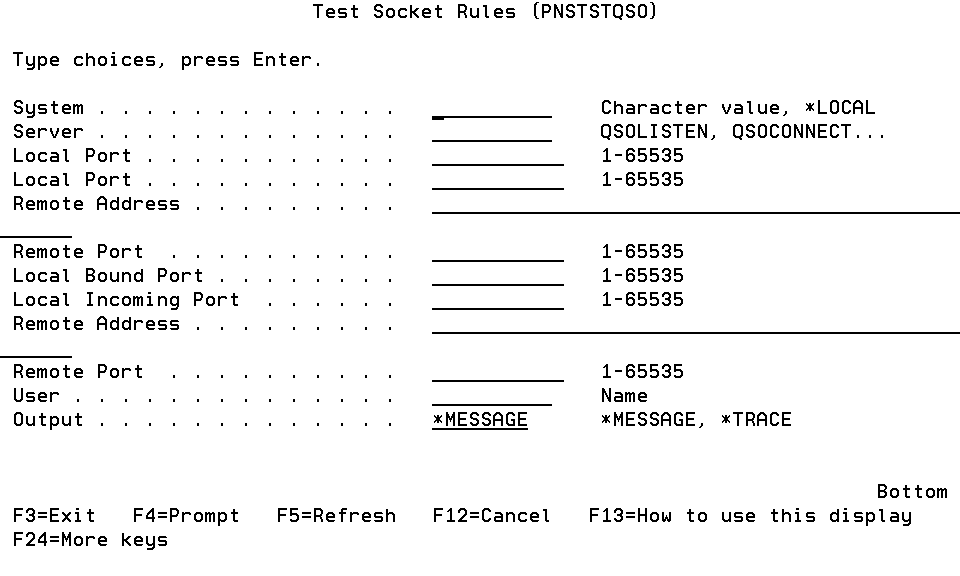
The Test Socket Rules (PNSTSTQSO) command allows you to see how a transaction would be evaluated by Powertech Exit Point Manager for IBM i.
Options
System
The name of the system silo for which you want to test the rules.
You can use the special value *LOCAL for the system on which you are running this test.
Server
The name of the Server for which you wish to test rules.
The valid values are:
Local Port (LPORT1)
A valid local port for QSOLISTEN.
Local Port (CPORT1)
A valid local port for QSOCONNECT.
Remote Address (CADDR2)
A valid remote IP address for QSOCONNECT.
Remote Port (CPORT2)
A valid remote port for QSOCONNECT.
Local Bound Port (APORT1)
A valid bound port for QSOACCEPT.
Local Incoming Port (APORT2)
A valid incoming port for QSOACCEPT.
Remote Address (AADDR3)
A valid remote IP address for QSOACCEPT.
Remote Port (APORT3)
A valid remote port for QSOACCEPT.
User (USER)
The user profile you want to test. This is the user profile associated with the local portion of the transaction.
A group profile is not valid for this field unless it is being used as the actual user profile.
Output (OUTPUT)
The results can be output to the following places:
Command Keys
F3 (Exit): Exit the screen without processing any pending changes.
F4 (Prompt): Displays a list of possible values.
F5 (Refresh): Refreshes the screen and resets all available text fields.
F9 (All Parameters): Shows all available parameters.
F11 (Keywords): Displays command keywords on the entry fields.
F12 (Cancel): Exit the screen without processing any pending changes.
F13 (How to use this display): Shows help for the prompt display or associated display you are currently using.
F14 (Command string): Displays the command string based on the panel configuration.
F15 (Error messages): Displays error messages.
F16 (Command complete): Submits the command.