Powertech Antivirus Setup Menu
The Setup Menu provides options to configure product settings. To access the Setup menu, choose option 50 from the Main menu, or run the command GO STANDGUARD/AVSETUP.
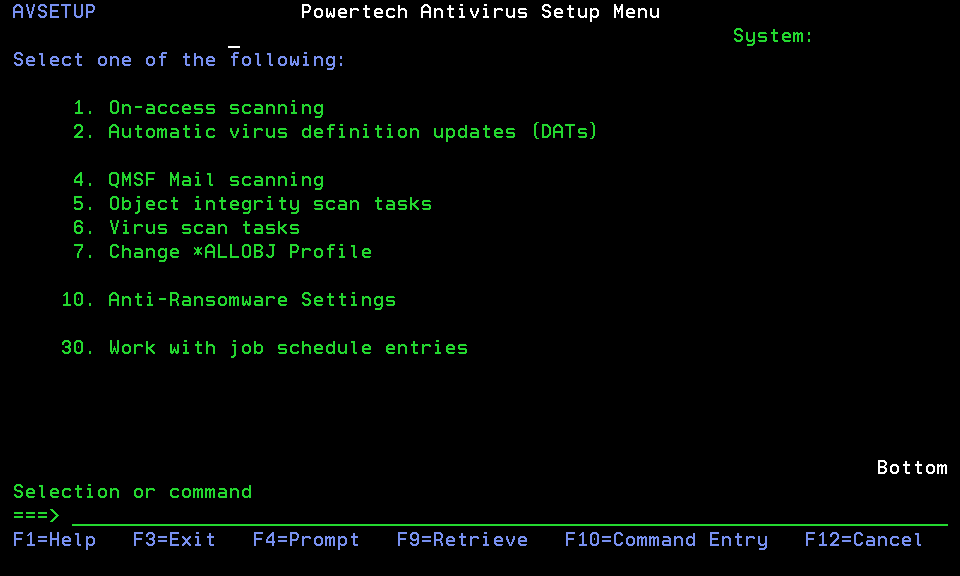
Options
Select this option to enable or disable on-access scanning, and change options that affect on-access scanning performance. On-Access scanning allows you to scan files dynamically as they are opened and/or modified. For more information about on-access scanning see On-Access Scanning.
2. Automatic virus definition updates (DATs)
Select this option to schedule and configure settings for updating virus definitions. For more information about virus definitions see Updating Virus Definitions.
3. Automatic program updates (PTFs)
Select this option to schedule and configure settings for updating program temporary fixes (PTFs).
Select this option to configure settings for scanning IBM i mail. For more information, see Email Scanning.
5. Object integrity scan tasks
Select this option to schedule and configure object integrity scan tasks. For more information, see Object Integrity Scanning.
Select this option to schedule and configure virus scan tasks. For more information, see On-Demand Scanning.
7. Change *ALLOBJ Profile
Select this option to view or change the *ALLOBJ profile that is used to perform virus scanning. The default is QSECOFR. You can use an existing profile but you must ensure the profile has *ALLOBJ, *JOBCTL, and *SECADM authority and is not disabled. A password is not required or used.
- USRPRF (name) parameter value: AVPRIVI
- SPCAUT parameter values: no commas, only blanks, between values: *ALLOBJ *JOBCTL *SECADM
- TEXT parameter value: (in single quotes): Privileged user profile for use by Powertech Antivirus for IBM i
10. Anti-Ransomware Settings
Select this option to configure Anti-Ransomware. See Powertech Antivirus Anti-Ransomware Menu.
30. Work with job schedule entries
Select this option to work with the jobs that have been scheduled as a result of changes made on this screen. Press F11 to see additional information. The jobs that may appear are as follows:
|
Name |
Description |
|---|---|
|
AVUPDATE |
Run virus definition update |
|
AVUPGRADE |
Run PTF update (no longer required. See the Disabling Automatic PTF Updates section in About PTFs.) |
|
AVRUNTSK |
Run a scan task |