Find Database Fields
The Find Database Field (FNDDBFLD) command allows you to find database fields (in physical files and tables) that contain values which meet your search criteria. This is especially useful for finding fields that contain unencrypted sensitive data such as credit card numbers, social security numbers and Canadian social insurance numbers. For instance, you can quickly perform a search for any numeric fields that contain a 16 digit number (e.g., credit card numbers) or perform a search for any alpha fields that contain a numeric pattern like 999-99-999 or 999999999 (e.g., Social Security numbers).
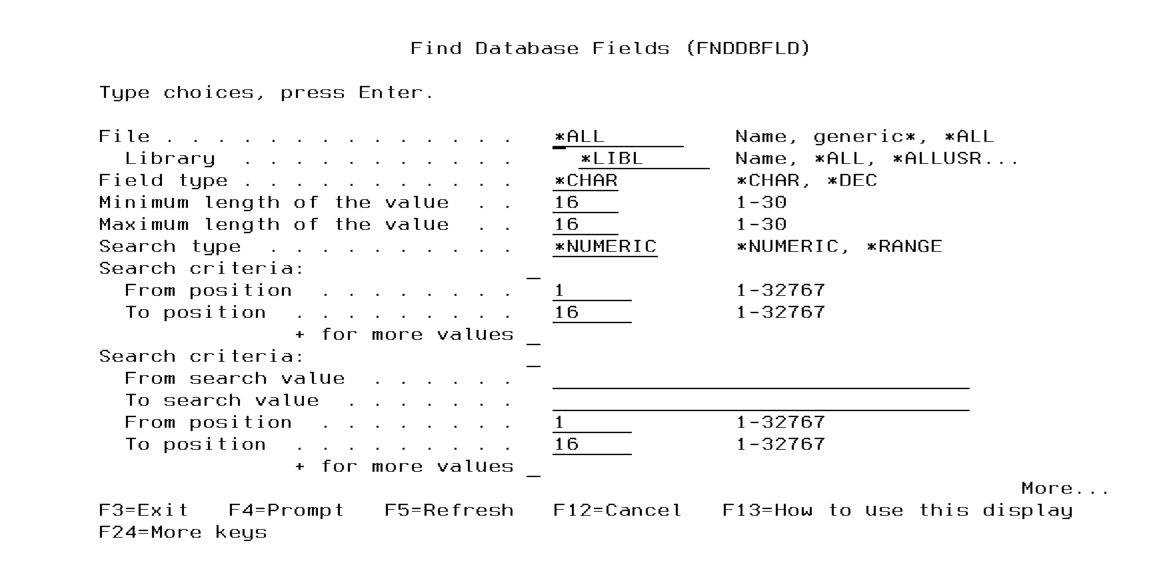
Multiple files and libraries can be searched with the FNDDBFLD command. It can search both numeric and character fields.
It is recommended to run the FNDDBFLD command in batch using the SBMJOB command.
Do the following steps to use the FNDDBFLD command:
- Prompt (F4) the command CRYPTO/FNDDBFLD.
- Press F1 on any parameter for complete online help text.
- Type in the parameter values, then press Enter to execute.
The search results are formatted in a report (spooled file). The report will indicate the following information for each database field that meets the selection criteria:
- File name
- Library name
- Field name
- Relative record number (RRN) of the data found (for the first match)
- The data found in the field (for the first match)
When searching numeric fields, FNDDBFLD will ignore fields that contain decimal positions.
If you have multi-member files, only the first member in each file will be searched.