Create Field panel
The Create Field panel allows you to create an Event Field.
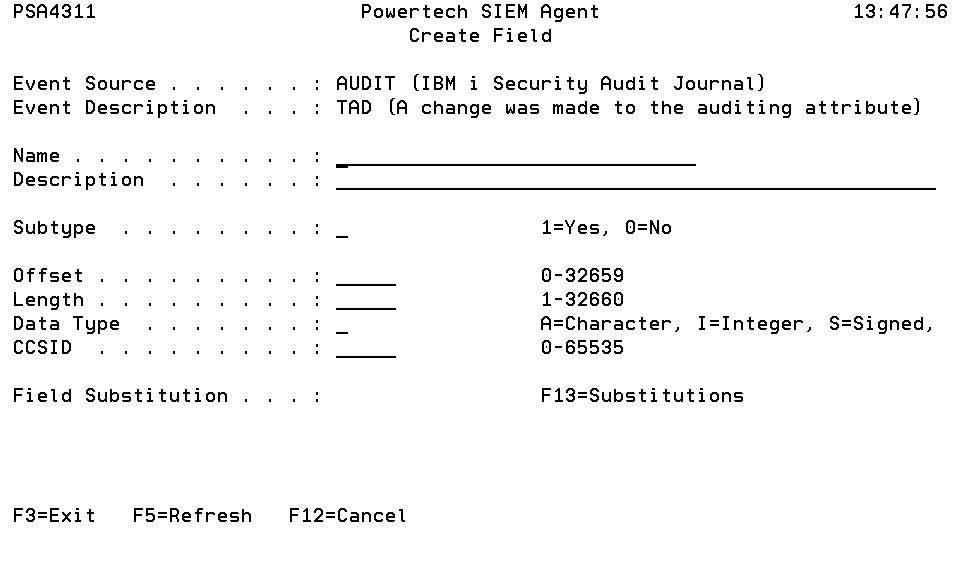
How to Get There
Press F6 in the Work with Fields panel.
Field Descriptions
Event Source
An Event Source is a location from which IBM i events are extracted. Currently, journals and message queues are supported as Event Sources. Common event sources are QAUDJRN (journal) and QSYSOPR (message queue). You may define your own journals and message queues as Event Sources.
Event Description
Indicates the Event Description to which the listed Event Subtype pertains.
An Event Description is a specification that defines how to identify the IBM i events in which you are interested.
Name
The name used to identify an Event Field within an Event Description.
Description
A short description assigned to the Event Field.
Subtype
Indicates if an Event Field is defined as a Subtype or not.
Offset
Indicates the distance from the beginning of the journal entry or message data. The first byte within the entry-specific data is offset zero.
Length
The number of bytes associated with a specific Event Field.
Data Type
Indicates the type of data the Event Field contains. The possible values are:
| Value | Meaning |
|---|---|
| A | Character |
| D | Zoned |
| I | Integer |
| L | Date |
| P | Packed |
| T | Time |
| U | Unsigned |
| V | Varying |
| Z | Timestamp |
CCSID
Indicates the coded character set identifier (CCSID) associated with the Event Field.
Command Keys
F3=Exit
Exit the program.
F5=Refresh
Discards changes and remains on this panel.
F12=Cancel
Discards changes and returns to the prior panel.