Load IBM i Menu (LOADMENU) Command
The Load Menu (LOADMENU) command allows you to load native IBM i menus into the Abstract cross-reference dictionary. Once loaded, Abstract will treat them similar to CL programs - menu options will explode out and down just as CALLs from within a CL program.
Abstract documents both display file and program menus. Display file menus are documented so that the command for each option can be recorded along with the option number that runs it. The menu’s associated message file is located and processed as if it were a CL program. Both standard and user created command tracking definitions are used to record the references that occur within the menu.
Program menus are documented as a single CALL-type transfer from the menu object to the menu program. CL analysis of the menu program will create the documentation for it.
If your application does not include any IBM i menu (*MENU) objects, you need not execute this part of the initialization process.
The LOADMENU command is automatically run as part of the LOADXREF TYPE(*ALL) job stream. You can invoke the LOADMENU command from any command entry line, or by using option 7 from the APINZ menu. The command can also be run from within a batch or interactive program. The syntax for the LOADMENU command is shown below:
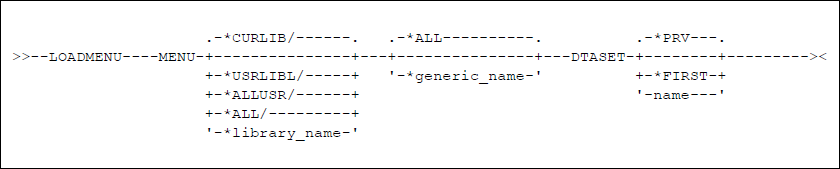
figure 13 - LOADMENU Command Diagram
MENU Parameter - Specify the qualified name of the menu(s) to be analyzed. A generic name (leading characters followed by an asterisk) can be specified to select objects with similar names. Specify a library name to be searched for the menu(s) indicated or use one of the following special values:
*CURLIB: Your job’s current library will be searched for the menus that meet the menu name part of the search criteria.
*USRLIBL: The user portion of your job’s library list will be searched for the menus that meet the menu name part of the search criteria.
*ALLUSR: All user libraries will be searched for the menus that meet the menu name part of the search criteria.
*ALL: All libraries on the system will be searched for the menus that meet the menu name part of the search criteria. Caution: this includes libraries QSYS and QUSRSYS (which should probably not be analyzed)
The name portion of the MENU parameter specifies the menus that shall be analyzed.
*ALL: Loads all menus in the specified library(s).
Name: specify the name of an individual menu, or use a generic name (one to nine characters suffixed with an asterisk, e.g. MENU*) to indicate that all menus sharing the prefix should be loaded.
DTASET Parameter - Specifies the name of the data set you want to load information into. You can accept the default or choose a separate data set, created by the Add Data Set (ADDDTASET) command, to contain the information. If the data set does not exist, an error will occur. The list of current data set names can be accessed by prompting the data set parameter.
*PRV: Use the value for this parameter from the previous session. If no previous session has occurred, use *FIRST.
*FIRST: all information should be stored in the default data set.
Name: the data set you want to use.
Examples
LOADMENU *ALL
Use this command to search your current library (*CURLIB) and load cross references with all the menus in it.
LOADMENU PRDLIB/MENU*
The library PRDLIB will be searched for menus beginning with MENU. Abstract will find menus such as MENU01, MENU02, etc. The cross reference dictionary will be loaded so that you will be able to view the function of the menus through the object relations displays.
LOADMENU *ALLUSR/*ALL
All the menus in all user libraries will be loaded into the cross references.