Tests
Each beSECURE scan runs multiple Tests designed to detect vulnerabilities. The Tests area of the beSECURE system provides an overview of the Tests included in a scan.
To access Tests:
-
Click Results > Tests. The Test Search page provides the following information about each test:
Field Description Test ID The ID for the test that detected the vulnerability. Vulnerability Name A descriptive name for the vulnerability. Test Category The category the test falls into. Each category is designed to detect different types of vulnerabilities. Test Risk The vulnerability risk level the test is designed to detect. Values are None, Low, Medium, and High. Date Added The date the test was added. Last Modified The date the test was last modified. 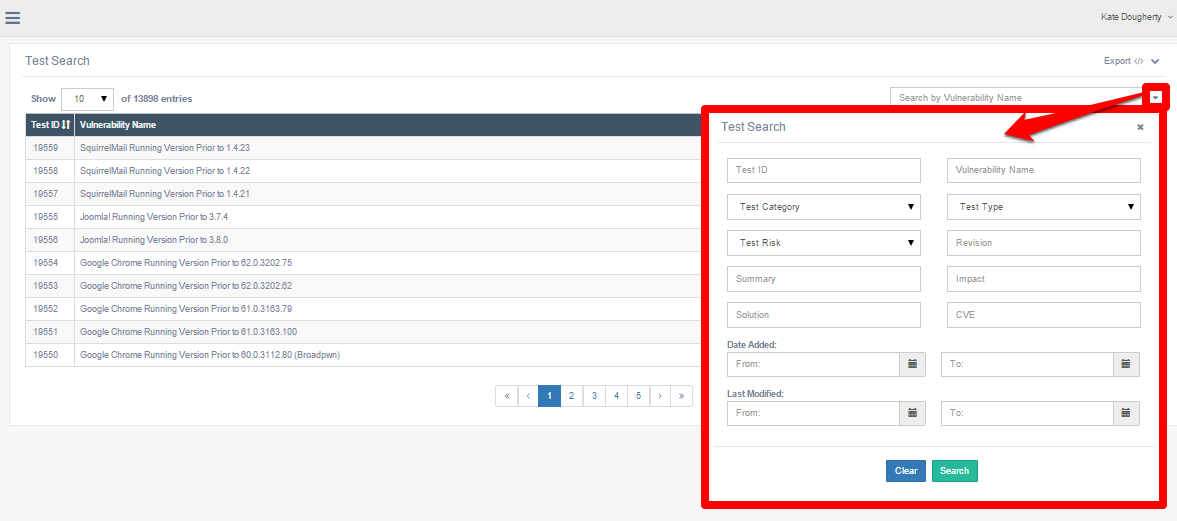
-
Use the search box to search for a test by Vulnerability Name, or click the arrow in the search box to open the advanced search options. The advanced search allows you to retrieve tests based on the following fields:
Field Description Test ID The ID for the test. Vulnerability Name Searches for text in the descriptive name for the vulnerability. Test Category The category the test falls into. Each category is designed to detect different types of vulnerabilities. Test Type The type of test. Values are Attack, DoS (denial ofservice), Informational (data-gathering only; do not uncover vulnerabilities), and Scanner(configure how the scanner preforms the scan in terms of speed, authentication usage, web scanning settings, etc.). Test Risk The vulnerability Risk level the test is designed to detect. Values are None, Low, Medium, and High. Revision The version of the test (for example, “1stgeneration,” “2ndgeneration,” etc.). Summary A summarized description of the test and the findings it revealed. Impact The potential impact of the vulnerability, such as unauthorized access or loss of data. Solution Potential solution(s) for resolving the vulnerability. CVE The Common Vulnerabilities and Exposures (CVE) ID number for the vulnerability. Date Added The date the test was added. Last Modified The date the test was last modified.
Click on a result to see the vulnerability details associated with the test. For more information on the details the system provides, see the Viewing vulnerability details section of this document.
Test Details table
| Field | Description |
|---|---|
| Vulnerability Name | A descriptive name for the vulnerability. |
| Risk | The risk level associated with the vulnerability. Values are High, Medium, Low, and None. |
| Hostname / IP Address | The host address or IP address of the affected host. |
| Service (Port) Protocol | The affected scan setting service, composed of the service name, port number, and scan setting protocol. |
| Scan Date | The date and time the scan took place. |
| Category | The category of vulnerability. beSECURE categorizes vulnerabilities according to their area of impact (web applications, encryption, etc.). |
| Summary | A summary of the vulnerability that gives extended details about the vulnerability, the affected products, and if possible, ways to recreate the situation caused by the vulnerability. |
| Solution | Potential solution(s) for resolving the vulnerability. |
| CVE(s) | The Common Vulnerabilities and Exposures (CVE) ID number for the vulnerability. Click on the value to view details about the CVE at NIST.gov. |
| Nist NVD CVSS Score | The CVSS severity score for the vulnerability. The CVSS is an independent system that scores vulnerabilities on a scale from 1 to 10. A score of 10 indicates a critical vulnerability, while 0 represents negligible risk. |
| Nist NVD CVSS Score v3 | The severity score for the vulnerability on the updated CVSS Score v3 scale. Click on the value to view details about the CVE at NIST.gov. |
| CWE | The Common Weakness Enumeration ID for the vulnerability. CWE is an industry standard for indicating vulnerability type. |
| More Information | Provides links to external websites that contain further information about the vulnerability, including the CVE, Microsoft's knowledge base, and securiteam.com. |
| Test ID | The ID for the beSECURE test that detected the vulnerability during the scan. |
| Vulnerability ID | The ID for the vulnerability. |
| Vulnerability Age | The age of the vulnerability, as the number of days that have elapsed between the first and last time beSECURE detected it. |