Cobalt Strike Research Labs
Cobalt Strike Research Labs (CS:RL) brings together the research expertise of the Cobalt Strike and Outflank teams. CS:RL delivers cutting-edge, ready-to-use research tooling built specifically for Cobalt Strike and is available as part of the Fortra Red Team Suite and Offensive Security Suite. For more information about CS:RL, see the Introducing Cobalt Strike Research Labs blog post.
Beacon Booster
Beacon Booster is a core component of CS:RL. It lets users upload a Beacon and "boost" it with content created by Outflank and Cobalt Strike. To connect the two product lines and support future user experience improvements, we created the CS:RL output file.
The CS:RL file is a container that includes Beacon and metadata to provide context that simplifies processing. For example, it includes the Cobalt Strike version, file architecture, and whether Guardrails or a custom Sleepmask have been applied. The CS:RL output file also ensures that Beacon is compatible with Beacon Booster regardless of the user’s Malleable C2 settings, so users do not need to disable certain options.
Enable CS:RL Options
To enable the Cobalt Strike Research Labs option:
-
Open the Cobalt Strike client on Windows, macOS, or Linux.
-
Go to Cobalt Strike > Preferences.
-
Select Enable CS:RL options (beta).
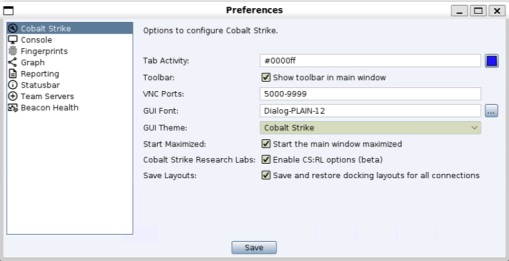 NOTE: The Enable CS:RL options (beta) option is persistent. You only need to configure it once.
 -
Select Save.
-
Restart the Cobalt Strike client.
Export a CS:RL file
To export a .csrl file for Beacon Booster:
-
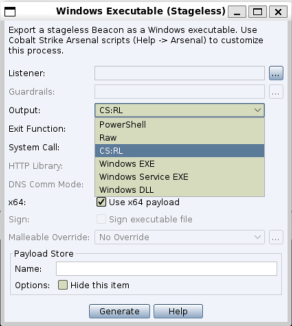
Open the Stageless Payload Generator or Windows Stageless Payload dialog.
-
From the Output drop-down, select CS:RL.
-
Select Generate.
-
Upload the exported
.csrlfile to Beacon Booster.