Custom Tables
Cobalt Strike provides the Aggressor Script function (openUserDefinedBrowser), which lets users create custom tables in the Cobalt Strike client.
Loading Custom Tables
You can use the Example code on this page to create an Aggressor Script file that loads a user-defined table. You must create the Aggressor Script file before you can load it in Script Manager.
-
Go to Cobalt Strike -> Script Manager. Select Load to load a script file. If you change the script or experience issues after loading it, select Reload.

figure 81 - Script Manager with a loaded Aggressor Script file.
-
From a Beacon console, run the command that is defined in the script.
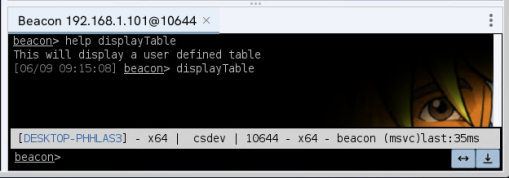
figure 82 - Beacon console with the user-defined table command.
-
After you run the command, your table appears in the client.
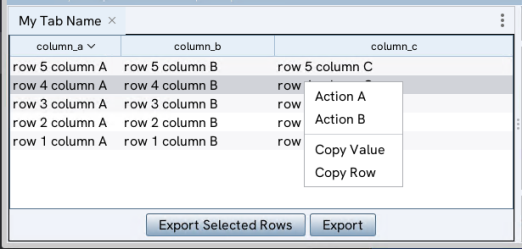
figure 83 - User-defined custom table in the client..
Example
The following example shows how to load a simple fixed set of data with a few actions that can be performed on that data set. You can use it as a starting point and provide your own data:
-
Defines an optional right-click pop-up menu, (
myTableID), for the table. -
Creates an alias for a user-defined command, (
displayTable), that can be called from Beacon consoles. -
Defines columns and data for the user-defined table.
-
Defines user-defined callback hints that can pass additional information to process right-click actions from the pop-up menu.
-
Calls
openUserDefinedBrowserto display the table.
debug(5);
# ====================================================================
# Define a popup menu for a table with matching tableID.
# Example: "myTableID"
# ====================================================================
# Popup Action Item Arguments:
# - $1 = Selected rows as an array of HashMap objects.
# - $2 = Callback Hints originally passed into openUserDefinedBrowser
# ====================================================================
popup myTableID {
item "Action &A" {
local('%row %callbackHints');
if (size($1) > 0) {
%callbackHints = $2;
foreach %row ($1) {
println("========== Processing Row for Action: A ==========");
println("Action A Callback Hints: " . %callbackHints);
println("Action A Row: " . %row);
println("Action A ColumnA: " . %row['column_a'] . " ColumnB: " . %row['column_b'] . " ColumnC: " . %row['column_c']);
}
}
}
item "Action &B" {
local('%row %callbackHints');
if (size($1) > 0) {
%callbackHints = $2;
foreach %row ($1) {
# Log some messages to the script console
println("========== Processing Row for Action: B ==========");
println("Action B Callback Hints: " . %callbackHints);
println("Action B Row: " . %row);
println("Action B ColumnA: " . %row['column_a'] . " ColumnB: " . %row['column_b'] . " ColumnC: " . %row['column_c']);
}
}
}
}
# ====================================================================
# Display a user-defined custom table
# ====================================================================
# Arguments:
# - $1 = Beacon ID (automatically provided as beacon console command alias)
# ====================================================================
alias displayTable {
local('$bid');
($bid) = @_;
local('$tableID $tabName');
local('@columnNames @data @columnWidths %callbackHints');
# tableID must match the user defined popup menu name (if required)
$tableID = "myTableID";
$tabName = "My Tab Name";
@columnNames = @("column_a", "column_b", "column_c");
@data = @(
@("row 1 column A", "row 1 column B", "row 1 column C"),
@("row 2 column A", "row 2 column B", "row 2 column C"),
@("row 3 column A", "row 3 column B", "row 3 column C"),
@("row 4 column A", "row 4 column B", "row 4 column C"),
@("row 5 column A", "row 5 column B", "row 5 column C")
);
@columnWidths = @(50, 100, 200);
# A hashmap of user defined callback hints that will be passed into
# the user defined popup menu actions as needed.
%callbackHints = %(bid => $bid, hintX => "x", hintY => "y", hintZ => "z");
openUserDefinedBrowser($tableID, $tabName, @columnNames, @data, @columnWidths, %callbackHints);
}
sub registerCommand {
warn("Registering Command: $1");
beacon_command_register("$1", "Display a user defined table", "This will display a user defined table");
}
registerCommand("displayTable");