You are here: Home > Server Configuration > Configuring Server Administrators > Enforcing Password History for Administrators
For more information, scroll through the topics in the Index or review the topics in the table of contents to the left. If the Index and Contents are hidden, click <--Show Table of Contents.
Enforcing Password History for Administrators
You can enable EFT Server to remember the previous passwords of administrator accounts so that administrators must create unique passwords.
To configure administrator accounts to enforce password history
-
In the EFT Server administration interface, connect to EFT Server and click the Server tab.
-
In the left pane, click the Server node you want to configure.
-
In the right pane, click the Administration tab.
-
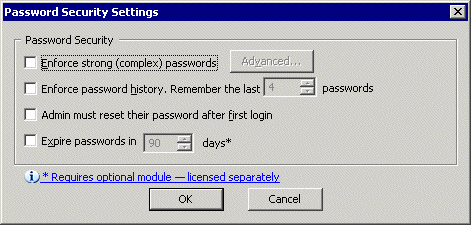
Click an EFT Server-managed administrator account, then click Password Policy. The Password Security Settings dialog box appears.
-
Select the Enforce password history check box, then specify the number of passwords to remember. The default is 4.
-
Click OK to close the dialog box.
-
Click Apply to save the changes on EFT Server.