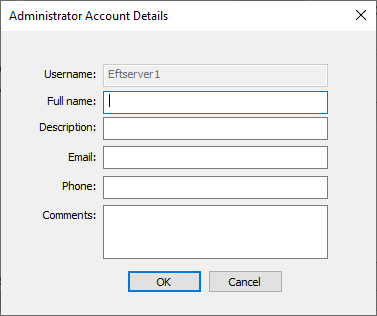
Administrator Account Details
Before configuring multifactor authentication for administrator accounts, verify that each administrator account has an email address. Otherwise, EFT will not be able to email a passcode to the administrator to log in. Administrators configured for MFA via SMS without a defined mobile number will default to email address.
To add an email address or phone number to an administrator account
-
In the administration interface, connect to EFT and click the Server tab.
-
On the Server tab, click the Server node you want to configure, then click the Administration tab.
-
Click any administrator account name (except Local computer\administrators), and then click Account Details. The Account Details dialog box appears.
-
Complete the fields in the dialog box:
-
Username - Name used for the account
-
Full name - First and last name of the user
-
Description - Type or purpose of administrator account
-
Email - Email address of administrator
-
Phone - Phone number of administrator
-
Comments - Other details you might want to add
-
Click OK, then click Apply to save changes.