Workspaces Notifications
(Requires Workspaces module) When a Web Transfer Client user shares a folder, an invitation is sent to the user with whom the folder is shared. If the recipient does not have an account on EFT, the user can register the account. For invitations sent to non-EFT users, an email is sent to verify the account when the user registers the account.
The text for the invitation and verification emails is contained in an HTML file that can be customized for localization or to provide company-specific information.
Workspaces invitations expire after 5 days.
The templates are stored in \ProgramData\Globalscape\EFT Server or your cluster share under Templates, and apply to all Sites on the Server.
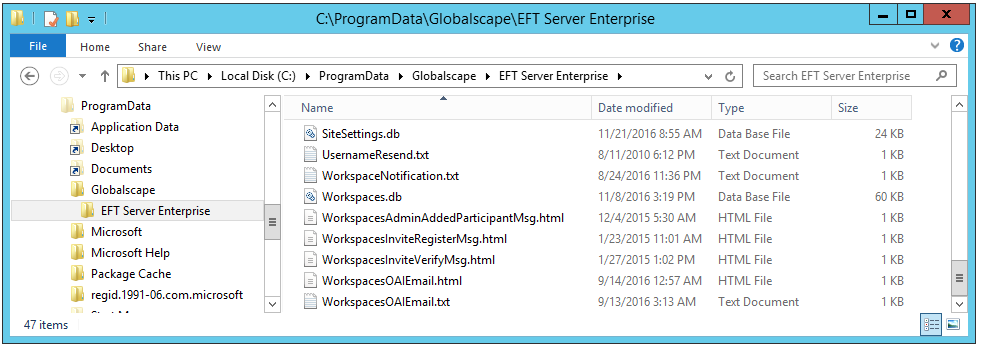
You can edit the files in any text editor. Note that the "WS" variables used in these notification templates are used only in these templates. They are not Event Rules variables. (Refer to Workspaces Events and Workspaces-Related Variables for additional means of notification.)
The files are named per their function:
-
WorkspaceNotification.txt - Used to notify the Workspace owner that a recipient took an action on a file.
-
WorkspacesadministratorAddedParticipantMsg.html - Used to notify recipients that a Workspace was shared with them.
-
WorkspacesInviteRegisterMsg.html - Used to notify recipients that a Workspace was shared with them and they are invited to register an account on EFT.
-
WorkspacesInviteVerifyMsg.html - Sent after recipient has registered for an EFT account and needs to verify the account.
-
WorkspacesOAIEmail.html - Notification to recipients that a file has been sent from Outlook.
-
WorkspacesOAIEmail.txt - Text version of the notification to recipients that a file has been sent from Outlook.
-
WorkspacesOAIEmailWithSecureMB.html - Notification to recipients that a file has been sent from Outlook with secure message body.
-
WorkspacesOAIEmailWithSecureMB.txt - Text version of the notification to recipients that a file has been sent from Outlook with secure message body.
-
WorkspacesRequestFileEmail.html - Notification to sender that a file has been requested.
-
WorkspacesRequestFileEmail.txt - Text version of the notification to sender that a file has been requested.
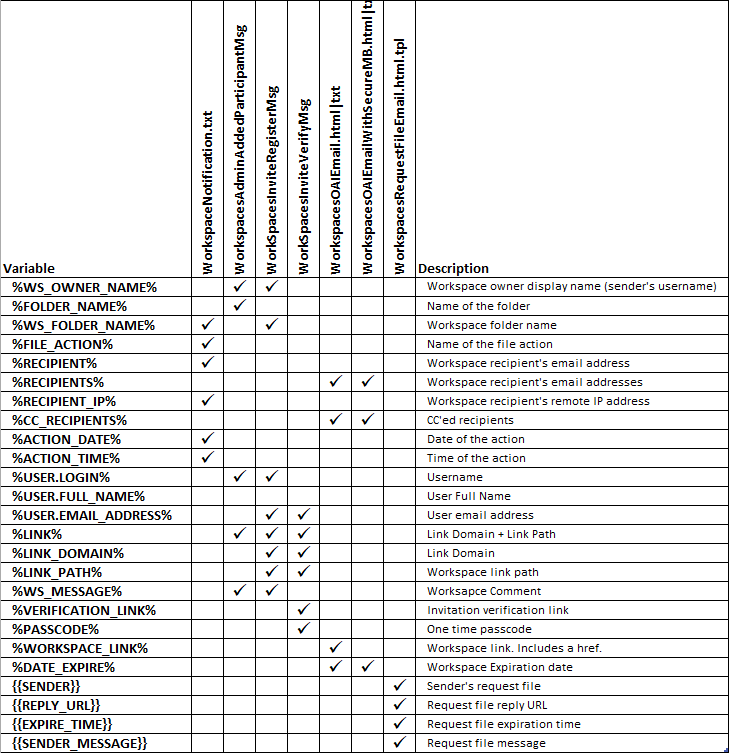
The following variables can be used in Workspaces notification templates:
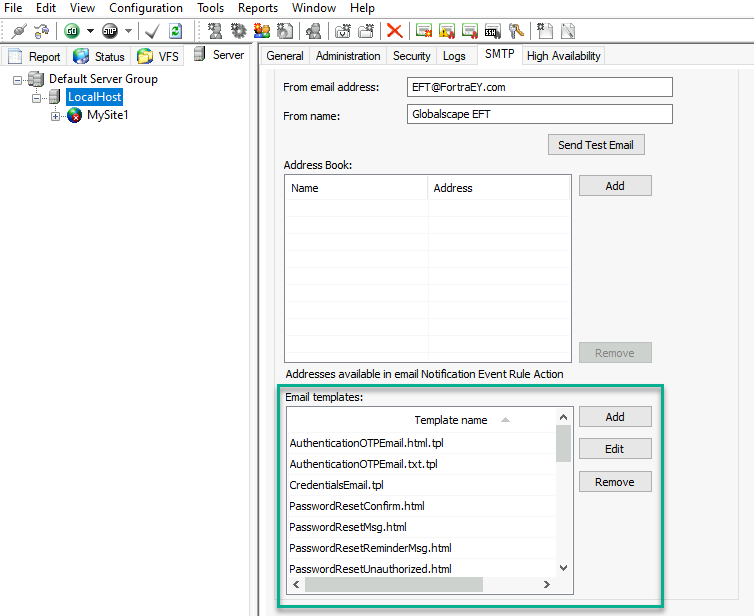
To edit Workspace notification templates
-
In the administration interface, connect to EFT and click the Server tab.
-
Select the Server node.
-
In the right pane, click the SMTP tab.
-
In the Email Templates area, select the Workspace template to modify.
-
Click Edit, update the template content, and click OK.
-
Click Apply to save the changes.
See EFT Messages and Templates for the list of editable Workspace templates and guidance on using variables.
To create Site-specific versions
(See also Specifying External and Internal Domains)
-
Make a copy of the existing template.
-
Make your edits (using a text editor, such as Notepad), being careful not edit any of the variables or necessary code.
-
Save the edited version with the Site name and an underscore prepended to the front if the filename. For example, name it MyFrenchSite_PasswordResetMsg.html