Using the Message Log display
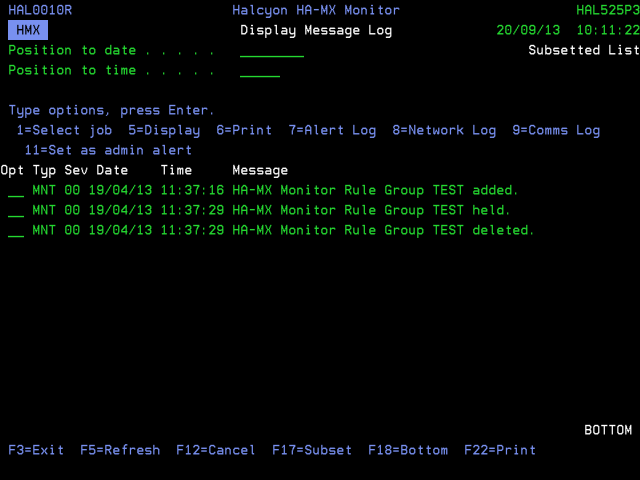
The following options are available when working with the Message Log. Type the option number in the Opt column against the required message.
Select job
Use option 1=Select job to display a subsetted list of messages sent by the same job that sent the selected message.
Display
Use option 5=Display to open the Display Message Detail window that shows additional information for the selected message. This is useful when the main display shows a truncated version of the message.
Use option 6=Print to print the complete Message Log detail for the selected message entry.
Alert log
Use option 7=Alert log to open the Work with Alert Log display for the alert associated with the message (if any alert exists).
Network log
Use option 8=Network log to open the Display Network Log display for the network message(s) associated with the message (if any network messages exist).
Communications log
Use option 9=Communications log to open the Display Communications Log display for the communication messages associated with the message (if any communications messages exist).
Set as admin alert
Use option 11=Set as admin alert to open the Add Administrator Alert Criteria display with the selection criteria pre-populated with the information from the selected message. You can amend the data if required. Press Enter to add the new admin alert criteria or F12 to cancel.
The following functions are available when working with the Display Message Log:
F3=Exit
Use F3=Exit to close the current display and return to the main menu.
F5=Refresh
Use F5=Refresh to update the display with current information.
F12=Cancel
Use F12=Cancel to exit the current display and return to the previous display.
F17=Subset
Use F17=Subset to open the Subset Message Log display which allows you to set or clear the filter parameters that restrict the visibility of messages on the main display.
F18=Bottom
Use F18=Bottom to refresh the display and position the view at the bottom of the Message Log.
F22=Print
Use F22=Print to open the Print Message Log display.