Work with User Own Exit Point Programs panel
Exit programs that were registered against exit points before Powertech Multi-Factor Authentication control for those exit points was activated can be changed.
When Powertech Multi-Factor Authentication is set to control an exit point, it registers the Powertech MFA exit program against that exit point. If an exit program was already registered (for example, Powertech Exit Point Manager) then that is written into a file and associated with the exit program. This is done for the following reasons:
- If Powertech Multi-Factor Authentication is deactivated (or no longer controlling that exit point) the former exit program is restored (registered against that exit point).
- Once the Powertech Multi-Factor Authentication program has been called, it will call the program that was formerly registered against the exit point.
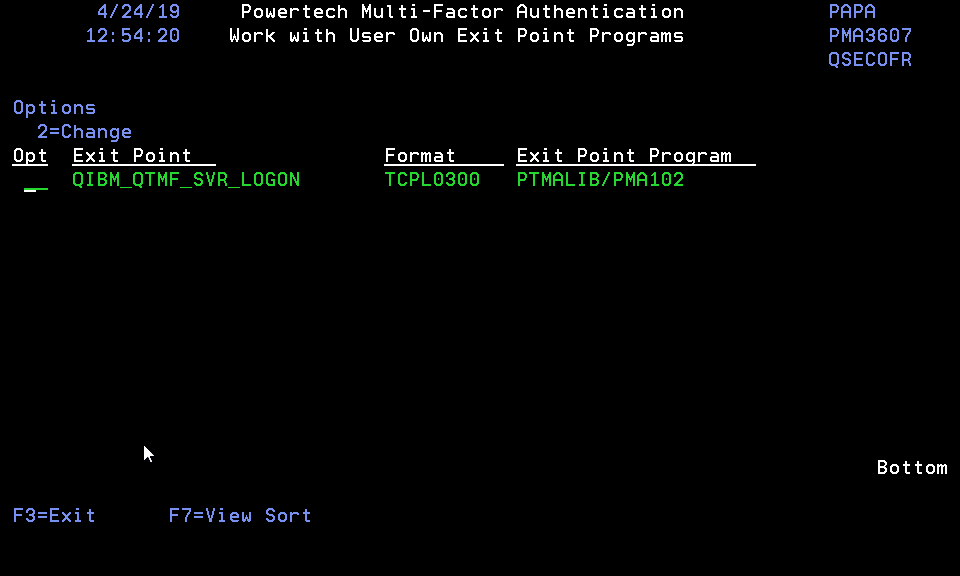
How to Get There
On the Powertech Multi-Factor Authentication Main Menu, choose option 6.
Field Descriptions
Exit Point
The name of the exit point where your own program is registered.
Format
The format of the exit point where user program is registered.
Exit Point Program
The user own program that has been registered against the exit point.
Command Keys
F3=Exit
Cancels this panel.
F7=View Sort
To sort the data within the view. To sort the data you need to take the cursor on top of the field that you want to sort or place the cursor on top of field caption and then press this function key. Sort always performs in ascending order. This key is only valid and will be visible when there are some data to show.