Powertech Code Types Maintenance
Codes can be maintained under a code type after a code type has been created. Codes can be added changed and deleted within the system based on need. An example of codes is a list of valid Departments under the Code Type DEPARTMENT. Each company using Database Monitor will likely create their own list of departments and perhaps even groups within departments depending on how they will use Database Monitor.
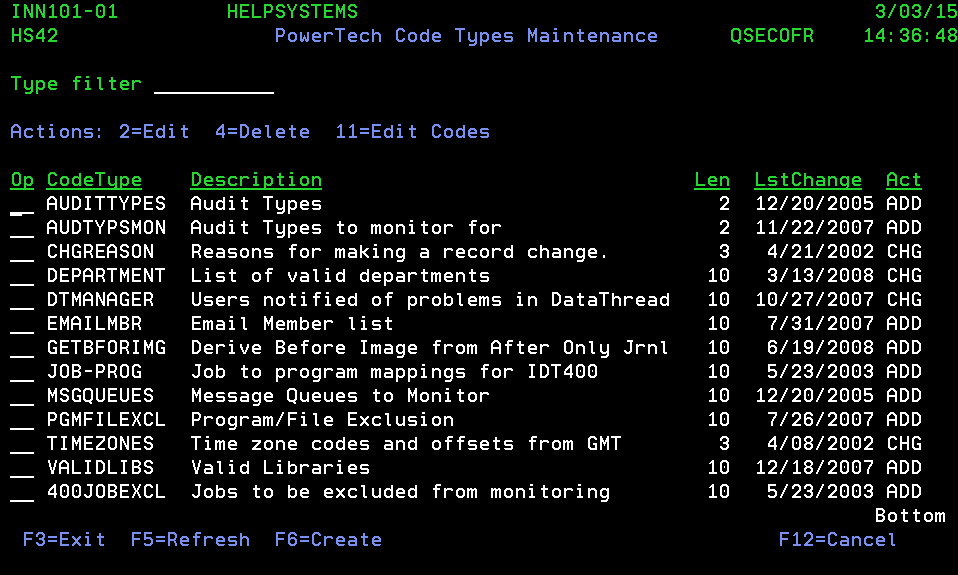
How to get there
From any menu select option 13.
Action entries – INN101-01
Code Type - Codes Maintenance
| Action Number | Short Description | Description |
|---|---|---|
| 2 | Edit | Placing a 2 in the Op field beside any Code and pressing enter will display a Change Record window for the selection. Here, you can update the description for the Code. |
| 4 | Delete | Entering a 4 in the Op field beside any Code and pressing enter will display a DELETE THIS RECORD window for the selection. By pressing enter, the selected Code will be removed from the list of valid Database Monitor codes. Should you decide not to remove the record, press F3 (exit) or F12 (cancel) to return to INN102-01 without deleting the record. |
| 11 | Edit Codes | Typing 11 in the Op field beside any CodeType and pressing enter will display the Powertech Codes Maintenance panel. From this panel you can maintain valid codes under the code type. |
Function keys– INN101-01
Code Type - Codes Maintenance
| Function Key | Short Description | Description |
|---|---|---|
| F3 | Exit | Pressing the F3 key returns you to the Powertech Code Types Maintenance panel. |
| F5 | Refresh | The F5 key will refresh the screen showing any new applicable information, if any. |
| F6 | Create | If the F6 key is pressed, an Add New Record panel window will be displayed. Use this to create a new Database Monitor Code. |
| F12 | Cancel | Press F12 to close INN102-01 and return to the Powertech Code Types Maintenance panel. |
Add New Record
Press F6 to open this panel, which allows you to create a new code type.

Code Types Maintenance
| Field | Description | Valid Entries | Needed? |
|---|---|---|---|
| Code Type | Establishes the field name of the code type. This field is the one that will be referenced within programs that are designed to manage code types and their codes.` | Any set of alphanumeric characters up to a maximum of 10. | Yes |
| Description | Any description to provide more complete identification detail. | Any set of characters up to a maximum of 40. | No, but recommended |
| Code Length | Enter the number of valid characters to include in the field length for the code. | 1 to 40. | Yes |
See Also