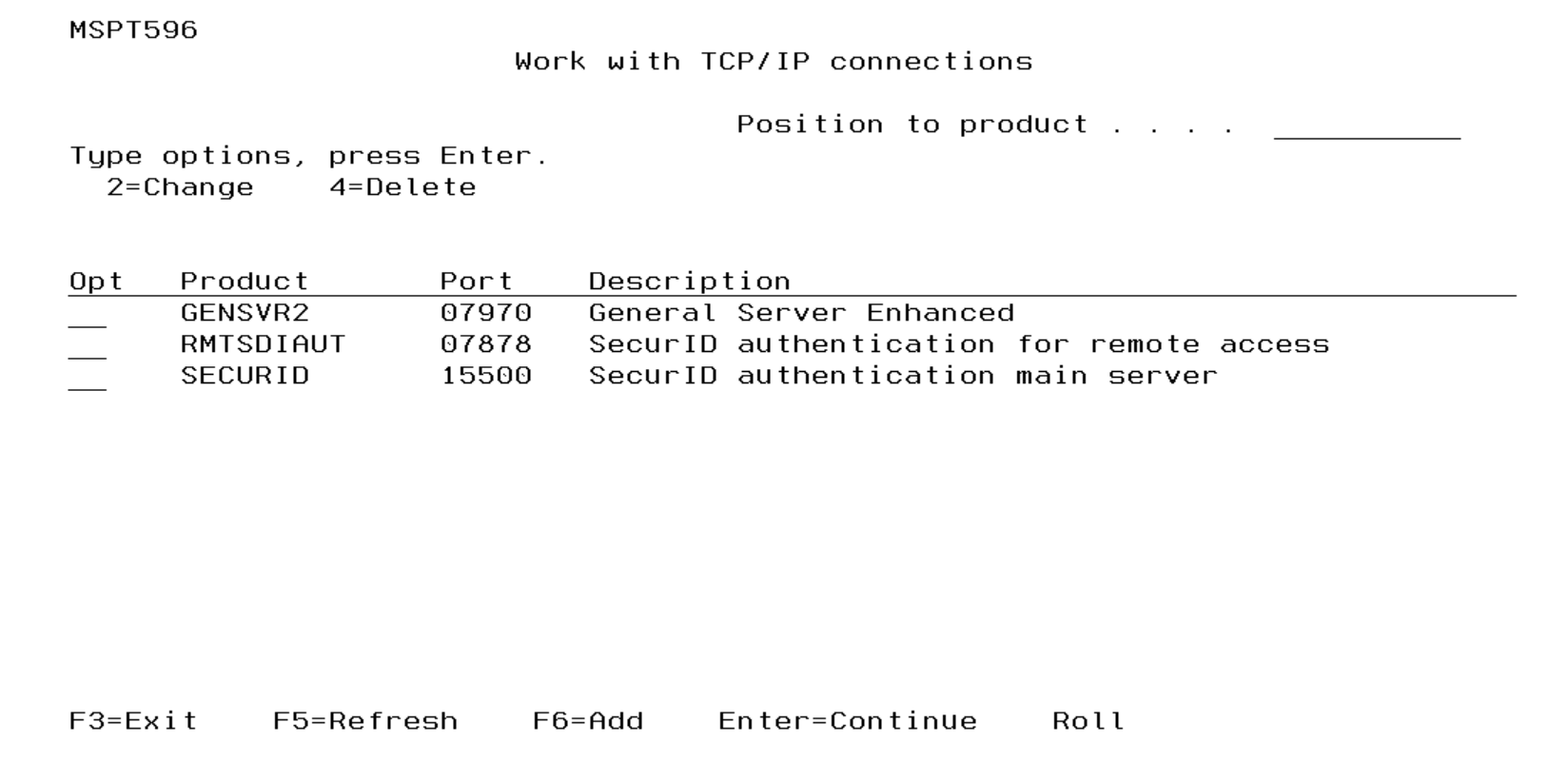
Work with TCP/IP Connections screen
This function allows you to work with TCP/IP port numbers. These ports will be used by RSA SecurID Agent for communications between IBM i and a machine operating under a different platform. These include Windows, AIX, UNIX etc.
During installation or upgrade, the General Server GENSVR2 is added to the list of Products if it does not exist already. The associated Product RMTSDIAUT is also added if it does not exist. This Product is required for Remote Authentication. The SecurID Authentication Product SECURID is also added during installation/upgrade if it does not already exist.
GENSVR2 "General Server Enhanced" provides enhanced security for the TCP/IP requests in relation to IP Address updates and profile synchronization for SecurID Remote Authentication. The default port number for GENSVR2 is 07970. When GENSVR2 has been configured, the activity processed through this server will result in a separate job named MSXT940B3 for each request. These additional jobs run within the ACEDTI subsystem.
If DTIGEN has not been registered automatically, the product administrator will be able to activate/register DTIGEN via option 8. Work with TCP/IP port connections.
How to Get There
From the Master Menu, choose 8.
Options
2=Change
Choose this option for a product to open the Maintain TCP/IP Connection Details screen, which allows you to change the details.
4=Delete
Choose this option for a product to delete the details.
Field Descriptions
Product
The product / application with which SecurID Agent is to integrate.
Port
This is the TCP/IP port number to be used for communications between IBM i and the machine running the specified product.
With specific reference to the RMTSDIAUT Product, the port number may now be configured using a 5 digit value. In other words, the port number can be a value greater than 9999.
Note the 5 digit port number only applies when all users, who would require Remote Authentication for this IBM i system, are running the Fortra branded Remote Authentication software on their Desktop and/or Laptop.
The previous versions of the Remote Authentication software were restricted to a port number that had a maximum value of 9999. Therefore, if ANY user is still running a previous version, the port number should be restricted to 4 digits.
Description
Text associated with the TCP/IP connection.
Function Keys
F6 (Add): Add TCP/IP port details for other products. This function will present a list of products and default TCP/IP port numbers.