Work with MIMIX Status
Overview
The Work with MIMIX Status option displays the current values of all MIMIX attributes, supported by Halcyon HA-MX Monitor and shows the status of any associated alerts or pending alerts. This display is available by taking menu option 10=Work with MIMIX Status from the HA-MX Monitor main menu.
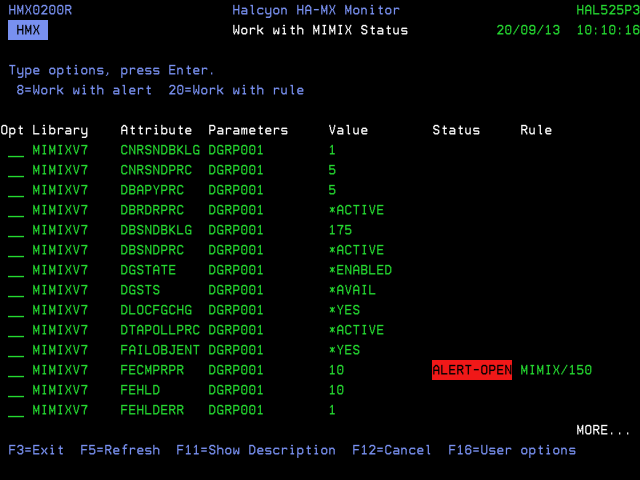
Parameters on the Work with MIMIX Status display
The following parameters are shown on the Work with MIMIX Status display.
Library
Displays the name of the MIMIX library.
Attribute
Displays the name of the MIMIX attribute. A description of each attribute can be displayed below by using F11=Show Description.
Parameters
The parameters identify a specific instance of an attribute. One of the following options is displayed in the Parameters column depending on the attribute:
-
A data group name
-
A data group name and apply session number
-
A remote system name
Value
Displays the last known value of the attribute. Depending on the attribute, this may be a special value representing a status or a numeric value.
Status
Displays the alert status of each value. This is one of the following:
| Blank | If no status is shown, there are either no released rules monitoring this attribute or the value does not meet the criteria of a rule in order to raise an alert |
| AIPEND | Alert Intelligence (AI) Pending status (blue). Similar to ALERTPND status (see below), except that this rule has an Alert Intelligence action with ALERT(*NO) specified, meaning a MIMIX alert is not raised when the alert delay expires |
| AIFLAG | Alert Intelligence (AI) Flag status (blue). Similar to ALERTOPN status (see below), except that this rule has an Alert Intelligence action with ALERT(*NO) specified, meaning a MIMIX alert has not been raised. However an Alert Intelligence rule to which this rule contributes may have been raised |
| ALERTPND | Alert-Pending (yellow background) indicates that the attribute value meets the selection criteria of a rule but the rule has an alert delay period specified . If this attribute still meets the selection criteria at the end of the alert delay period, an alert is raised and the status changes to Alert- Open |
| ALERTOPN | Alert-Open status (red background) indicates that an alert has been raised for this attribute and is still open |
| CLOSEPND | Close-Pending status (green background) indicates that an alert has been raised for this attribute value and the alert is still open, however the attribute value no longer meets the selection criteria of a rule and it has a close delay period specified. If this attribute still does not meet the selection criteria at the end of the close delay period, the alert is closed automatically and the status changes to blank |
| CLOSED | Close status (red background) indicates that an alert has been raised for this attribute and the value still meets the selection criteria of the rule, however the alert has been closed. When the attribute value no longer meets the selection criteria, the status changes to blank |
Rule
When a status value is displayed this column displays the associated rule group and rule number.
Using the Work with MIMIX Status display
The following options are available when using the Work with MIMIX Status display. Type the option number in the Opt column against the required selection.
Work with Alert Log
When the attribute status is one of ALERT-PEND, CLOSE-PEND or CLOSED, use option 8=Work with ALert Log against the selection to open the Work with Alert Log display, subsetted to show the alert associated with the selected attribute.
Work with Rule
When the attribute status is one of ALERT-PEND, CLOSE-PEND or CLOSED, use option 20=Work with Rule against the selection to open the Change HA-MX Monitor Rule display, allowing you to change or display the rule associated with the selected attribute. See Changing HA-MX Rule Criteria for more information.
The following functions are available on the Work with MIMIX Status display:
F3=Exit
Use F3=Exit to close the current display and return to the main menu.
F5=Refresh
Use F5=Refresh to update the display with current information.
F11=Show description
Use F11=Show description to expand the current display so that each attribute has the full description listed beneath the abbreviated entry.
F12=Cancel
Use F12=Cancel to close the current display and return to the previous display.
F16=User options
Use F16=User options to open a popup window from within which you can set the auto-refresh options for the Work with MIMIX Status display.