Administrator Account Security Settings Dialog Box
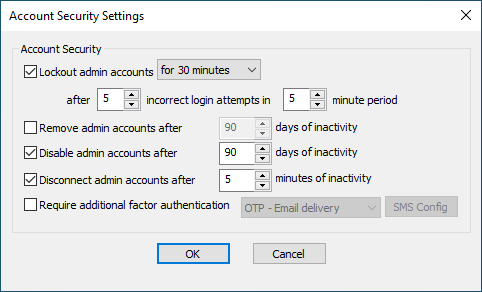
The Account Security Settings dialog box is used to unlock or lock out an administrator account, disable an inactive administrator account, change the administration interface session timeout, disable an inactive administrator account, or set up multifactor authentication for an administrator login.
To open the Account Security Settings dialog box
-
In the administration interface, connect to EFT and click the Server tab.
-
On the Server tab, click the Server node you want to configure, then click the Administration tab.
-
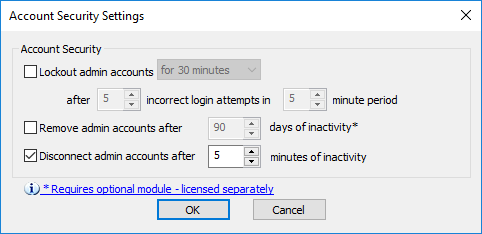
Click any administrator account name (except Local computer\administrators), and then click Account Policy. The Account Security Settings dialog box appears.
-
To lock out an account, select the Lockout administrator accounts check box, then specify the length of time the account is to be locked out, the number of incorrect login attempts to count, and the period during which to count the attempts. To enable an account that has been locked out, clear the Lockout check box.
-
To remove an inactive account automatically, select the Remove administrator accounts after check box, then specify the number of days of inactivity after which to delete the account.
-
To disable an account, select the Disable admin account after check box, the specify the number of days of inactivity after which to disable the account.
-
To change the default administration interface session timeout for this administrator, select the Disconnect administrator accounts after check box, then specify the minutes of inactivity that you need.
-
To set up multifactor authentication for an administrator account, select the Require additional factor authentication check box, then select OPT - Email delivery. Refer to Specifying Multifactor Authentication for options.
-
Click OK to close the dialog box.
-
Click Apply to save the changes on EFT.
A change in any date-sensitive value resets the calculations. For example, if this feature was configured for 60 days, and you change it to 90 days, the count resets to zero, so that any inactive account that has been inactive for 59 days and was set to be deleted tomorrow, will now not be considered inactive until 90 days from today.
Related Topics