System Group options
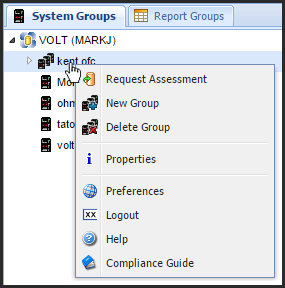
You can select from the following options:
- Request Assessment: Displays the Request Assessment window from which you can select the reports for an Assessment. Requesting an Assessment from a system group runs the Assessment on all Endpoints in the group.
- New Group: Displays the Create System Group window, allowing you to define a new system group.
- Delete Group: Deletes the selected system group. A window displays asking you to confirm the deletion.
- Properties: Displays the System Group Properties window. You can view and change the system group name and description, add or remove Endpoint systems, and set security for the system group.
- Preferences: Displays the User Preferences window, which allows you to customize your report configuration, define Header and Footer information, specify report links to the Powertech Compliance Guide, and edit Policy report display colors.
- Logout: Logs you off the Consolidator system. A confirmation window asks you to confirm that you want to log out.
- Help: Displays the online help for the Systems Groups tab. From there, you can display any Compliance Monitor help.
- Compliance Guide: Displays the Powertech Compliance Guide in a separate window.
How to Get There