How to Get There
- On the Navigation Pane, choose Object Rules.
- Click the
 icon adjacent to the Object Rule you would like to copy and choose Copy.
What it Does
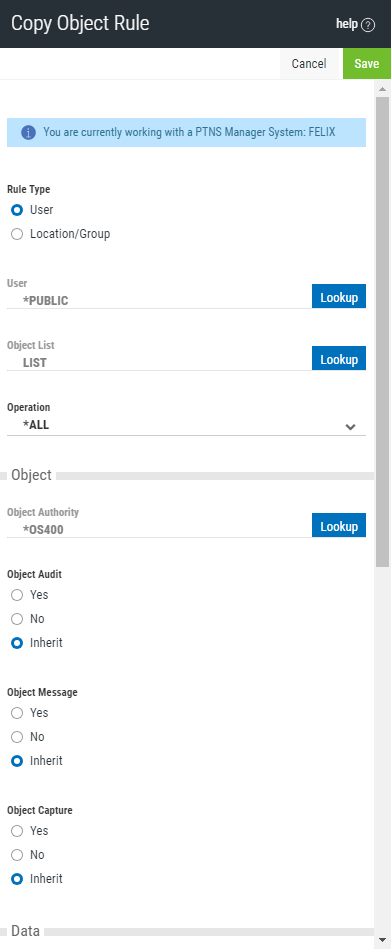
Use the Copy Object Rules screen to copy Object Rules to one or more managed systems.
Options
Cancel
Choose Cancel to return to the Object Rules screen without making changes.
Save
Choose Save to save the Rule and return to the Object Rules screen.
Rule Type
Specifies whether this is a User or Location Object rule.
User; Lookup
This field is available when creating a new Object Rule. Choose this Lookup button to open the Users selection window where you can choose from a list of user profiles.
Object List; Lookup
This field is available when creating a new Object Rule. Choose this Lookup button to open the Object Lists selection window where you can choose from a list of Object Lists. Object Lists can be added and changed using the Object Lists screen.
Operation
Object Authority; Lookup
Choose this Lookup button to open the Authorities selection window where you can choose from a list of Authorities.
Object Audit
This audit property controls the type of requests Exit Point Manager will log. This Audit Transaction flag pertains to Object Accesses.
Possible values are:
Object Message
The message property entry will determine if Exit Point Manager sends a message to the Exit Point Manager message queue.
This Send Messages flag pertains to Object Accesses.
Object Capture
Capture transactions for Memorized Transaction Request.
This Capture Transactions flag pertains to Data Accesses.
Data Audit
This audit property controls the type of requests Exit Point Manager will log. This Audit Transaction flag pertains to Data Accesses.
Possible values are:
Data Message
The message property entry will determine if Exit Point Manager sends a message to the Exit Point Manager message queue.
This Send Messages flag pertains to Data Accesses.
Data Capture
Capture transactions for Memorized Transaction Request.
This Capture Transactions flag pertains to Data Accesses
Active
Choose Yes to activate the rule. Choose No to make the rule inactive.
Add Server > Function
Click this button to open the Select Server/Function screen, where you can choose additional Servers/Functions.